
Entertainment · iOS
Chromecast TV Streamer #1
by Kraus und Karnath GbR 2Kit Consulting
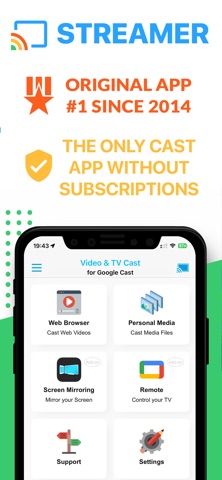
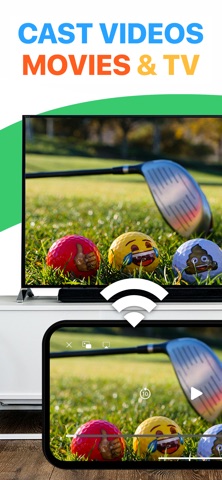


Released in 2015 and still receiving updates, Chromecast TV Streamer #1 does one focused job: letting you browse the web on your iPhone and fire embedded video straight to any Google Cast compatible screen. Hardware support spans Chromecast dongles, TCL, Sony, and Vizio smart TVs, and the Nvidia Shield. At 34 MB, the install stays light, and the free entry point makes a quick trial easy to justify.
Built-in browser casting works well on cooperative sites
The core mechanic is a built-in browser that detects embedded videos on whatever page you visit, then lets you tap once to push that stream to your Cast device. When the handoff works, it is genuinely fast and satisfying. Beyond web video, the app also handles personal media from your phone, meaning photos, local video files, and music can all reach the big screen without a separate solution. That breadth in a single 34 MB package explains why more than 2,000 ratings land above four stars on average. The caveat is that detection quality varies considerably depending on how a given site is built, so the experience is uneven rather than reliably polished.
Basic browser struggles with complex streaming pages
Performance is best described qualitatively rather than by benchmarks. The compact install size suggests a lean runtime footprint, and the January 2025 update indicates the developer is actively addressing compatibility issues. On straightforward pages with clearly embedded video players, the app responds quickly. Where daily use gets bumpy is on JavaScript-heavy or adaptive-streaming sites, which the built-in browser struggles to parse reliably. The browser itself is functional but noticeably basic, lacking the rendering sophistication of a modern mobile browser. Users who rotate through many different web sources will encounter dead ends more often than the aggregate rating implies.
Free tier sufficient for casual video sites
The app is free to download, which lowers the barrier to trying it considerably. In-app purchases are present, but the store listing does not clearly spell out what functionality sits behind them, and that ambiguity is a genuine friction point. Before spending anything inside the app, it is worth running your most-used video sites through the built-in browser to confirm they work. For casual use against cooperative web pages, the free tier may be entirely sufficient. Power users chasing DRM-protected content from major streaming services or reliable 4K playback will likely find the limitations frustrating regardless of what the paid tier unlocks.
Review privacy label for browsing data practices
Because the app includes a built-in browser, it has the technical capacity to observe your browsing activity within that environment. The app carries a 17-plus content rating, which is worth noting for household devices. Rather than rely on any summary here, prospective users should review the App Store privacy label directly on the product page, which details what data the developer collects, whether it is linked to your identity, and how it is used. Pay particular attention to browsing history and usage data disclosures, which are the categories most relevant to a browser-based streaming tool.
Utilitarian design prioritizes simplicity over refinement
The interface prioritizes simplicity, with a single-tap casting workflow that keeps the learning curve low. Visual design is utilitarian rather than refined, reflecting the app's long history and its origins as a focused utility rather than a consumer media product. Standard iOS accessibility features such as Dynamic Type and VoiceOver compatibility depend on how the developer has implemented UIKit controls, and the store listing does not make specific accessibility claims. Users who rely on assistive technologies should test the app in their own environment before committing. The overall layout is uncluttered, which generally benefits readability even if it does not signal deliberate accessibility investment.
Recent updates show ongoing developer maintenance
A January 2025 update on an app first released in May 2015 is a meaningful signal of continued developer attention across nearly a decade. Version 3.8 suggests incremental refinement rather than stagnation. The rating count of roughly 2,000 is modest for an app this old, which could reflect a niche audience, significant churn, or limited organic discovery. That relatively thin review base means the 4.15 average carries less statistical weight than the same score on an app with tens of thousands of ratings. Still, the combination of a recent update and a positive average suggests the developer is keeping pace with iOS changes well enough to maintain basic functionality.
Pros
- Supports a wide range of Cast-enabled hardware including Chromecast dongles and smart TVs from TCL, Sony, and Vizio
- Single-tap video sending from the built-in browser keeps the workflow fast when site compatibility cooperates
- Handles personal media alongside web video, reducing the need for a separate local casting app
- Actively maintained with a January 2025 update despite being nearly ten years old
Cons
- Video detection fails on JavaScript-heavy or adaptive-streaming sites more often than the four-star average implies
- In-app purchases are present but not transparently explained, making it hard to evaluate the full cost before investing time in the app
- No support for DRM-protected content from major streaming services limits usefulness for the most common viewing scenarios
Related guides
Similar Entertainment apps


apptidal is independent and ad-supported. We earn no commission on installs and no company can pay for a better score. How we stay independent.