
Entertainment · iOS
Google TV: Watch Movies & TV
by Google


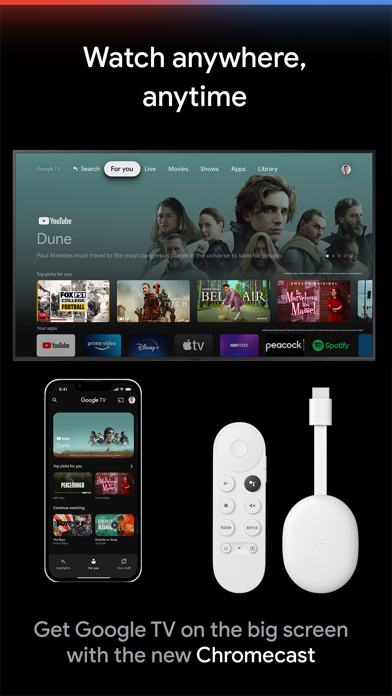
Google TV on mobile acts as a universal remote for your streaming life, pulling titles from across your subscribed services into one browsable interface. It handles discovery, watchlist management, and library access without replacing any individual streaming app. For households already deep in the Google ecosystem, it removes a genuine friction point. For everyone else, it sits as a decent but non-essential layer on top of apps you already have.
Cross-service search that reliably aggregates
The core proposition is cross-service search and discovery. Rather than opening Netflix, then Max, then Prime Video to hunt a single title, you search once and see every service carrying it. Recommendations are organized by genre and trending topics, and a shared Watchlist syncs across phone, tablet, and Google TV hardware. That sync is the app's most genuinely useful feature, letting you queue something spotted on your phone and find it ready on the living room TV later. Within that specific scope, the app does its job reliably, and a 4.3 rating across roughly 5,000 reviews suggests consistent satisfaction among the audience it actually serves.
Modest footprint with responsive everyday navigation
At 70 MB the install footprint is modest by modern entertainment-app standards, and the app avoids the bloat that plagues some aggregator tools. Navigation is responsive enough in everyday browsing, and the June 2026 update confirms Google is still actively optimizing the build. That said, the experience is fundamentally dependent on network conditions and the responsiveness of third-party app handoffs, since Google TV itself streams almost nothing directly. On older devices, the transition latency when launching a partner app can feel clunky. Overall performance is adequate rather than impressive, which is appropriate for what is essentially a smart index rather than a media engine.
Free aggregation layer for multi-service subscribers
The app is free to download with no mandatory account tier required to access core discovery features, which is a straightforward win. The catch is that in-app purchases exist, and some content still requires separate transactions through partner services, so the zero-cost promise has real limits. For multi-service subscribers already paying for four or more streaming apps, the aggregation layer adds genuine organizational value at no extra charge. For casual viewers with one or two subscriptions and no Google hardware, the return on even a free install is questionable. The value equation is almost entirely determined by the size and shape of your existing streaming stack.
Google data collection warrants privacy review
Because this is a Google product, the privacy posture deserves careful attention. Google's business model is built on data, and an app that tracks what you search, browse, and add to a watchlist across multiple streaming services represents a meaningful data surface. We recommend reviewing the App Store privacy label directly on the product page before installing, as it is the authoritative source for what data is collected and how it is linked to your identity. At minimum, expect usage and search data to inform Google's broader advertising profile. Users who are already signed into Google accounts across devices will find little that is new here, but privacy-conscious users should weigh that context.
Functional interface without visual polish
The interface is functional and clean, organized around familiar patterns like carousels, genre rows, and a persistent search bar. It is not a design showcase. After more than a decade on the App Store, the layout still reads as a utility rather than a polished entertainment product, and it lacks the visual warmth that apps like Apple TV or even the individual streaming services bring to content browsing. Standard iOS accessibility features such as Dynamic Type and VoiceOver should work within the app's native controls, as is typical for major Google iOS releases, though users with specific accessibility needs should verify current support before relying on it. The content rating of 12-plus reflects the nature of linked content rather than the app's own interface.
Continuous updates since 2014 launch
The update history is genuinely encouraging. A version shipped as recently as June 2026 confirms that Google is not treating this as an abandoned side project, and the app has been continuously updated since its 2014 launch, a lifespan that few entertainment aggregators can match. Version 3.33.00001 suggests a mature, iterative development cycle rather than sporadic bursts of attention. The 5,000-review count on iOS is modest for a Google product, which likely reflects the app's niche utility rather than neglect. For users who depend on Watchlist sync as part of their daily routine, the active maintenance cadence is a meaningful reassurance.
Pros
- Cross-service title search saves real time for households juggling four or more streaming apps
- Watchlist syncs reliably across phone, browser, and Google TV hardware
- Free to download with no mandatory account tier blocking core discovery features
- Consistently updated, with a June 2026 release confirming active ongoing maintenance
Cons
- Does not stream content natively, redirecting to third-party apps for almost all playback
- Value drops sharply without a Google TV or Chromecast device to complete the ecosystem loop
- In-app purchases and partner paywalls mean the free promise has meaningful real-world limits
Related guides
Similar Entertainment apps


apptidal is independent and ad-supported. We earn no commission on installs and no company can pay for a better score. How we stay independent.