
Entertainment · iOS
IPTV - Watch TV Online
by Nguyen Van Sy
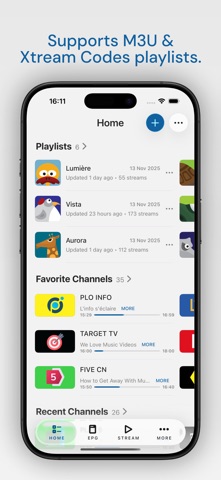

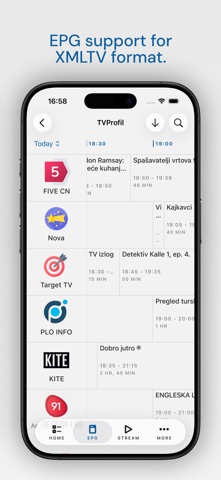


IPTV - Watch TV Online is a lean, 48 MB iOS player built around M3U, XSPF, and Xtream-Codes playlists that users supply themselves. Protocol support is genuinely broad, spanning RTMP, RTSP, MPEG-DASH, and Apple HLS among others. The app brings zero bundled content, functioning purely as a front end. With the right credentials it becomes a well-maintained, feature-complete client. Without them, it is an empty shell with nowhere to go.
Comprehensive protocol support for advanced users
Where most casual IPTV players stop at HLS, this one supports nine network protocols and six streaming formats, giving edge cases like multicast RTP, Sat-IP tuners, and legacy MMS streams a genuine chance of working. M3U, XSPF, and Xtream-Codes API credentials are all accepted as playlist inputs. An XMLTV and GZIP-compatible EPG with broadcast reminders rounds out the feature set. For technically minded cord-cutters who have already sourced a provider, the checklist is impressively complete. The app does exactly what it promises, and the 8,000-review base rating of 4.62 suggests that core audience agrees.
Modest footprint with six years of active updates
At 48 MB the install footprint is modest by entertainment-app standards, which typically points to a focused codebase rather than a bloated one. Update frequency is a meaningful signal here: the app was revised as recently as June 2026, more than six years after its 2020 launch, suggesting the developer is actively addressing compatibility issues as iOS evolves. No independent benchmark data is available, so performance claims beyond these signals would be speculative. Qualitatively, the combination of a high rating, a large review count, and sustained updates is a reasonable proxy for stable everyday playback across common stream types.
Free app with setup effort as primary cost
The base app is free, which removes the financial risk of trying it. In-app purchases are listed in the App Store but their scope is not detailed in publicly available information, so prospective users should review those disclosures before committing. The practical cost is less about money and more about setup effort: sourcing a legitimate IPTV provider or building a curated M3U playlist takes time and, usually, a separate subscription fee. For users who have already cleared that hurdle, the app itself represents good value as a capable, actively maintained client at no direct charge.
Credentials handled on-device, review privacy label first
Because the app connects to external streaming servers using credentials the user provides, it necessarily handles those credentials on-device. What data is collected beyond that, and whether any usage information is shared with third parties, is disclosed in the App Store privacy nutrition label rather than in any material available here. We recommend reviewing that label directly before installing. Pay particular attention to whether network activity or identifiers are linked to your account. The content rating of 4+ indicates Apple found no objectionable content in the app itself, though the streams users load are entirely outside the developer's control.
Polished interface undermined by steep onboarding curve
Dark mode support is a notable inclusion for an app in this price tier, and the overall layout is described as polished once the initial setup is complete. The onboarding experience is a genuine weak point: there is no guided flow explaining what M3U or Xtream-Codes credentials are or where to obtain them legally, which creates real friction for less technical users. Accessibility features such as Dynamic Type support or VoiceOver compatibility are not documented by the developer, so users with visual or motor accessibility needs should test the app against their requirements before relying on it.
Sustained maintenance across multiple iOS generations
The maintenance record here is strong. Version 3.3.5 arrived in June 2026, meaning the developer has sustained updates across a six-year lifespan that has taken the app through multiple major iOS releases. That consistency is meaningful for a free utility from an independent developer. An 8,000-review base with a 4.62 average rating also suggests the developer has been responsive enough to retain users over time rather than losing them to accumulating bugs. For a category where abandoned apps are common, this level of ongoing support is a genuine differentiator.
Pros
- Unusually broad protocol support covering RTMP, RTSP, RTP multicast, Sat-IP, MPEG-DASH, and Apple HLS in a single client
- Accepts M3U, XSPF, and Xtream-Codes API inputs, reducing the need for multiple apps across different provider types
- XMLTV and GZIP-compatible EPG with broadcast reminder functionality adds real utility beyond basic playback
- Actively maintained through mid-2026 with a strong 4.62 rating across 8,000 reviews, signaling genuine long-term support
Cons
- Zero bundled content means the app is completely non-functional without a separately sourced IPTV subscription or playlist URL
- No guided onboarding exists for users unfamiliar with M3U or Xtream-Codes setup, creating a steep barrier for less technical audiences
- In-app purchase details are undisclosed in available information, leaving the true cost structure unclear before download
Related guides
Similar Entertainment apps


apptidal is independent and ad-supported. We earn no commission on installs and no company can pay for a better score. How we stay independent.