
Entertainment · iOS
PlayOn Cloud - Streaming DVR
by MediaMall Technologies, Inc.

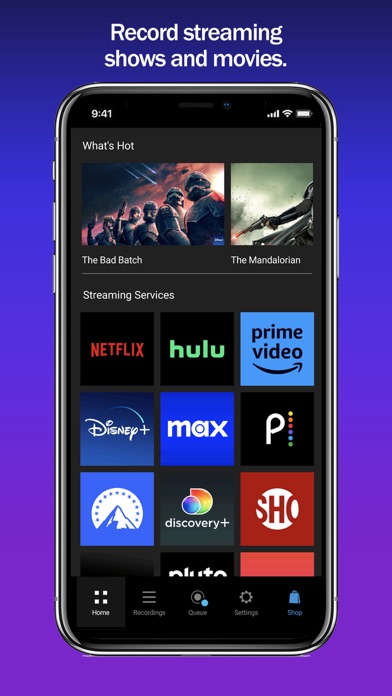
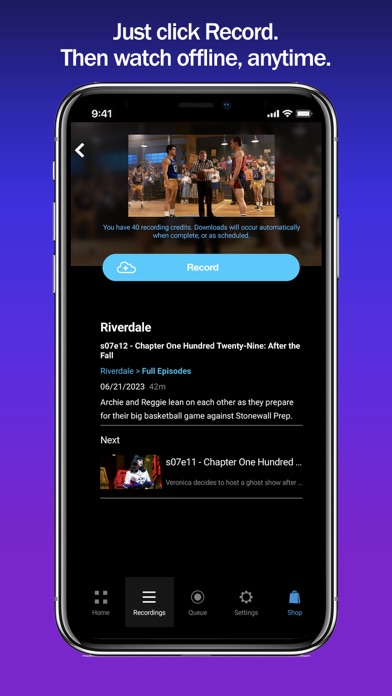
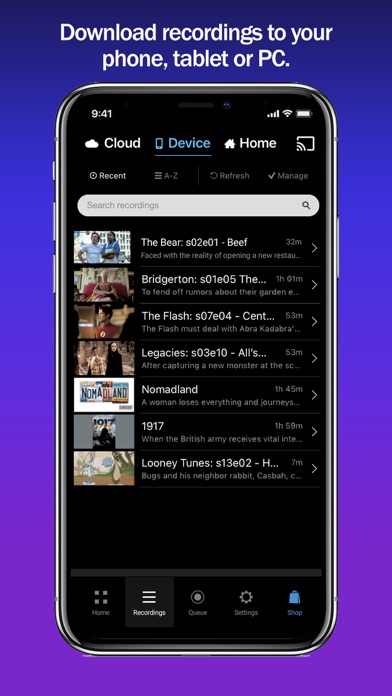
PlayOn Cloud turns your iPhone into a scheduling hub for a cloud-based DVR that captures content from more than 20 streaming services. Finished recordings download as permanent files that never expire. The headline appeal is subscribing to cheaper ad-supported tiers, letting PlayOn strip the ads, and keeping the content indefinitely. That workflow genuinely functions, but each recording consumes purchased credits, making total cost a variable that deserves careful attention before signup.
Cloud recording works reliably across major services
The core loop is straightforward: queue a title inside the app, PlayOn Cloud captures it on MediaMall's remote servers, and a finished video file lands in your downloads. Because the recording happens entirely in the cloud, your phone does not need to stay on or connected during capture. Service breadth is a genuine strength, covering Netflix, Disney+, Hulu, Max, Peacock, Paramount+, Tubi, Pluto TV, PBS, BBC iPlayer, and others. For anyone juggling several subscriptions, managing everything through one scheduling interface has real appeal. The ad-stripping feature works as advertised on supported services, which is the clearest practical argument for the platform's value proposition.
Moderate footprint with server-dependent performance
At 155 MB the install footprint is moderate for a scheduling and download manager, suggesting the app leans on server-side processing rather than heavy on-device computation. That architecture keeps the phone free during recording but means performance is tied to MediaMall's infrastructure rather than your hardware. A 4.59 rating across roughly 2,000 reviews points to a generally stable experience, though the review volume is thin compared with category leaders, so edge-case reliability is harder to gauge. Update activity through September 2024 indicates the team is responsive to iOS changes. Download speeds for finished recordings will reflect your own connection rather than anything the app controls.
Credit costs add up for regular users
The app is free to download, but that framing can mislead. Meaningful use requires purchasing credit packs through in-app purchases, and each recording draws from that balance. Heavy users can accumulate a real ongoing bill layered on top of existing streaming subscriptions. The clearest value case is pairing PlayOn with an ad-supported tier: if the credit cost per recording is less than the monthly price difference between ad-supported and ad-free plans, and you record enough titles, the math works in your favor. Casual users who record a handful of titles monthly will likely find the spend manageable. Power users should calculate their actual recording frequency before assuming this is a straightforward money-saver.
Credentials stored on third-party servers
Because PlayOn Cloud records content on MediaMall's own servers using your streaming service credentials, those credentials pass through a third-party infrastructure. That is the most significant privacy consideration to weigh before signing up. The app's full data practices are disclosed in its App Store privacy label, which is the authoritative source for what categories of data are collected and how they are used. We recommend reviewing that label directly before entering any account credentials. Standard due diligence applies: use a strong, unique password for any streaming account linked to the service, and review MediaMall's privacy policy for data retention details.
Functional interface follows iOS conventions
The interface prioritizes the scheduling workflow, presenting a service browser, a recording queue, and a downloads library in a logical sequence. Navigation follows familiar iOS conventions, which lowers the learning curve for new users. The content rating of 4+ reflects no objectionable material within the app itself. Accessibility features such as Dynamic Type support and VoiceOver compatibility are not explicitly documented in the store listing, so users who rely on assistive technologies should test the app under their specific settings before purchasing credits. The overall visual design is functional rather than distinctive, but it serves the task-oriented nature of the product well.
Eight years of active development and updates
PlayOn Cloud launched in October 2016 and received its most recent update in September 2024, reflecting nearly eight years of continuous development. That update cadence matters in a category where streaming services frequently change their playback infrastructure, and it suggests MediaMall actively works to keep capture compatibility current. The version number, 1.2.127.37153, implies a high iteration count consistent with ongoing maintenance. The relatively modest 2,000-review count means community feedback is less comprehensive than for top-tier entertainment apps, but the combination of long release history and recent updates is a reasonable signal of platform commitment.
Pros
- Supports more than 20 streaming services through a single scheduling interface
- Downloaded recordings are permanent files with no expiration, unlike typical in-app offline modes
- Cloud-based capture keeps your device free and does not require the app to stay open
- Ad-stripping on recorded content provides a concrete financial argument for using cheaper ad-supported subscription tiers
Cons
- Per-recording credit system creates an ongoing variable cost on top of existing streaming subscription fees
- Free download framing is misleading since the app has no practical utility without purchasing credits
- Routing streaming credentials through MediaMall's servers introduces a third-party privacy consideration that warrants scrutiny before use
Related guides
Similar Entertainment apps


apptidal is independent and ad-supported. We earn no commission on installs and no company can pay for a better score. How we stay independent.