
Health & Fitness · iOS
Pocket Meditation Timer
by 倩 赵
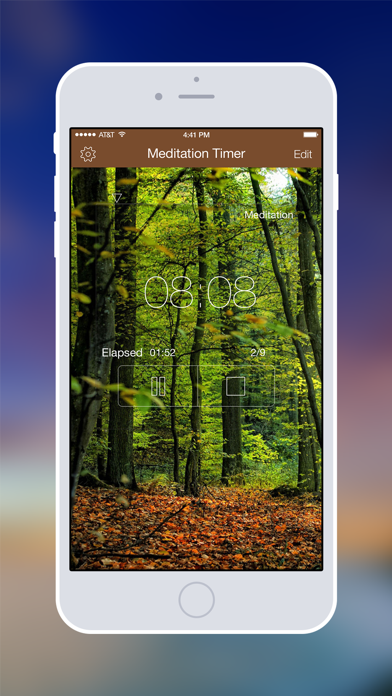


Released in 2012 and still receiving updates in 2025, Pocket Meditation Timer occupies a deliberate niche between a bare countdown clock and a full guided-meditation platform. At 29 MB it installs quickly, costs nothing upfront, and focuses on one clear job: dividing a session into prepare, interval, and cool-down phases, each marked by a distinct, assignable bell sound. That focused pitch has earned a 4.39 rating from roughly 1,000 reviewers over thirteen years.
Phase bells handle meditation segments well
The core mechanic is phase segmentation. Rather than a single start-and-stop bell, the app lets a practitioner define prepare, interval, and cool-down segments independently, assigning each its own bell sound that can ring one, two, or three times at the transition. That granularity is genuinely useful: a body-scan block, a breath-focus period, and a gentle return to wakefulness can each carry a distinct audio cue without requiring the meditator to glance at a screen. Start, stop, restart, and resume controls handle real-world interruptions gracefully. For that specific use case the app delivers reliably, and the free entry point makes it risk-free to verify that for yourself.
Manual schedule editing creates daily friction
A 29 MB footprint is modest by any current standard, which suggests the app carries little bloat and should launch quickly even on older hardware. The July 2025 update on a codebase dating to 2012 is a positive signal for stability and compatibility with current iOS releases. Where daily friction does appear is structural rather than technical: only one schedule exists, and it must be manually re-edited every time a practitioner switches between, say, a 10-minute morning sit and a 45-minute weekend session. That is a genuine inconvenience that accumulates over time. Background audio reliability and lock-screen controls are not detailed in the App Store listing, so testing those behaviors before committing to the app in a serious practice setting is advisable.
Free tier covers basic needs
The app is free to download, which removes any barrier to trying it. In-app purchases are referenced but not clearly itemized in the listing, so the full cost picture requires a visit to the App Store product page before assuming everything is permanently free. For practitioners whose routine is consistent in length and structure, the free tier likely covers all practical needs. Anyone expecting multiple saved presets or an expanding content library may find the value proposition thinner, particularly if in-app purchases gate those features. Compared to subscription-based wellness platforms charging monthly fees, even a modest one-time purchase here would represent strong value for the phase-timer utility alone.
Privacy label review required before use
No privacy findings are fabricated here. The content rating is 4-plus, indicating Apple found no mature content concerns, but that says nothing about data collection practices. The definitive source for understanding what this app collects, shares, or links to your identity is the Privacy Nutrition Label on its App Store product page. Before installing, reviewing that label is worthwhile, especially for an app that has been updated as recently as July 2025, since data practices can change with new versions. A timer app of this type would typically require audio permissions; any additional permissions beyond that are worth scrutinizing.
Interface design shows its age
The interface reflects its 2012 origins in at least one obvious way: ten background photographs that change on a shake gesture feel like a period design flourish rather than a considered UX choice. The overall layout is straightforward enough that navigation should not present a steep learning curve for new users. Accessibility performance, including VoiceOver compatibility and Dynamic Type support, is not verifiable without hands-on testing, but the app's simple, timer-centric structure means there are fewer interactive elements that could create friction for users relying on assistive technology. Anyone with specific accessibility requirements should test the app directly before relying on it for a regular practice.
Thirteen years of updates signal stability
A July 2025 update on an app first released in April 2012 is a meaningful signal. Many utilities of that vintage have been abandoned or left to accumulate compatibility debt, so the developer's continued attention over thirteen-plus years stands out. Version 7.0.1 implies a series of substantive revision cycles rather than cosmetic patches. The rating count of roughly 1,000 after more than a decade is modest, suggesting the app serves a small, loyal audience rather than achieving broad mainstream reach. That is not a quality indictment, but it does mean community resources, third-party guides, and rapid bug-report responses may be limited compared to higher-profile competitors.
Pros
- Prepare, interval, and cool-down phases deliver genuine session structure beyond a basic countdown timer
- Each phase transition supports an assignable bell sound with one, two, or three repetitions
- Lightweight 29 MB install with a free entry point and no immediate subscription wall
- Actively maintained through July 2025, demonstrating sustained developer commitment over 13 years
Cons
- Only one editable schedule exists, forcing manual re-entry for practitioners with varied session lengths
- In-app purchase scope is not clearly disclosed in the listing, leaving the true cost picture uncertain
- Roughly 1,000 ratings after 13 years points to a small user base, which limits community support and signals slow growth
Related guides
Similar Health & Fitness apps


apptidal is independent and ad-supported. We earn no commission on installs and no company can pay for a better score. How we stay independent.