
Entertainment · iOS
Spectrum TV
by Charter Communications

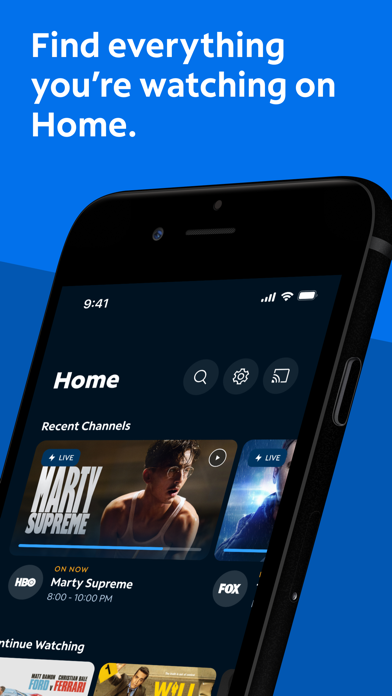


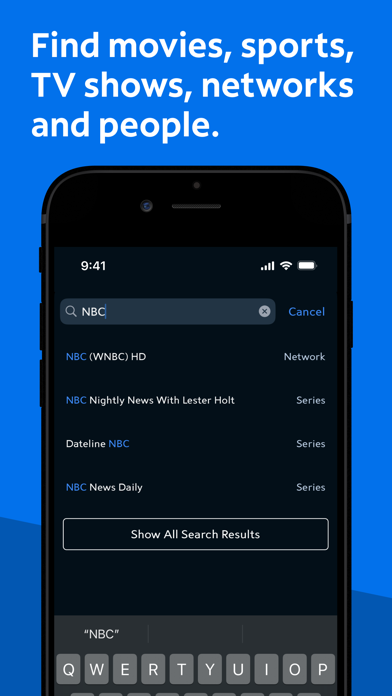
Spectrum TV is Charter Communications' mobile extension for paying Spectrum cable customers. It streams live TV and on-demand content, supports Chromecast casting, and enables remote DVR management from a phone or tablet. At 79 MB it installs lightly, and its 4.71 rating across more than 559,000 reviews signals broad subscriber satisfaction. For anyone without a Spectrum subscription, the app offers nothing at all.
Live TV and DVR management work reliably
The core proposition is straightforward: take your Spectrum cable subscription mobile. Live TV streaming, a full on-demand library, and a personalized channel guide that lets you filter a sprawling lineup down to the channels you actually watch all land well. Remote DVR management is a standout feature, covering scheduling, modifying, and deleting recordings directly from your phone without touching the remote. Chromecast support extends the experience to any screen in the house. Search by actor, network, or sports team adds a practical discovery layer that goes beyond basic browsing. For what it promises, the app largely delivers.
Install size and ratings indicate consistent performance
A 79 MB install is reasonable for an app of this scope, suggesting Charter has kept asset bloat in check over more than a decade of updates. The 559,000-plus ratings provide a statistically meaningful signal, and a 4.71 average from that volume points to consistent day-to-day reliability rather than a spike from a single favorable update cycle. That said, live TV playback is entirely dependent on your network connection quality, and no offline viewing option exists. On slower connections, buffering will be the limiting factor, not the app itself. Version 9.69, updated as recently as July 2026, suggests active optimization is ongoing.
Free app requires active Spectrum subscription
The app itself is free to download, which is appropriate since it functions solely as an extension of a paid Spectrum cable subscription. There is no standalone value here. The presence of flagged in-app purchases is worth noting, even if those purchases may relate to subscription upgrades rather than core features. Subscribers who are already paying a monthly cable bill should expect the full mobile experience without additional charges for basic functionality. Whether the broader Spectrum subscription justifies its cost is a separate question about the cable package, not the app.
Account data requires careful permission review
Because Spectrum TV handles account credentials, viewing history, DVR schedules, and potentially location data for regional content rights, the permissions footprint is meaningful. Charter's privacy practices are governed by its own privacy policy and by what is disclosed in the App Store privacy nutrition label, which is the definitive source to consult before installing. We recommend reviewing the data-linked-to-you and data-used-to-track-you sections in the App Store listing directly. As with any app tied to a billing account, using a strong unique password and reviewing account permissions periodically is prudent.
Interface is functional but shows age
The interface is functional and broadly consistent with platform conventions, making core tasks like finding a channel or scheduling a recording approachable without a learning curve. That said, the app has accumulated updates since its 2011 launch, and navigation can feel slightly uneven between sections, a common symptom of long-running apps built in layers over time. The content rating of 12 and above reflects the nature of cable programming rather than the app's own design. Standard iOS accessibility features such as Dynamic Type and VoiceOver should be available, though subscribers with specific accessibility needs should verify current support in the App Store listing.
Regular updates show active ongoing support
A July 2026 update to version 9.69 confirms that Charter is actively maintaining the app, which matters for an entertainment product where streaming protocols, device compatibility, and security requirements shift regularly. The original release date of March 2011 means this app has over 15 years of iteration behind it, a double-edged reality: the codebase is mature and battle-tested, but accumulated legacy layers can introduce inconsistencies. The high rating sustained across a very large review pool suggests that recent versions have kept pace with subscriber expectations, and the update cadence indicates Charter treats the app as a live product rather than an afterthought.
Pros
- Personalized channel guide effectively filters a large cable lineup to preferred channels
- Remote DVR scheduling, modification, and deletion from a phone is genuinely practical
- Chromecast support offers flexible casting to any compatible screen in the home
- A 4.71 rating across 559,000-plus reviews reflects sustained real-world reliability
Cons
- Completely non-functional without an active Spectrum TV subscription, limiting its audience entirely
- DVR playback on a TV requires a compatible receiver, narrowing the advertised feature set in practice
- In-app purchases flagged on an app already tied to a paid monthly cable bill raises reasonable questions about additional costs
Related guides
Similar Entertainment apps


apptidal is independent and ad-supported. We earn no commission on installs and no company can pay for a better score. How we stay independent.