
Education · iOS
Language Learning - Polyglot
by AJA Digital LLC

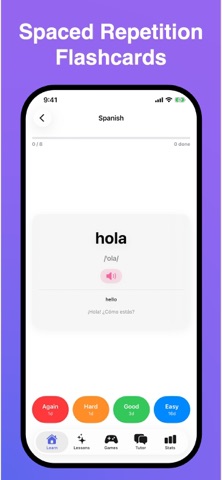
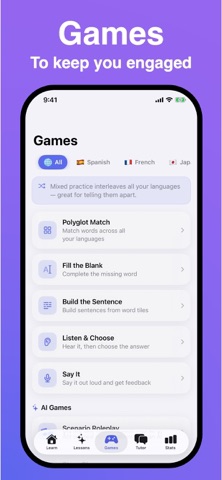
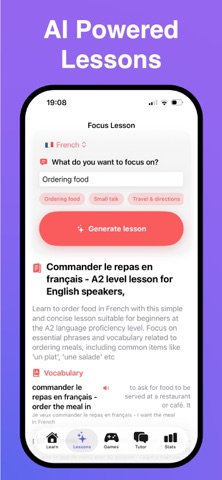
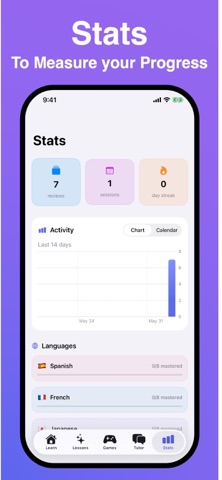
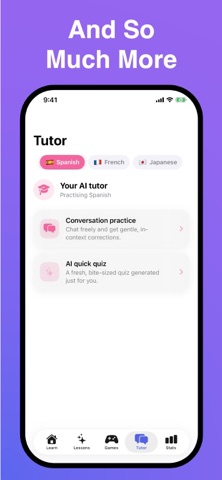
Released in early June 2026 by AJA Digital LLC, Polyglot challenges the single-language-track model that dominates the category. The app is free, installs in just 12 MB, and keeps all processing on-device with no account required. Color-coded language separation, spaced repetition flashcards, and an on-device AI tutor form the core feature set. Zero user ratings at publication make any definitive quality verdict premature, but the foundational concept is differentiated.
Parallel language study with unverified execution
Polyglot's central proposition is letting learners study multiple languages in parallel rather than forcing a single-track commitment, a meaningful departure from Duolingo, Babbel, and most competitors. Color-coding visually anchors each language so sessions involving Spanish and Japanese simultaneously feel organized rather than chaotic. Core learning mechanics include spaced repetition flashcards, pronunciation feedback, and an on-device AI tutor. Offline translation rounds out the toolkit. Whether the spaced repetition algorithm is genuinely adaptive and whether pronunciation feedback is accurate enough to be useful are questions that zero public reviews leave unanswered. The concept is sound; execution at this stage is unverifiable.
Lean footprint masks uncertain AI depth
A 12 MB install footprint is notably lean for an app that claims on-device AI processing, which raises reasonable questions about the depth of that model. On the positive side, small binary size typically means fast installation and modest storage impact, both welcome traits for travelers or users on constrained devices. Version 1.0.2 arrived within a week of the 1.0 launch, a cadence that suggests early bug-fixing rather than a fully settled codebase. With no rating volume to signal crash frequency or UI responsiveness, performance can only be described as unknown. Qualitatively, the offline-first design should eliminate the latency and connectivity failures that frustrate users of cloud-dependent rivals.
Free entry with hidden paywall risk
The base app is free with a 4+ content rating, so the barrier to trying it is essentially zero. The complication is that in-app purchases are listed as possible but their scope and pricing remain undisclosed in available materials. Until the ceiling of the free experience is transparent, learners cannot judge whether the no-cost tier delivers meaningful progression or functions primarily as a preview. For now, the app is worth a low-risk download given the price, but committing time to building a study habit here carries real uncertainty about whether a paywall will eventually interrupt that routine.
On-device design limits exposure, audit pending
The on-device processing model and no-account-required design are the strongest privacy signals available. When language data, pronunciation attempts, and AI interactions never leave the device, the attack surface for data exposure shrinks considerably compared with cloud-dependent apps. That said, we have not independently audited permissions or network calls, and neither should any reviewer claim to without instrumented testing. The definitive source of truth is the App Store privacy nutrition label on Polyglot's product page, which details exactly which data types are collected or linked to identity. Prospective users should review that label directly before installing, particularly regarding any analytics or advertising frameworks the free, ad-supported model may require.
Color-coding aids clarity, accessibility unconfirmed
Color-coding as a primary organizational metaphor is a practical, not merely cosmetic, choice for multi-language contexts. Visual anchors genuinely reduce cognitive blending when switching between structurally different languages in a single session. The design philosophy appears to favor clarity over feature density, which suits the lean install size. On accessibility, the 4+ content rating and straightforward educational purpose suggest a clean interface, but specific support for Dynamic Type, VoiceOver compatibility, or sufficient color-contrast ratios for users with color-vision deficiency cannot be confirmed from available data. Learners who rely on assistive technologies should test the app directly before committing to it as a primary study tool.
Early updates suggest responsiveness, not commitment
The version history is short by necessity given the June 2026 launch, but the jump from 1.0 to 1.0.2 within roughly a week does indicate the developer is responsive to early issues. AJA Digital LLC has no established public track record that would allow comparison against prior apps or long-term support patterns. Sustained maintenance, curriculum expansion, and AI model improvements all require ongoing developer investment, and nothing in the available record confirms that commitment beyond these first two updates. Revisiting the app after several months of user reviews accumulate will give a far clearer picture of whether the team is actively iterating or has moved on.
Pros
- Simultaneous multi-language study is a rare and genuinely useful structural feature
- Fully on-device processing with no account required offers a strong privacy posture
- 12 MB install with offline translation suits travelers and data-limited users
- Color-coded language separation is a sensible, functional usability decision
Cons
- Zero user ratings leave real-world quality, stability, and AI accuracy completely unverified
- In-app purchase scope is undisclosed, making the free tier's long-term value impossible to assess
- Version 1.0.2 arriving days after launch signals an unsettled codebase with no track record behind it
Related guides
Similar Education apps


apptidal is independent and ad-supported. We earn no commission on installs and no company can pay for a better score. How we stay independent.