
Education · iOS
Lingard: Language Learning
by Dmitry Schavlik
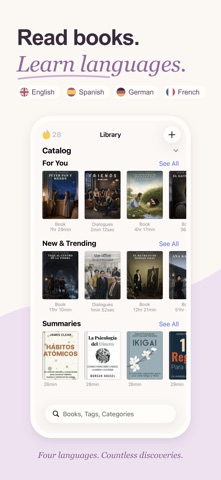


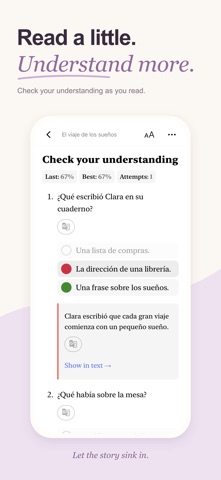
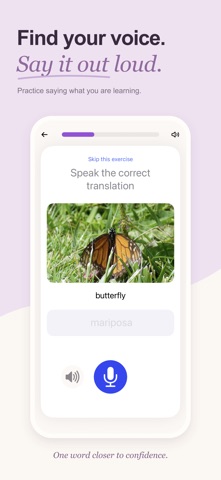
Lingard takes a reading-first approach to language learning, letting you work through a built-in library of more than 1,000 books, podcasts, dialogues, and summaries, or import your own ePub, PDF, and DOCX files. A one-tap translator keeps you inside the reading flow, and saved words feed a spaced-repetition review system. Cross-platform sync carries your progress across devices, and the 142 MB install stays reasonably lean for what it offers.
Reading companion that eliminates app switching
The core loop is elegantly simple: tap an unfamiliar word, receive a context-aware AI translation with examples and pronunciation, save it to your vocabulary deck, and continue reading without ever leaving the page. That friction reduction is more meaningful than it sounds, because constant app-switching is one of the biggest flow-killers in self-directed reading practice. Pair that with synchronized audiobook playback and Lingard offers a genuine listen-while-reading mode, a meaningful edge over flashcard-only competitors. Grammar and test modules exist but feel supplementary rather than fully realized, so learners who prioritize structured grammar work may find the coverage thin. Within its stated mission as a reading companion, though, the app executes confidently and earns its strong 4.7 store rating across 819 reviews.
Active development with consistent user satisfaction
At 142 MB, Lingard sits in a reasonable size range for an app that bundles a substantial content library alongside audio playback and AI translation features. The developer pushed an update as recently as June 30, 2026, suggesting active optimization rather than a stagnant codebase. User rating volume of 819 reviews at 4.7 stars points to consistent real-world satisfaction rather than a spike from a single promotional push. Qualitatively, an app built around sustained reading sessions needs smooth scrolling, reliable tap targets for word lookup, and uninterrupted audio sync, and the update cadence suggests these fundamentals are being actively maintained. No performance claims beyond what the data supports can be made here, but the signals are encouraging.
Free download with subscription-based premium features
Lingard is free to download, but the app carries in-app purchases whose exact scope requires checking the App Store listing directly before committing. The content library alone, at 1,000-plus items across multiple formats, represents genuine value if the core reading features are accessible on the free tier. The real differentiator for paid tiers is likely the AI translation depth, audio content, and possibly import volume. Competing apps such as LingQ charge meaningful subscription fees for similar reading-first workflows, so Lingard's pricing deserves a close look. For learners targeting one of its four languages, even a modest subscription could be justified given the breadth of the library and the quality of the in-context translation system.
Mature content rating requires privacy label review
Lingard carries a 17-plus content rating, which reflects mature text content in the library rather than any safety concern about the app itself. For a precise picture of data collection, the App Store privacy label on Lingard's product page is the authoritative source and should be reviewed before installing. An app of this type would typically request access to storage for imported files and possibly microphone or speech features for pronunciation practice. Cross-platform sync implies some form of account and cloud storage, so it is worth confirming what personal reading data and vocabulary lists are transmitted to Dmitry Schavlik's servers and under what retention policy.
Inline translation design prioritizes reading flow
A reading-centric app lives or dies by its typography, tap target sizing, and the clarity of its word-lookup interface. Lingard's approach of keeping translation inline rather than launching a modal or external app reflects considered UX thinking. Support for ePub, PDF, and DOCX import suggests the rendering engine handles varied document structures, though PDF reflow quality can vary across titles. On accessibility, VoiceOver compatibility and Dynamic Type support are worth verifying in the app directly, as these features are not always prioritized by independent developers. The clean, content-forward design philosophy visible in screenshots suggests readability has been taken seriously, which is the right instinct for this category.
Four years of steady version releases
The maintenance picture here is genuinely strong. Lingard launched in July 2022 and reached version 10.1.3 by a June 2026 update, meaning the developer has pushed through more than ten major version increments in roughly four years. That cadence reflects ongoing investment rather than a soft launch followed by neglect. For a solo or small-team developer, sustaining that update frequency alongside a growing content library is notable. The combination of recent updates, a healthy review count, and a high average rating suggests Lingard is not at risk of abandonment, which matters when you are building a long-term vocabulary deck and reading history inside the app.
Pros
- One-tap in-context AI translation keeps reading flow intact without switching apps
- Supports ePub, PDF, and DOCX imports so learners are not limited to curated content
- Synchronized audiobook playback enables combined listening and reading practice
- Version 10.1.3 with a June 2026 update signals active, sustained development
Cons
- Only four languages supported, excluding most of the world's popular learning targets
- Free tier scope and paywall placement require hands-on investigation before committing
- Beginners lack a structured grammar onboarding path before tackling real texts
Related guides
Similar Education apps


apptidal is independent and ad-supported. We earn no commission on installs and no company can pay for a better score. How we stay independent.