
Utilities · iOS
MetaWeather: Weather Forecasts
by Nathan Anthony


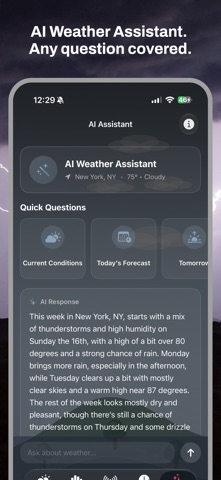
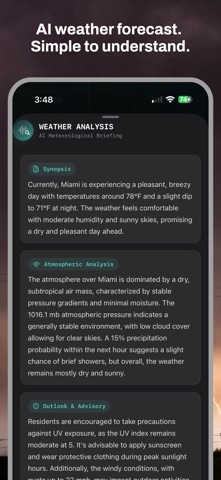


Nathan Anthony's MetaWeather fits a surprising feature set into a 36 MB free download. Built on Apple Weather data, it extends that foundation with a 240-hour forecast window, worldwide radar, an AI assistant, an activity planner, and a weather blog. Themes and custom app icons push it well past basic utility territory. With 54 ratings averaging 4.69, the audience is small but clearly enthusiastic.
Ten-day forecasts with serious meteorological depth
The 240-hour forecast window is the headline feature, and paired with a 10-day outlook it gives travelers and event planners considerably more runway than most competitors offer. The AI assistant is woven throughout the experience rather than bolted on as a standalone screen, and the activity planner translates raw forecast numbers into something genuinely actionable. Worldwide radar coverage, support for custom units across temperature, wind speed, visibility, and measurement systems, and a built-in weather blog round out a package that takes meteorology seriously. For a free, single-developer app, the ambition is real and largely delivered.
Lightweight app with reliable Apple Weather backend
At 36 MB the install footprint is modest, which suggests the app leans on on-demand data fetching rather than heavy local assets. That is typical for weather utilities and generally means snappy launches on modern hardware. The April 2026 update confirms active maintenance, a reassuring signal for daily reliability. Because all forecast data flows through Apple Weather rather than a proprietary backend, performance consistency is tied to that pipeline. On the upside, Apple Weather is a robust, well-resourced service. On the downside, any gaps or regional inaccuracies in that source will surface directly in MetaWeather with no independent modeling to compensate.
Free with unclear premium feature boundaries
The base download is free and the developer explicitly confirms no ads, which is a meaningful commitment in a category where ad-supported apps are the norm. A subscription tier exists, but the specific features locked behind it are not clearly disclosed before purchase, which is a genuine friction point. Prospective users should tap through the app carefully before subscribing to understand exactly what the paywall covers. If the free tier satisfies your needs, the value proposition is strong. If premium features turn out to be central to your use case, the unclear pricing structure makes budgeting harder than it should be.
Location access required, review privacy label first
Weather apps as a category typically request location access, and MetaWeather almost certainly does the same to deliver local forecasts. The App Store privacy nutrition label for this app is the authoritative source for understanding exactly which data types are collected, whether any are linked to your identity, and what is shared with third parties. We recommend reviewing that label before downloading, particularly given the AI assistant feature, which may involve additional data handling depending on how queries are processed. The content rating of 4+ suggests no mature content concerns, but privacy due diligence is always worthwhile.
Thoughtful design hampered by undocumented accessibility
The inclusion of themes and custom app icons signals that visual design is a deliberate priority rather than an afterthought, which is relatively uncommon among solo-developer utilities. The activity planner and AI assistant suggest an interface built around decision-making workflows, not just data display. Custom unit support across multiple measurement systems indicates thoughtful localization for a global audience. Formal accessibility features such as Dynamic Type support and VoiceOver compatibility are not detailed in available materials, so users with specific accessibility requirements should test the app directly or consult the App Store listing for any declared accessibility features.
Four years of solo development, modest user base
Version 5.4.9 updated in April 2026 from an app first released in November 2021 represents a healthy, sustained development arc of roughly four and a half years. That cadence is genuinely impressive for a solo developer and suggests Nathan Anthony treats this as a long-term project rather than an abandoned side experiment. The risk inherent in any single-developer app remains real: priorities can shift, life circumstances change, and there is no team to absorb disruption. For now, the update history is reassuring. The modest rating count of 54 reviews also means the developer has less community feedback to guide future decisions than larger apps enjoy.
Pros
- 240-hour forecast window is notably more generous than most competing weather apps
- Confirmed no-ad policy is a meaningful commitment in an ad-heavy category
- Worldwide radar coverage serves international users often ignored by US-centric apps
- Actively maintained through April 2026 despite being a solo-developer project
Cons
- Forecast accuracy depends entirely on Apple Weather with no proprietary modeling as a fallback
- Subscription paywall features are not clearly disclosed before purchase
- 54 ratings is a thin sample size, limiting confidence in the high store average
Related guides
Similar Utilities apps


apptidal is independent and ad-supported. We earn no commission on installs and no company can pay for a better score. How we stay independent.