
Media · iOS
Phlow: Pro Camera Photo Editor
by Phlow, Inc.


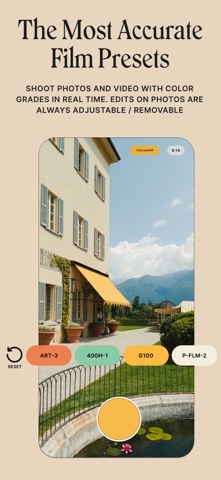


Launched in January 2024, Phlow has earned a near-perfect 4.87 rating from roughly 3,000 users in a competitive category. Its defining feature, PhlowSYNC, writes edits directly back to the original RAW file in your Photos library rather than spawning copies. Paired with real-time film emulations at capture and a proprietary RAW pipeline, the app carves out a distinct identity well beyond the typical filter-heavy camera replacement.
RAW capture and non-destructive syncing work well
Phlow centers on two interlocking ideas: capturing in its proprietary PhlowRAW format and syncing edits non-destructively back to the source file inside Apple Photos. Most competing apps export a new copy every time you adjust an image, quietly bloating your camera roll. PhlowSYNC sidesteps that entirely, which is the kind of unglamorous plumbing feature that turns out to matter enormously in daily use. Real-time film emulations let you preview and lock a look at capture rather than guessing in post, adding genuine creative value before the shutter fires. The interval camera, supporting up to 30 shots on a custom timer, rounds out a feature set that feels purposefully assembled rather than padded.
Heavy app size reflects full pipeline, not bloat
At 254 MB, Phlow sits on the heavier end of the iOS camera app spectrum, so storage-tight devices warrant a check before downloading. That size reflects a full RAW pipeline and preset library rather than obvious bloat. The update cadence is a meaningful signal here: version 2.1.17, pushed as recently as June 2026, shows the developer is actively maintaining the app well past launch. A rating of 4.87 from 3,000 reviews is a statistically strong result for a paid-tier camera app, suggesting the core workflow holds up across a wide range of devices and shooting conditions rather than impressing only a small enthusiast base.
Subscription cost justified for active RAW shooters
Phlow is free to download but gates its most meaningful features behind a subscription. The honest caveat is that pricing tiers are not prominently surfaced before you commit, so prospective users should check the App Store listing carefully. For JPEG shooters who rarely touch a desktop editor, the recurring cost is genuinely hard to justify. For photographers who value a clean, duplicate-free library, real-time emulations, and RAW editing headroom that stays inside Photos, the workflow advantage is concrete and recurring, which is exactly the kind of daily utility that makes a subscription defensible. The value case scales directly with how often you shoot and edit.
Permissions standard for camera apps, review privacy label
A camera app by definition requires camera and Photos library access, and an interval timer or sync feature may request additional permissions around background processing. Phlow's actual data practices are detailed in its App Store privacy label, which is the authoritative place to check what data is collected, whether it is linked to your identity, and whether it is shared with third parties. We recommend reviewing that label before subscribing, particularly if you store sensitive images in the same Photos library the app accesses. Nothing in the publicly available app metadata raises a specific red flag, but informed consent starts with reading the label.
Minimal design supports outdoor shooting, assistive tech untested
The app's visual identity leans toward the minimal, high-contrast aesthetic common to premium iOS camera tools, which tends to support legibility in bright outdoor shooting conditions. Real-time preset previews give immediate visual feedback, reducing the cognitive load of post-processing decisions. Dynamic Type support and VoiceOver compatibility are not officially documented in the App Store listing, so users who rely on assistive technologies should test during any free trial period before subscribing. The overall interaction model, shoot in PhlowRAW, adjust, sync back, is straightforward enough that the learning curve is low for anyone already familiar with Apple Photos.
Steady updates since January 2024 signal active development
The development history here is encouraging. Phlow launched in January 2024 and has reached version 2.1.17 as of June 2026, a steady release pace for an app that is just over two years old. Consistent updates in a category where many competitors go dormant after the initial launch window signal that the team is responding to user feedback and keeping pace with iOS changes. The strong and growing review count, 3,000 ratings at a 4.87 average, suggests the user base is expanding rather than stagnating, which in turn makes continued investment from the developer more likely.
Pros
- PhlowSYNC writes edits back to the original RAW file in Apple Photos, eliminating duplicate exports entirely
- Real-time film emulations and presets are applied at capture rather than only in post-processing
- Interval camera supports up to 30 shots on a custom timer, a practical tool for solo creators
- A 4.87 rating across 3,000 reviews and active updates through June 2026 signal both quality and longevity
Cons
- Subscription pricing tiers are not clearly surfaced upfront, making cost-benefit assessment difficult before committing
- The 254 MB install size is on the larger end for a mobile camera app and may deter storage-conscious users
- PhlowRAW is a proprietary format, which limits compatibility and portability outside the Apple Photos ecosystem
Related guides
Similar Media apps


apptidal is independent and ad-supported. We earn no commission on installs and no company can pay for a better score. How we stay independent.