
Utilities · iOS
USA Weather forecast
by ID Mobile SA

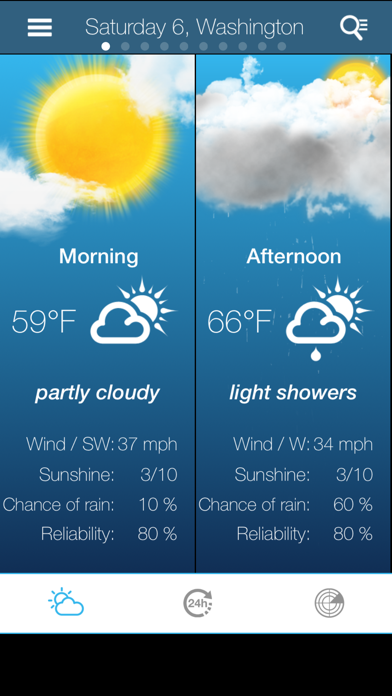
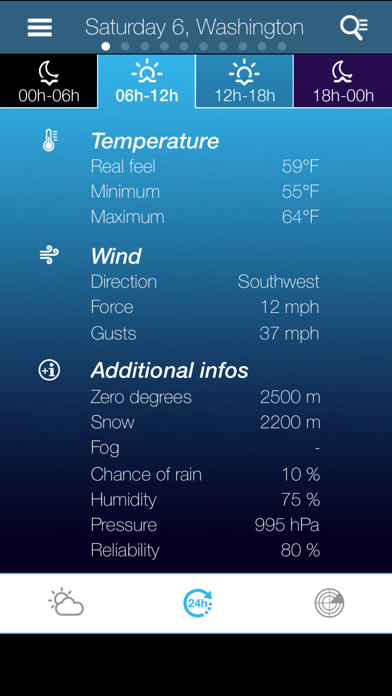
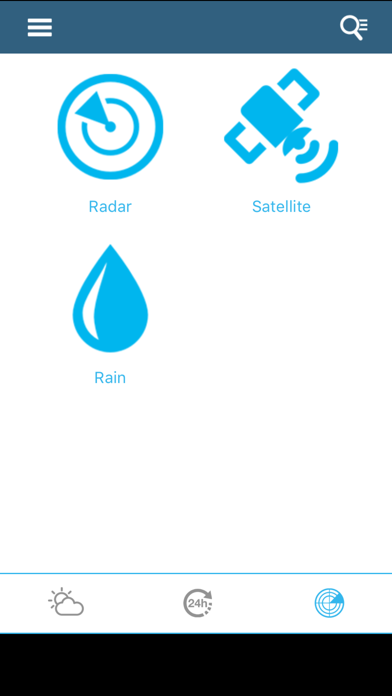
Released in July 2012 and still receiving updates as recently as May 2026, USA Weather Forecast from ID Mobile SA offers temperature ranges, wind data, precipitation probability, rainfall radar, and a 10-day outlook. A forecast reliability score and altitude-specific metrics give it a modest edge in one niche. With only 16 ratings accumulated over more than a decade, however, it occupies a very quiet corner of a very crowded category.
Granular forecasts with mountain-specific data
The core forecast breaks each day into morning, afternoon, and evening slots, which is meaningfully more granular than a simple daily high and low. Beyond standard temperature readings, the app surfaces perceived temperature, snowfall limits, zero-degree altitude, fog conditions, and gust force alongside wind speed and direction. A reliability score attached to each forecast is a genuinely practical differentiator that most competitors skip entirely. Rainfall radar rounds out the data picture adequately for casual planning. For mountain-oriented users, that combination is hard to find in a single free app. General users, though, may find the data density more overwhelming than helpful, and the overall presentation feels functional rather than refined.
Modest footprint with long update history
At 58 MB the install footprint is modest by modern standards, which suggests the app leans on server-side data rather than bundling heavy local assets. That is typical for weather utilities and generally keeps the download painless. Version 7.17.0 reflects a long update history, and the May 2026 update date signals the developer is still actively iterating. With only 16 ratings on record, there is limited community feedback to draw on when assessing real-world stability. What can be said is that the app has survived over 13 years on the App Store without being pulled, which implies basic functional reliability. The landscape-only constraint on the 10-day view is an awkward friction point on a device most people hold in portrait orientation.
Free download with unclear paywall scope
The app is free to download, which keeps the barrier to entry at zero. In-app purchases are listed but their scope is not disclosed upfront, leaving prospective users uncertain about what features sit behind a paywall. That lack of transparency is a genuine annoyance. For casual users, the free tier appears to cover the main forecast screens. For anyone considering a deeper commitment, it is worth checking the App Store purchase details before assuming full access. Given the competitive landscape, where polished free alternatives like Weather Underground or Apple's own Weather app exist, the value proposition depends almost entirely on whether the altitude-specific data points justify the trade-off in interface quality.
Standard location permissions, privacy details unconfirmed
The app carries a 4+ content rating, indicating Apple found nothing objectionable in its content classification. Beyond that, specific privacy practices are best verified directly in the App Store privacy nutrition label for this listing, as that is the authoritative source for data collection and tracking disclosures. Weather apps as a category commonly request location access, which is expected for delivering local forecasts. Users should review exactly which location permission tier the app requests (while-in-use versus always-on) and check whether any data is shared with third parties, particularly given the free, ad-supported model typical of apps in this space.
Dated interface with accessibility questions
The interface is functional but shows its age. After more than a decade of incremental updates, the visual design has not kept pace with the cleaner, card-based layouts that define modern weather apps. The data density can feel cluttered on smaller screens, and the landscape-only 10-day view is an odd structural choice that interrupts an otherwise portrait-native experience. Accessibility features such as Dynamic Type support and VoiceOver compatibility are not highlighted in the App Store listing. Users who rely on screen readers or larger text sizes should test the app personally before committing, as there is no public documentation confirming those accommodations are in place.
Steady updates for a narrow audience
A May 2026 update on an app first released in July 2012 is a meaningful signal of continued developer investment. Version 7.17.0 implies a substantial update history rather than a single large release. ID Mobile SA appears to be keeping the app compatible with current iOS requirements, which matters for long-term usability. The low rating count of 16 is not necessarily a sign of abandonment; it may simply reflect a narrow target audience that does not engage heavily with App Store reviews. Still, the absence of broader community feedback makes it harder to assess how quickly the developer responds to bugs or how frequently meaningful feature additions arrive.
Pros
- Forecast reliability score is a practical differentiator absent from most free competitors
- Morning, afternoon, and evening breakdown delivers more daily granularity than a basic high and low
- Snowfall limits and zero-degree altitude data serve mountain and outdoor users well
- Actively maintained with a confirmed May 2026 update across a 13-year lifespan
Cons
- Only 16 ratings after more than a decade signals very limited real-world adoption
- In-app purchase scope is undisclosed upfront, creating uncertainty about the free tier's limits
- Landscape-only 10-day view is an awkward constraint on a portrait-first device
Related guides
Similar Utilities apps


apptidal is independent and ad-supported. We earn no commission on installs and no company can pay for a better score. How we stay independent.