
Utilities · iOS
Weather⁺
by Impala Studios
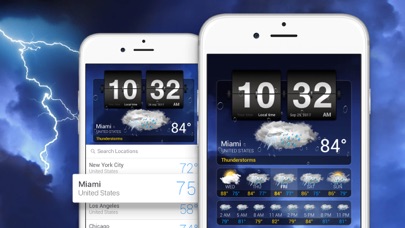
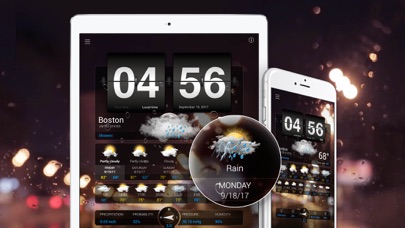
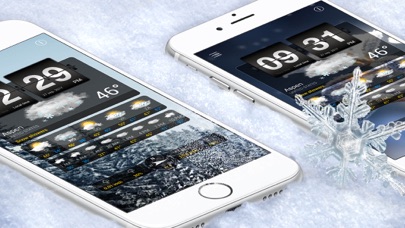

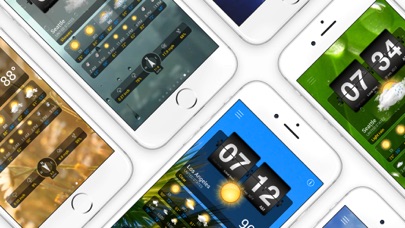
On the App Store since December 2010, Weather+ has built a 4.57-star average across 145,000 ratings by doing one thing rivals rarely bother with: matching looping video backgrounds to real local conditions. Impala Studios keeps the app current, with a May 2026 update on record. Free users get solid core data, widgets, and Apple Watch support, while ads and the complete video library require a recurring subscription.
Polished forecast display trades depth for style
Weather+ delivers standard forecast data, including 3-hourly breakdowns, wind direction and speed, precipitation probability, humidity, atmospheric pressure, and visibility, wrapped inside a continuously shifting video backdrop that mirrors current local conditions. An animated flip clock reinforces the cinematic mood. The execution is consistent enough that 145,000 raters have rewarded it with a 4.57 average, a strong signal that the concept lands. Where it falls short is depth: there is no evident radar layer, no severe-weather alerting, and no hyperlocal storm tracking. The app is style-forward by design, and for users who accept that framing, it does the job with real polish.
Heavy video library stable across 15 years
A 173 MB install is notably heavy for a weather utility, and that footprint is almost entirely attributable to the video asset library rather than forecast computation. On modern iPhones with ample storage, the size is an inconvenience at download time rather than an ongoing problem. The app has received consistent updates across 15 years, with the most recent version dated May 2026, suggesting Impala Studios actively addresses compatibility and stability. Free-tier users will encounter ads that interrupt the very visual flow the app is built around, which is the sharpest friction point in daily use. Qualitatively, a long update history and a high rating volume both point to a stable, well-maintained runtime.
Free tier functional but video library requires subscription
The free download is genuinely functional: 3-hourly forecasts, core atmospheric metrics, widgets, and Apple Watch support all arrive without payment. That is a reasonable baseline. The problem is that the video library, the app's primary reason to exist over free competitors, is paywalled behind a recurring subscription whose exact pricing is not surfaced in the listing. Free users also absorb ads, which corrodes the premium aesthetic the app promises. For someone who genuinely values a beautiful, distraction-free weather glance every morning, the subscription may be justified. For anyone primarily chasing forecast accuracy or data depth, free alternatives offer more without the trade-offs.
Location access necessary, review privacy label first
Location access is a functional necessity for any weather app, and Weather+ will request it to deliver local conditions. Beyond that, the specifics of what data is collected, shared, or used for advertising purposes are detailed in the App Store privacy nutrition label on the app's product page. We recommend reviewing that label directly before installing, paying particular attention to data linked to your identity and any third-party advertising frameworks that may accompany the free, ad-supported tier. The content rating of 4+ indicates no objectionable material, but ad networks embedded in free tiers can introduce their own data practices independent of the developer's own collection.
Visual design strong, accessibility features not prominent
The interface is clearly built around visual impact first: looping video conditions, a flip-clock time display, and a clean data layout beneath. iPad Split View support and widget availability on both iPhone and iPad show that Impala Studios has thought about context beyond the primary full-screen view. Apple Watch support is a practical inclusion that works without a subscription. Formal accessibility features, such as Dynamic Type scaling and VoiceOver optimization, are not prominently advertised. Users who rely on screen readers or large-text settings should test the free tier before committing to a subscription, as visually rich apps occasionally deprioritize assistive-technology compatibility.
Consistent updates since 2010 signal active support
A release date of December 2010 combined with a confirmed update in May 2026 represents one of the longer active maintenance records on the App Store. Reaching version 4.18.19 across that span indicates iterative, ongoing development rather than occasional bursts of attention. The 145,000-rating volume also implies a large enough user base to surface bugs and motivate fixes. For a utility that depends on OS-level location services, widget APIs, and watchOS compatibility, that update cadence is a meaningful reassurance. Weather+ is not an abandoned project, and users can reasonably expect continued support through future iOS releases.
Pros
- Live video backgrounds tied to actual local conditions are a genuine visual differentiator
- Solid free tier includes 3-hourly forecasts plus wind, pressure, humidity, and visibility data
- Full Apple Watch support and iPad Split View included at no cost
- 15-plus years of active maintenance with a confirmed May 2026 update
Cons
- Full video library, the app's core selling point, requires a recurring subscription
- Ads in the free tier directly undercut the premium aesthetic the app is built around
- 173 MB install is disproportionately large for a weather utility with no radar feature
Related guides
Similar Utilities apps


apptidal is independent and ad-supported. We earn no commission on installs and no company can pay for a better score. How we stay independent.