
Utilities · iOS
Weather Forecast by Climacam
by Weather Maps LLC
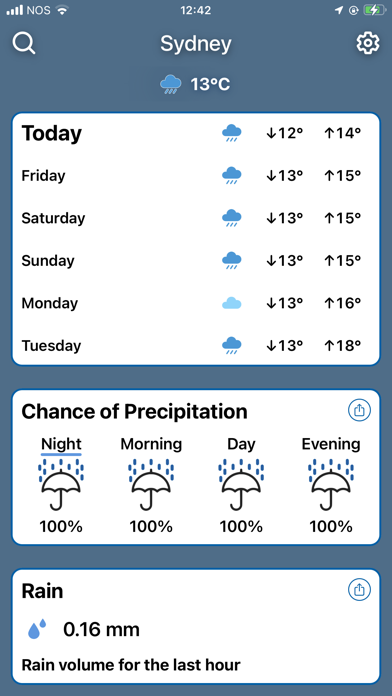
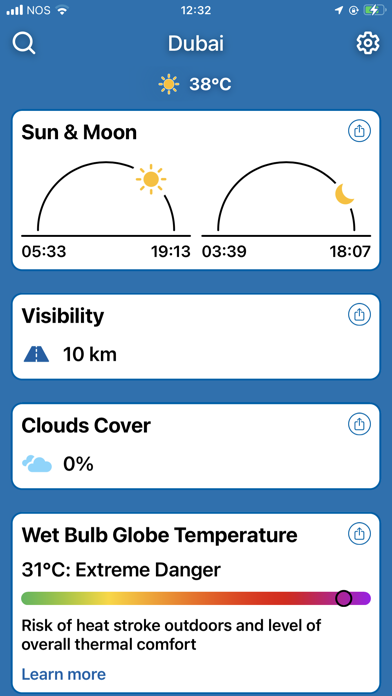

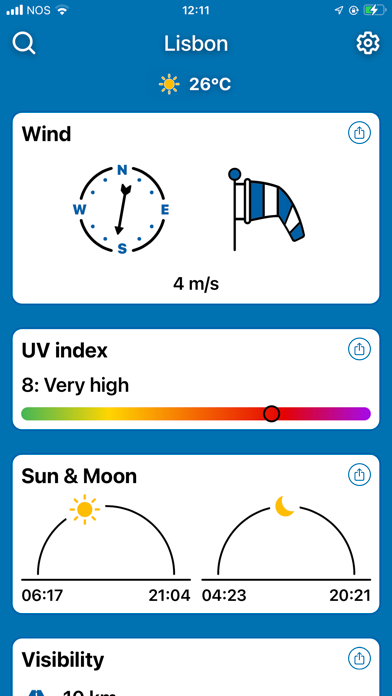

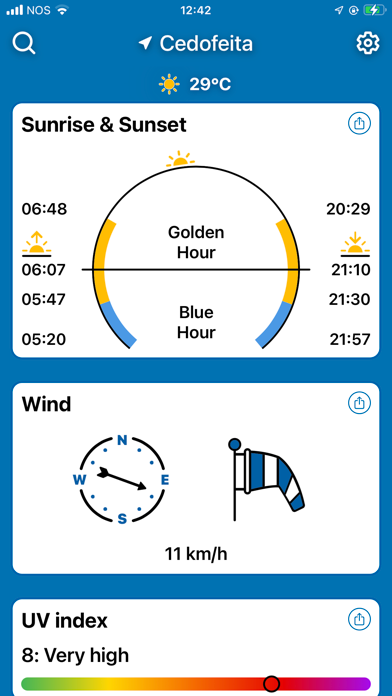
Launched in July 2024 by Weather Maps LLC, Weather Forecast by Climacam is a stripped-back iOS utility covering temperature, humidity, wind speed, multi-day forecasts, and sunrise and sunset times. It has earned a 4.45-star average across 476 ratings in under two years, which is a respectable start. The free download comes with unspecified in-app purchases, and the 389 MB install size feels disproportionate for the feature set on offer.
Simplicity works, but feature ceiling is low
Climacam focuses on the fundamentals: current temperature, humidity, wind speed, a multi-day outlook, and sunrise and sunset times. All of that information sits on a single, uncluttered screen, which is genuinely useful for anyone who finds mainstream weather apps overwhelming. What the app does not do is equally notable. There is no radar overlay, no hourly graph, no severe weather alerting, and no storm tracking. For a casual user checking whether to bring an umbrella, that simplicity works. For anyone with professional or safety-critical weather needs, the feature ceiling is hit almost immediately. The app does its narrow job competently, but the narrow job is the whole product.
Stability solid despite unusual file size
Qualitative signals here are reasonably encouraging. A 4.45-star rating across 476 reviews, built in under two years, suggests that most users are not encountering crashes or data errors serious enough to prompt complaints. The April 2026 update confirms the app is being actively maintained, which typically correlates with stability fixes and compatibility upkeep for current iOS versions. The one persistent concern is the 389 MB install size, which is unusually large for a utility delivering core forecast data with no offline maps or radar assets to justify the bulk. On devices with limited storage, that footprint alone could be a dealbreaker, and it raises questions about what is actually occupying that space.
Free base unclear on paywall scope
The base download is free, which removes the obvious barrier. However, the App Store listing notes in-app purchases without clearly explaining what they unlock. That ambiguity matters: if premium features are cosmetic, the free tier is genuinely complete. If core functionality like extended forecasts or ad removal sits behind a paywall, the value proposition shifts considerably. Until that is transparent, users should treat the free version as a trial rather than a finished product. Apple's built-in Weather app, powered by Dark Sky data, is free, pre-installed, and offers hourly and ten-day forecasts with no purchases required, making it the default benchmark Climacam must clear.
Location access requires privacy label review
Weather apps, by definition, request location access, and Climacam will almost certainly do the same. Beyond location, the permissions and data-handling practices worth scrutinizing include whether the app shares data with third-party advertisers, what analytics are collected, and how long location history is retained. Because this is a free, ad-supported utility from a small developer, advertising SDKs are plausible. The definitive source for all of this is the App Store privacy label on Climacam's product page, under the 'App Privacy' section. We recommend reviewing that label before granting always-on location access, and choosing 'While Using' permission as a precaution if anything there is unclear.
Clean layout prioritizes readability over depth
The interface prioritizes legibility, placing key figures prominently rather than burying them in nested menus. That approach benefits a wide range of users, including older users or anyone who prefers large, readable data at a glance. The one-screen layout also suits one-handed use, which the original design appears to have considered. On accessibility more broadly, iOS provides system-level support for Dynamic Type, VoiceOver, and display accommodations, and well-built apps inherit those automatically. Whether Climacam fully leverages those frameworks is best confirmed by testing with VoiceOver enabled. The clean visual hierarchy is a positive signal, but it does not guarantee full assistive-technology compatibility.
Recent updates confirm active maintenance
The update history here is a genuine positive. Version 2.6 arrived in April 2026, meaning the app has received attention within the past few months and is not abandoned. For a utility released in mid-2024, reaching version 2.6 in roughly two years indicates a developer who is iterating rather than shipping and forgetting. The 476-rating count is modest, which means the community feedback pool driving those updates is relatively small, but the update cadence itself is reassuring. Users who adopt the app now can reasonably expect continued iOS compatibility maintenance, though the pace of feature development remains an open question given the current minimal feature set.
Pros
- Uncluttered single-screen layout puts temperature, humidity, wind speed, and forecast data immediately visible
- Sunrise and sunset times are a practical, well-placed addition for anyone planning outdoor activities
- Version 2.6 updated April 2026 confirms active maintenance and likely current iOS compatibility
- Free to download with a solid 4.45-star average built across 476 ratings in under two years
Cons
- 389 MB install size is disproportionately large for a utility offering only basic forecast data
- In-app purchases are listed without explanation, creating real uncertainty about what the free tier actually includes
- No radar, hourly breakdowns, or severe weather alerts means power users will outgrow it almost immediately
Related guides
Similar Utilities apps


apptidal is independent and ad-supported. We earn no commission on installs and no company can pay for a better score. How we stay independent.