
Utilities · iOS
Weather forecast - Daily&Local
by 嘉妮 赖
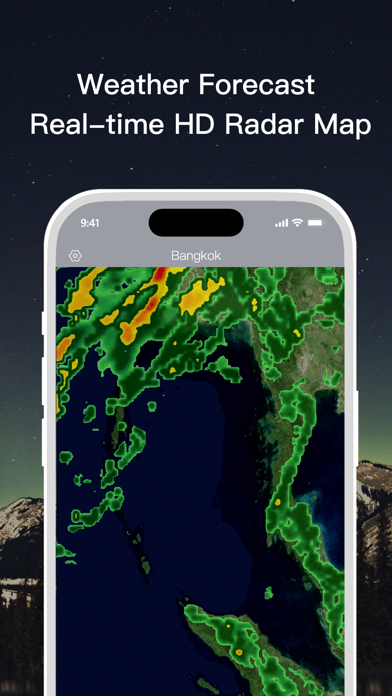
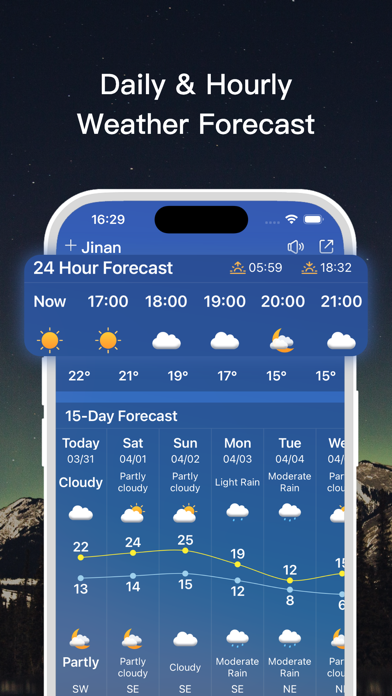
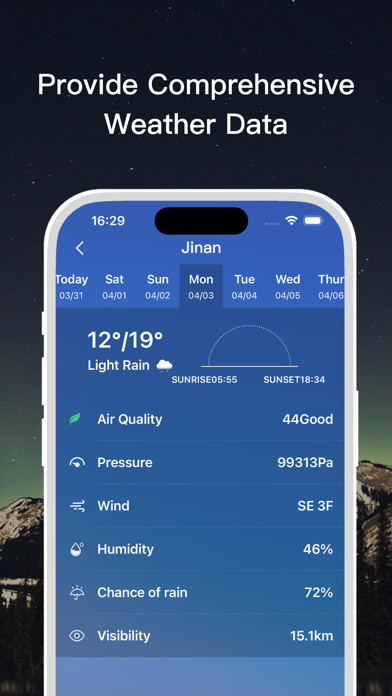

Released in 2019 and updated as recently as February 2026, Weather Forecast - Daily&Local is a free iOS utility from independent developer Lai Jiani. It covers 15-day outlooks, hourly breakdowns, animated precipitation maps, air quality readings, UV index, and both lock screen and home screen widgets. A 4.28 rating across roughly 9,000 reviews signals reasonable user satisfaction, though the 198 MB install size and unclear paywall structure temper enthusiasm.
Competitive feature set hampered by unclear paywall
The core forecast toolkit is genuinely competitive for a free app. Users get 24-hour hourly detail, a 15-day lookahead, UV index, wind speed and direction, sunrise and sunset times, and color-coded air quality readings. Animated precipitation maps let you track incoming rain or snow in real time, while earth time-lapse videos offer a broader view of global weather patterns. Multiple location support is a practical bonus for travelers or anyone monitoring weather for family in other cities. On paper, the feature list rivals paid alternatives, though how much of it remains free versus locked behind in-app purchases is never clearly spelled out in the store listing.
Heavy app runs smoothly on current devices
At 198 MB, this is a notably heavy install for a weather utility. That bulk likely reflects the animated map assets and time-lapse video content rather than any unusually sophisticated forecasting engine. Qualitatively, a 4.28 average across around 9,000 ratings suggests the app runs without widespread crashing or data-loading complaints, which is a meaningful signal at that review volume. The February 2026 update indicates the developer is still actively addressing compatibility with current iOS builds. That said, asset-heavy apps in this category can feel sluggish on older devices, so users on aging hardware should temper expectations around animation smoothness.
Free download obscures true cost of features
The app is free to download, which lowers the barrier to trying it. The complication is that in-app purchases are listed in the App Store without any clear description of what they unlock. Features like severe weather alerts or extended forecast detail could plausibly sit behind a paywall, and without transparency on that point, it is difficult to assess the true cost of a complete experience. Competing free weather apps such as Weather Underground or the built-in Apple Weather app offer clearly defined feature sets at no cost. Until the purchase tiers are disclosed more openly, value is genuinely hard to judge.
Location access required, privacy policy listing incomplete
A weather app fundamentally requires location access to function, so that permission is expected. What warrants closer attention here is that the developer's privacy policy URL appears visibly truncated or incomplete in the App Store listing, which is a real transparency concern rather than a cosmetic one. Before granting precise or always-on location access, prospective users should check the App Store privacy label directly under the app's listing, as that section is Apple-verified and will show what data categories are collected and whether any are linked to your identity. The solo independent developer context means privacy practices may not be as formally audited as those of larger weather platforms.
Visual design prioritizes clarity over documented accessibility
Color-coded air quality indicators and animated precipitation maps suggest the developer has invested in visual clarity, which benefits users who prefer scanning over reading. Widget support for both the lock screen and home screen reflects an understanding of how people actually consume weather information on iOS. The content rating of 4+ confirms no age-restricted material. Formal accessibility features such as Dynamic Type support or VoiceOver optimization are not documented in the store listing, which is typical for smaller independent apps but worth verifying in-app if accessibility is a priority for you.
Six years of updates suggest sustained support
A February 2026 update on an app first released in September 2019 is a positive signal, indicating the developer has sustained the project for over six years. Version 2.0.2 suggests incremental rather than transformational updates, which is common for stable utility apps. The risk with a solo independent developer is that update cadence can become irregular if priorities shift, and there is no organizational backstop if development stalls. For now, the recent update history is reassuring, but users who depend on reliable severe weather alerts should consider whether a larger-team alternative offers more consistent long-term support.
Pros
- 15-day forecast combined with 24-hour hourly detail covers both planning and immediate needs
- Animated precipitation maps provide practical at-a-glance storm tracking
- Color-coded air quality monitoring adds a health-relevant dimension rarely seen in free utilities
- Lock screen and home screen widget support suits users who prefer quick glances over opening the app
Cons
- 198 MB install size is disproportionately large compared to most competing weather apps
- In-app purchase scope is never clearly disclosed, making the true cost of full functionality unknown
- Privacy policy URL is visibly incomplete in the store listing, raising legitimate transparency concerns
Related guides
Similar Utilities apps


apptidal is independent and ad-supported. We earn no commission on installs and no company can pay for a better score. How we stay independent.