
Utilities · iOS
Weather Mate Pro - Forecast
by DylogicApps Pvt Ltd


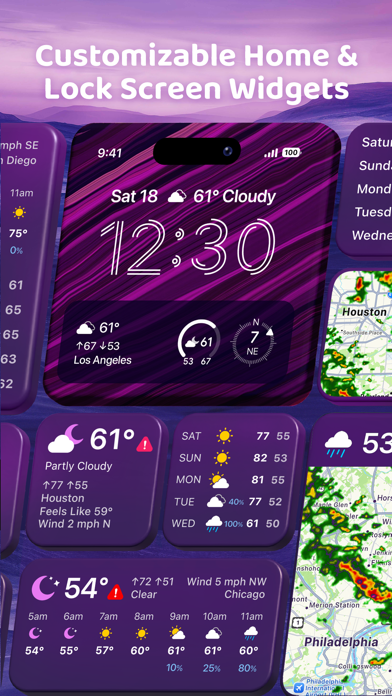


Released in 2013 and still receiving updates in early 2026, Weather Mate Pro is one of the longer-lived premium weather utilities on the App Store. Its headline feature is access to a network of over 250,000 personal weather stations alongside ASOS airport sensors, letting users manually tune which station feeds their forecast. That single capability separates it from most competitors at any price point.
Manual station selection solves microclimate gaps
Weather Mate Pro pulls forecast data from Weather Underground, The Weather Channel, and a self-described network of more than 250,000 personal weather stations, including ASOS airport sensors. The standout capability is manual station selection: rather than accepting whatever the nearest official sensor reports, users can browse nearby personal stations and pin the one that best matches their microclimate. For anyone living in a valley, coastal pocket, or urban heat island that official readings consistently miss, this is a meaningful advantage. The feature works well once configured, though the configuration itself is not especially guided. The app covers the expected bases, including hourly breakdowns, extended forecasts, radar, and severe weather alerts, so the core utility is solid rather than just a novelty.
142 MB footprint outweighs consistent reliability
At 142 MB, Weather Mate Pro is considerably heavier than most single-purpose weather utilities, which typically land well under 50 MB. That bulk suggests rich assets or embedded map data, but it does raise the question of whether the experience justifies the storage footprint on a device with limited space. Version 8.0.5 was pushed in March 2026, which signals active optimization work, and a 4.66 rating across roughly 6,000 reviews points to a user base that finds the app reliable day to day. Qualitatively, a high rating sustained over that review volume suggests the app avoids the chronic crash or refresh complaints that plague lower-rated weather tools. No independent benchmark data is available to us, so performance claims beyond these signals would be speculative.
One-time fee favors committed users only
A one-time $7.99 purchase compares favorably to subscription-based weather apps that charge that amount or more every month. There is no free tier and no trial, which means buyers are committing without a firsthand test of the accuracy benefit in their specific location. That is the sharpest friction point. For power users, the combination of a permanent license, multi-source data, and manual station control represents genuine value. For casual users who only want a quick tomorrow glance, the free Weather app pre-installed on every iPhone covers that need without any outlay. The honest calculus is whether the station-selection feature solves a real problem you already notice with your current app.
Location data practices require direct label review
Weather apps as a category typically request location access, and some request it continuously in the background to power widgets and alerts. Weather Mate Pro would require at minimum location permission to deliver hyperlocal station data. The full picture of what data is collected, how it is used, and whether it is shared with third parties is detailed in the App Store privacy nutrition label for this listing. We recommend reviewing that label directly before purchasing, paying particular attention to whether location data is linked to your identity or used for tracking. No independent audit data is available to us, so we decline to characterize the app's privacy posture beyond pointing to that official disclosure.
Interface complexity demands accessibility verification
Version 8.0.5 carries a content rating of 4+, confirming no objectionable material, and the app's longevity suggests iterative UI refinement over more than a decade. Weather apps in this category typically rely on iconography, color-coded radar layers, and data-dense forecast grids, all of which can present challenges for users with low vision or color-perception differences. Whether Weather Mate Pro supports Dynamic Type scaling, VoiceOver labels on forecast elements, or sufficient color contrast is best verified by enabling those accessibility features during an evaluation. The station-selection workflow, while powerful, adds a layer of interface complexity that may require some acclimatization for new users regardless of ability.
Thirteen years of active development signals commitment
Few weather apps released in 2013 are still receiving meaningful updates in 2026, making Weather Mate Pro an outlier in terms of developer commitment. The jump to version 8.0.5 and a March 2026 update date confirm that DylogicApps is actively maintaining compatibility with current iOS releases rather than letting the app coast on legacy installs. A rating of 4.66 held across 6,000 reviews over that lifespan suggests the developer has responded to user feedback over time rather than shipping a static product. That track record meaningfully reduces the risk that a $7.99 purchase becomes an abandoned app within a year or two.
Pros
- Manual selection from 250,000-plus personal weather stations enables genuine microclimate accuracy
- Combines multiple data sources including Weather Underground and The Weather Channel
- One-time $7.99 purchase with no recurring subscription required
- Actively updated through version 8.0.5 in March 2026 after more than 12 years on the App Store
Cons
- 142 MB install size is disproportionately large for a single-purpose weather utility
- No free trial means buyers must commit $7.99 without testing accuracy in their specific location
- Station selection workflow adds setup friction that casual or infrequent users are unlikely to bother with
Related guides
Similar Utilities apps


apptidal is independent and ad-supported. We earn no commission on installs and no company can pay for a better score. How we stay independent.