
Utilities · iOS
Windfinder: Wind & Weather map
by Windfinder


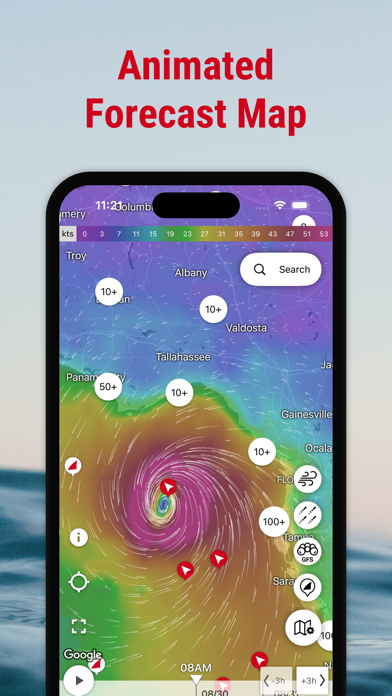


Launched in 2009 and still actively refined, Windfinder is built around wind rather than generic weather. It draws real-time readings from 21,000 stations across more than 160,000 locations worldwide. Parameters span wave period, Beaufort scale, tide highs and lows, air pressure, and gust strength, making it a genuine planning tool for anyone whose safety or enjoyment depends on knowing exactly what the wind is doing at a specific spot.
Wind forecasting with comprehensive station data
Windfinder's core promise is wind-first forecasting, and it delivers with unusual thoroughness. Each location view surfaces wind speed, gusts, direction, wave height, wave period, wave direction, precipitation, cloud cover, air pressure, and tide data in a single scrollable layout. Unit switching between knots, Beaufort, mph, km/h, and m/s is quick and reliable, which matters when coordinating with crew or fellow athletes who use different conventions. The animated global wind map provides helpful at-a-glance context before drilling into a specific waypoint. Webcam integration at popular spots adds a real-world visual check that no data table can fully replace. For its target audience, the feature set is hard to fault.
Reliable performance across devices and conditions
At 79 MB, the install footprint is modest for an app carrying global station data, animated maps, and webcam feeds. A 4.8-star rating across 61,000 reviews is a strong signal of sustained reliability rather than a honeymoon spike, suggesting the app holds up across diverse devices and conditions. Update cadence is notably healthy, with version 5.40.1 landing in May 2026, indicating the team actively addresses bugs and platform changes. Load times for forecast screens will naturally vary with connection quality and station proximity, but no structural performance concerns emerge from the available data. Home-screen widgets reduce the need to open the full app for a quick wind check, which is a practical daily-use advantage.
Generous free tier with optional purchases
The free tier is genuinely generous. Tide forecasts for over 20,000 locations, multi-parameter wind data, and the animated wind map are all accessible without paying. In-app purchases exist, and their presence does create some uncertainty about which features may eventually move behind a paywall. For now, the free experience competes credibly with paid alternatives in the wind-sports niche. Users who rely on Windfinder professionally, such as charter skippers or instructors, would likely find a subscription worthwhile for ad removal and any premium forecast layers on offer. Casual users checking occasional forecasts will find the free version more than sufficient.
Ad-supported model requires privacy review
Windfinder is ad-supported, which typically involves some level of data collection for targeting purposes. The definitive source for understanding exactly what is collected, how it is used, and whether it is shared with third parties is the App Store privacy nutrition label on the app's product page. We recommend reviewing that label before installing, paying particular attention to data linked to your identity and any tracking disclosures. Location access is functionally necessary for the app to surface nearby station data and relevant forecasts, so that permission request is expected and reasonable. As with any free, ad-supported utility, users with heightened privacy concerns should weigh the data trade-off against the subscription option.
Dense interface suited to experienced users
The interface prioritises information density over visual simplicity, which is the right call for the target audience but does impose a learning curve on newcomers. Colour-coded wind scales and directional arrows communicate forecast changes quickly once the layout becomes familiar. Widget support extends usability beyond the app itself. On accessibility, the app carries a 4+ content rating and appears to follow standard iOS conventions, meaning Dynamic Type and VoiceOver should function at a baseline level, though the chart-heavy forecast tables may present challenges for screen-reader users. Windfinder does not prominently advertise dedicated accessibility features, so users with specific needs should test the free version before committing to a subscription.
Fifteen years of active development and updates
Fifteen-plus years on the App Store with a May 2026 update is a strong maintenance record by any measure. The addition of severe weather warnings for the US and Europe, while not yet a global differentiator, shows the team is expanding scope rather than coasting on legacy reputation. Version numbers in the 5.x range suggest a mature but evolving codebase. The 61,000-review base also means the developer receives substantial user feedback, which tends to correlate with faster bug identification. The main caveat is that severe weather alerts remain limited to the US and Europe, leaving users in other regions without that layer of safety-relevant information.
Pros
- Exceptional wind parameter depth covering gusts, wave period, Beaufort scale, and tide forecasts in one view
- Real-time data from 21,000 stations grounds forecasts in actual measurements rather than pure model output
- Multiple unit systems including knots, m/s, and Beaufort make it practical for international coordination
- Consistent update cadence, with a May 2026 release, signals active long-term maintenance
Cons
- Station coverage is uneven, so rural and inland areas rely more on interpolated model data than live readings
- Severe weather alerts are limited to the US and Europe, leaving other regions without critical notifications
- The parameter-dense layout requires a learning curve and may feel over-engineered for casual weather checking
Related guides
Similar Utilities apps


apptidal is independent and ad-supported. We earn no commission on installs and no company can pay for a better score. How we stay independent.