
Media · iOS
Afterlight: Film Photo Editor
by Afterlight Collective, Inc

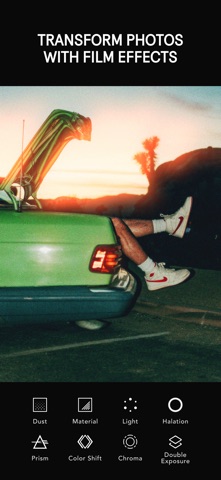

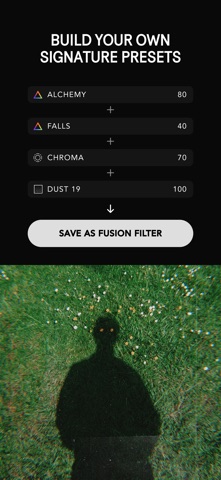


Afterlight has been refining its film-emulation toolkit since its 2017 launch, and version 5.2.3 reflects a team that knows its creative lane. The app offers 300-plus film-inspired presets, overlays sourced from real 35mm film stock, and nuanced effects like Halation and Chroma Shift that go well beyond generic filter sliders. At 417 MB the install is substantial, but the toolset depth justifies that footprint for anyone committed to the film-photography look on a phone.
Film stock presets anchor a focused editing toolkit
Afterlight centers its identity on analog film emulation, and it executes that focus with real specificity. The preset library references actual film stocks by name, including Kodak Gold, Portra, and Agfa Vista, giving users a meaningful creative anchor rather than vague mood labels. Pairing those presets with Halation for warm edge glow or Color Shift for RGB channel separation produces results that feel deliberate rather than decorative. The standout workflow feature is the Fusion Filter system, which lets you combine multiple effects into a single reusable one-tap preset. Overlays are sourced from real 35mm film material rather than digital approximations, a distinction that serious film enthusiasts will notice and appreciate. The breadth of tools is genuinely impressive for a mobile editor.
Heavy install size offsets reliable daily performance
A 417 MB install is on the heavier end for a photo editing app, and users on older or storage-constrained iPhones should factor that in before downloading. That said, a strong 4.74 rating across roughly 20,000 reviews suggests the core editing experience holds up reliably in everyday conditions, with no widespread complaints about crashes or freezing visible at that rating volume. The app has received consistent iOS updates, most recently in June 2026, which is a meaningful signal for a 2017 release since photo-editing pipelines are among the first features to break after major iOS version changes. Qualitatively, the layering system and preset rendering appear smooth based on the community reception, though users on older hardware may experience slower processing when stacking multiple effects.
Free tier masks paywall boundaries for committed users
Afterlight is free to download, and that entry point is genuinely generous since a meaningful portion of the toolset is accessible without spending anything. The complication is that in-app purchase boundaries are not clearly signposted before you download and begin exploring. You may invest time building a workflow around certain presets or features before discovering they sit behind a paywall. For users who commit to a subscription or one-time purchase, the depth of the library, the Fusion Filter system, and the real-film overlays represent solid value compared to competitors charging similar prices for less specific tools. Casual users who only need basic adjustments will likely find the free tier sufficient, but the app clearly rewards those willing to pay for its full analog toolkit.
Photo library access requires standard permission review
Afterlight requires access to your photo library to function, which is standard for any editing app in this category. Beyond that expected permission, the specifics of what data the app collects, how it is used, and whether it is shared with third parties are detailed in the App Store privacy nutrition label on Afterlight's product page. We strongly recommend reviewing that label before installing, paying particular attention to any data linked to your identity or used for tracking purposes. The app carries a 4+ content rating, indicating no mature content concerns. As with any free, ad-supported creative tool, it is worth checking whether analytics or advertising identifiers are collected as part of the business model.
Massive preset library overwhelms without guided curation
Afterlight's visual design leans into its analog identity, with a clean, dark-toned interface that keeps the focus on your images. The layout is logical for users already familiar with layered photo editing, but the sheer volume of presets and overlays, more than 300 and 100 respectively, creates a real discovery problem for newcomers. There is no obvious curation layer or guided onboarding to help first-time users build a personal workflow, which means early sessions can feel like sorting through a very large, unsorted archive. On the accessibility front, the app carries a 4+ content rating and is iOS-native, meaning it benefits from system-level accessibility features like Dynamic Type and VoiceOver support, though the depth of the custom editing controls may vary in screen-reader friendliness.
Nine years of updates signal genuine developer commitment
Active maintenance is one of Afterlight's clearest strengths. A June 2026 update on an app originally released in November 2017 represents nearly nine years of continuous development, which is a strong track record in a category where many competitors go dormant after a year or two. Regular updates matter especially for photo editors because iOS system changes frequently disrupt camera roll access, file handling, and rendering pipelines. The 20,000-plus ratings accumulated over that lifespan also suggest a stable, engaged user base rather than a spike-and-fade popularity pattern. Version 5.2.3 indicates iterative refinement rather than stagnation, and the update history gives reasonable confidence that the app will remain functional through future iOS releases.
Pros
- Preset library references real film stocks by name, providing a genuine creative reference point
- Fusion Filter system lets users save custom multi-effect combinations as reusable one-tap looks
- Overlays are sourced from actual 35mm film material rather than digital approximations
- Consistently updated since 2017, with a June 2026 release reducing compatibility risk
Cons
- Paywall boundaries between free and paid content are unclear until you are already inside the app
- 417 MB install size is heavy compared to many competing mobile photo editors
- No guided onboarding or curation layer makes navigating 300-plus presets slow for new users
Related guides
Similar Media apps


apptidal is independent and ad-supported. We earn no commission on installs and no company can pay for a better score. How we stay independent.