
Tools · iOS
Ahero: Focus & Productivity
by Allison Mui
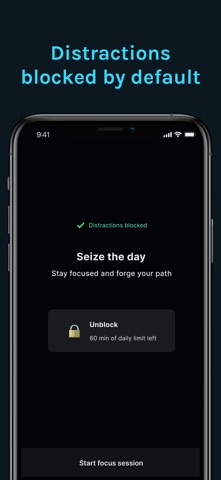

Ahero is a distraction blocker from solo developer Allison Mui, released in early 2025 for iOS. At just 12 MB, the app strips the concept down to its essentials: select the apps you want blocked, optionally lock those settings so you cannot quietly reverse course, and start working. A companion desktop client for Mac and Windows extends the pitch beyond mobile. With only six store ratings so far, the app is clearly in its earliest days.
Settings lock adds real accountability
Ahero's core loop is straightforward: choose which apps to block during a focus session, activate the session, and optionally engage a settings lock that prevents mid-session backsliding. That lock is the feature that genuinely distinguishes Ahero from a basic screen-time toggle. Most blockers fail because willpower erodes the moment temptation peaks, and the ability to undo your own rules in seconds makes the tool nearly pointless. Ahero addresses that gap directly. The caveat is that a determined user can still delete and reinstall the app, so the lock is a friction raiser rather than an absolute barrier. For honest self-regulation, though, it adds meaningful accountability where most competitors do not bother.
Smooth performance remains largely unverified
Qualitative signals suggest a reasonably smooth experience. The 12 MB install size is notably lean for a productivity tool, indicating minimal bloat and a fast initial setup. Version 1.6 arriving less than a year after the March 2025 launch points to active iteration, which is a positive sign for stability. On the other hand, only six user ratings exist, so there is almost no crowd-sourced evidence about edge cases, battery behavior, or how reliably the settings lock holds across iOS updates. Performance in daily use is plausible given the app's simplicity, but the honest answer is that real-world durability at scale remains unverified.
Free entry point obscures paywall scope
Ahero is free to download, which removes any financial risk from trying it. The concern is that the app references potential in-app purchases without making the full scope of the free tier immediately clear. Users cannot easily determine before downloading whether core features like the settings lock or cross-platform sync sit behind a paywall. Established competitors such as Freedom or Cold Turkey carry subscription fees but come with years of user feedback and transparent pricing tiers. Ahero's free entry point is appealing, but the purchase structure needs more clarity before it can be recommended without reservation to users who want to plan their toolset budget.
System access necessary, privacy label required
A distraction blocker by definition needs to know which apps are installed and active on your device, so some level of system access is inherent to the category. Beyond that, we cannot responsibly characterize Ahero's specific data practices without fabricating details. The correct approach is to check the App Store privacy label on Ahero's product page directly, where Apple requires developers to disclose data collected, data linked to you, and data used to track you. Given that this is a solo-developer app with limited public scrutiny so far, reviewing that label carefully before granting permissions is especially worthwhile.
Minimal design aids usability and accessibility
The app's small footprint and focused feature set suggest a deliberately minimal interface, which tends to benefit usability. A simple pick-and-block workflow is easier to navigate than a dashboard heavy with settings, and that simplicity can also support accessibility by reducing cognitive load. Whether Ahero supports Dynamic Type, VoiceOver, or other iOS accessibility features is not something we can confirm from available data. Users who rely on assistive technologies should test the app during the free trial period before committing to it as a daily tool. The 4+ content rating signals no mature content concerns.
Active updates suggest sustained solo development
The update history offers genuine encouragement here. Version 1.6 was published in January 2026, roughly ten months after the initial March 2025 release, which represents a meaningful pace of iteration for a solo developer. That cadence suggests Allison Mui is actively responding to feedback and refining the product rather than abandoning it post-launch. The risk, as with any single-developer project, is that sustained support depends entirely on one person's availability and resources. The low rating count also means the developer has had limited public feedback to act on, so the quality of those updates is harder to assess than it would be for a more established app.
Pros
- Settings lock creates genuine commitment by preventing mid-session rule changes
- Lean 12 MB install size means fast setup with minimal device overhead
- Cross-platform desktop clients for Mac and Windows extend blocking beyond mobile
- Free entry point lets users evaluate the core experience with no financial risk
Cons
- Only six store ratings leave reliability and long-term stability largely unverified
- In-app purchase structure is unclear, making the free tier's actual scope hard to judge
- No evidence of scheduled blocking windows or session-history statistics for users who want data-driven accountability
Related guides
Similar Tools apps



apptidal is independent and ad-supported. We earn no commission on installs and no company can pay for a better score. How we stay independent.