
Tools · iOS
Drift Productivity
by SETU SANGHANI
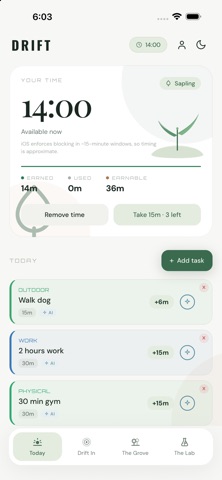
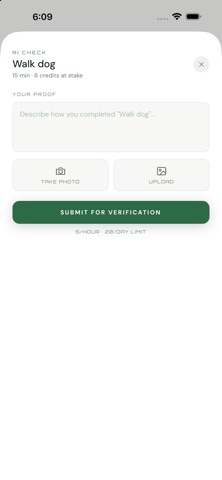
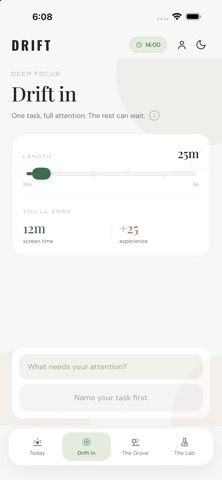


Drift flips the usual screen-time model by requiring task completion before unlocking distracting apps. Apple's Screen Time API handles the actual blocking, recurring schedules reduce daily setup friction, and an AI suggestion layer helps when motivation stalls. Released in late June 2026 and updated within weeks, it is a genuinely fresh concept still in its earliest public life, with only four ratings to its name.
Earn-to-unlock mechanic is logically sound but unproven
The earn-before-you-scroll mechanic is the product's entire identity, and it holds together logically. Complete a task, receive unlocked minutes with a distracting app, repeat. Apple's Screen Time API handles enforcement at the OS level, which is meaningfully stronger than anything a sandboxed app could manage alone. Recurring task scheduling means your routine survives from one morning to the next without rebuilding it manually. The AI task-suggestion feature fills a genuine gap when decision fatigue sets in, functioning as a practical nudge rather than a marketing flourish. The concept is psychologically sound, borrowing from behavioral economics research on reward-based motivation, but execution is still early and unproven at scale.
Early maturity shows active development with rough edges
With only four App Store ratings and a version history that moved from launch to 1.1.2 within roughly two weeks, there is very little community signal to draw from. The 44 MB install size is moderate for a utility that is essentially a task list layered over Screen Time, suggesting the AI and social components add meaningful overhead. The rapid update cadence is a double-edged signal: it shows active developer attention, but it also hints at bugs being patched in real time. Qualitatively, apps built on Apple's Screen Time API can introduce occasional permission-prompt friction, which is a category-wide reality rather than a Drift-specific flaw. Expect a polished-enough experience for early adopters willing to tolerate rough edges.
Free entry point removes barrier for unproven concept
Drift is free to download, and no hard paywall has been reported at launch, making the barrier to entry essentially zero. That generosity matters when the app is asking for significant trust from a user base that barely exists yet. The earn-to-unlock concept competes with free built-in Screen Time settings on iOS, so Drift must justify itself through the structured reward loop and social layer rather than raw blocking power. For users who find Apple's native limits too blunt or easy to override, the added motivation framework could deliver real value at no cost. The calculus may shift if a subscription tier appears in a future update, which is worth monitoring.
Screen Time integration requires careful privacy review
Because Drift integrates with Apple's Screen Time API, it requires permissions that touch app-usage data, which is sensitive by nature. We cannot independently verify what data is collected, retained, or shared, and we do not fabricate privacy-label findings. The right move is to open the App Store listing, scroll to the App Privacy section, and review the declared data types before installing. Pay particular attention to whether usage data or identifiers are linked to your identity. The social challenge feature, which connects users with friends, is a second area worth scrutinizing for any account or contact data handling. Developer SETU SANGHANI is an independent creator, so a formal privacy policy review is especially worthwhile.
Accessibility support unclear without direct testing
The app carries a 12-plus content rating, suggesting no mature content concerns. Beyond that, the publicly available store materials do not provide enough detail to make definitive claims about VoiceOver support, Dynamic Type scaling, or contrast compliance. What can be observed is that the core interaction model, creating a task and tapping to mark it complete, is conceptually simple and likely maps cleanly to accessible UI patterns. Apps in the productivity category that rely on lists and toggles tend to fare reasonably well with iOS accessibility features, though that is a category-level observation rather than a verified finding for Drift specifically. Users with accessibility needs should test the free download directly before committing.
Rapid updates suggest responsiveness but signal instability
The update timeline is genuinely encouraging for such a new app. Drift launched on June 22, 2026, and reached version 1.1.2 by July 9, 2026, meaning the developer shipped at least two post-launch updates in under three weeks. That pace signals responsiveness to early feedback, which matters enormously when a product has almost no public review history to establish trust. The risk is that rapid versioning this early can also reflect instability rather than pure improvement. Checking back after two or three months of ratings accumulate will give a far clearer picture of whether the maintenance momentum holds or tapers off once the launch sprint ends.
Pros
- Earn-to-unlock model is a psychologically grounded alternative to blunt screen-time limits
- Blocking operates through Apple's native Screen Time API, giving it genuine OS-level enforcement
- Recurring task scheduling reduces daily setup friction and supports consistent routines
- Free at launch with no reported paywall, making it risk-free to trial
Cons
- Only four store ratings makes reliability and long-term stability almost impossible to judge
- Task completion is entirely self-reported, so accountability depends fully on user honesty
- The social challenge feature has virtually no existing user base to connect with yet
Related guides
Similar Tools apps



apptidal is independent and ad-supported. We earn no commission on installs and no company can pay for a better score. How we stay independent.