
Media · iOS
AI Photo Editor: BG Remover
by Hoang Hang
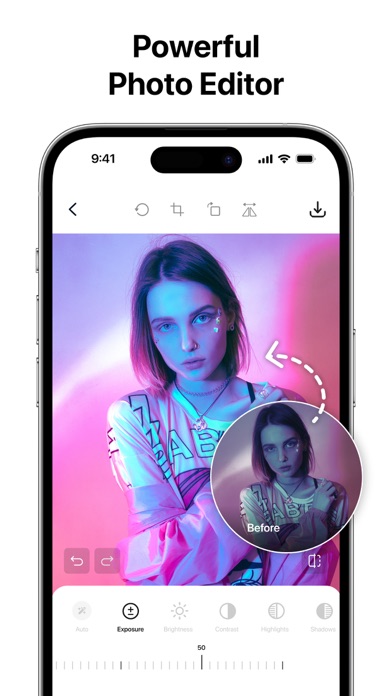


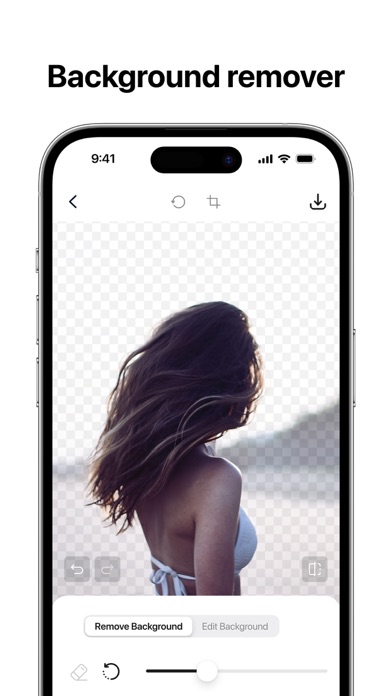


Solo developer Hoang Hang packages background removal, object removal, and image sharpening into a single free download that weighs in at 166 MB. Launched in January 2024 and updated as recently as August 2025, the app keeps its scope deliberately narrow. A 4.07 store rating across 167 reviews points to modest satisfaction rather than breakout popularity, placing it firmly in the functional-but-unremarkable tier of mobile photo editors.
Three basic tools with competent execution
Three tools anchor the experience: background removal, object removal, and sharpening. Background removal is the clear headline feature, letting users isolate a subject for export on a transparent layer or placement against a new scene. Object removal targets photobombers and visual clutter, while sharpening serves as a finishing step to recover detail. None of these tools are exotic, and the AI-assisted processing follows a pattern common to many apps in this category. Having all three in one free package does offer genuine convenience for everyday tasks like marketplace listings or social posts, even if the execution is unlikely to rival dedicated professional tools.
Lightweight app with modest user satisfaction
At 166 MB, the install footprint is compact and the app loads without the overhead typical of feature-heavy editors. AI processing speed will depend on device generation and connectivity, so no specific benchmark can be cited honestly here. What the rating data does suggest is that most users who bother to review the app leave satisfied enough, with a 4.07 average across 167 ratings. That said, the low review volume after more than a year on the market hints that either results are inconsistent enough to discourage word-of-mouth, or the app simply struggles to surface in search due to its Utilities categorization rather than Photo and Video.
Free download with unclear paywall boundaries
The app is free to download, which lowers the barrier to trying it considerably. In-app purchases are listed as available, but the app provides limited upfront transparency about which features sit behind that paywall. For users who only need background removal a few times a month and want to avoid a subscription, the free tier may be entirely sufficient. Anyone expecting the full feature set without spending anything should read the in-app purchase disclosures carefully before committing time to a workflow built around tools that may require payment to unlock.
Unusually high rating warrants privacy review
The app carries a 17-plus content rating, which is unusually high for a photo editing utility and worth noting before downloading, particularly for younger users or family-shared devices. The App Store privacy label is the authoritative source for understanding exactly what data this app collects, how it is linked to your identity, and what third-party sharing occurs. We recommend reviewing that label directly before granting camera roll or photo library access. As with many free, ad-supported apps from independent developers, advertising frameworks may collect device identifiers, so checking the privacy nutrition label is a sensible step.
Simple layout favors casual accessibility
The interface appears to follow a straightforward single-task flow, which suits the app's narrow scope and keeps the learning curve low for casual users. Keeping the feature set small generally benefits accessibility by reducing the number of controls a user must navigate. Whether VoiceOver labels, dynamic type support, and sufficient color contrast are fully implemented cannot be confirmed without hands-on testing, but the simplicity of the layout at least avoids the dense, layered menus that make complex editors difficult to use. Users with accessibility requirements should test the free download before relying on it in a regular workflow.
Solo developer shows commitment through updates
An August 2025 update on an app released in January 2024 is a genuine positive signal, indicating the solo developer has not abandoned the project after its initial launch. Version 1.1.8 suggests incremental rather than transformative iteration, which is typical for a small independent release. The concern is that a low review count after roughly eighteen months on the market may reflect limited resources for marketing or bug resolution. Continued updates are encouraging, but users should watch whether the update cadence holds and whether patch notes address user-reported issues rather than just backend maintenance.
Pros
- Free to download with three genuinely useful tools bundled in one place
- Compact 166 MB install size keeps setup fast and storage impact low
- Actively maintained with an update as recent as August 2025, over a year post-launch
- Simple, focused interface reduces the learning curve for casual users
Cons
- Only 167 ratings after eighteen-plus months signals limited real-world adoption or inconsistent results
- In-app purchase scope is not clearly disclosed upfront, creating uncertainty about the free tier's limits
- Miscategorized under Utilities rather than Photo and Video, likely hurting search discoverability
Related guides
Similar Media apps


apptidal is independent and ad-supported. We earn no commission on installs and no company can pay for a better score. How we stay independent.