
Media · iOS
Audio Editor: Recording Studio
by Giant Brains

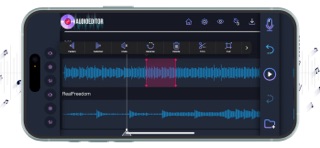


Giant Brains launched this app in late 2019 and has kept it alive through mid-2026, earning a 4.28 average across 12,000 ratings. The core promise covers recording, cutting, layering, applying effects, and exporting, all within one interface. At 147 MB it is a heavier install than most utility-class audio tools, and the free price point almost certainly means meaningful features sit behind a paywall, but casual users regularly find enough here to get the job done.
Core editing workflow works smoothly for basic tasks
The app covers the fundamental audio editing loop: record directly inside the app, import existing clips, cut and paste segments, layer multiple tracks, apply effects, then export or share. For someone trimming a voice note or combining two audio clips before posting to social media, that workflow is accessible without consulting any documentation. Where the experience gets murkier is at the edges. The free tier almost certainly gates the features that make multi-track work genuinely useful, a pattern common in this category and one that erodes trust when users discover the ceiling mid-project. At 147 MB, the install footprint is substantial for what the free tier actually delivers, and the App Store category listing under Utilities rather than Music hints that the experience leans functional over refined.
Reliable performance backed by 12,000 sustained reviews
A 4.28 rating across 12,000 reviews is a meaningful signal that the app works reliably for a broad audience, not just a small group of enthusiastic early adopters. That volume of feedback over roughly six years suggests crashes and major bugs have been addressed over time. The 147 MB install size does raise a question about background resource usage, since audio apps that handle real-time recording and playback can be demanding on older devices. Without running controlled tests, we cannot quantify load times or latency, but the sustained rating suggests daily usability is solid for the tasks the free tier supports. Users on older iPhones should monitor storage and background app behavior.
Free download conceals paid feature tier details
Downloading the app costs nothing, which removes any financial risk for someone testing whether it fits their workflow. The practical question is what the in-app purchase structure looks like once you are inside. Giant Brains has not published a detailed feature tier breakdown in the App Store description, which makes it harder to evaluate value before committing. Casual users who only need basic trimming and recording may never hit the paywall at all. Anyone expecting professional export formats, advanced effects, or deep multi-track control should assume those features carry a cost and compare that cost against established alternatives like GarageBand, which is free and deeper, before purchasing any upgrades here.
Check privacy label before granting microphone access
An audio recording app will request microphone access at minimum, and depending on its import and export features it may also request access to your media library or local file storage. We cannot independently verify what data is collected or shared, and we have not fabricated any privacy label findings. The definitive source is the App Store privacy nutrition label on the app's product page, which Apple requires developers to populate. Before granting permissions, check that label for data linked to your identity, data used for tracking, and any third-party sharing disclosures. Given the app is ad-supported and free, advertising-related data collection is a realistic possibility worth reviewing there.
Simple interface designed for non-technical users
The interface is designed around approachability, with a cut-and-paste editing model that non-technical users can navigate without a steep learning curve. That simplicity is a genuine design strength for the target audience. On accessibility, we cannot confirm specific VoiceOver compatibility or Dynamic Type support without direct testing, but apps in this category that handle waveform visualization and timeline scrubbing can present challenges for users relying on screen readers. Anyone with accessibility requirements should test the free download directly before committing to any paid upgrades. The content rating of 4-plus signals no age-restricted material, making it broadly appropriate across user groups.
Active maintenance since 2019 signals developer commitment
A June 2026 update on an app first released in November 2019 is a strong positive signal. Maintaining an audio app across multiple iOS versions requires consistent developer attention, particularly as Apple updates its audio frameworks and permission models. Version 7.8 suggests a meaningful number of iterative releases over the app's lifetime rather than a single launch followed by neglect. The 12,000-rating volume also implies an active user base that would surface and pressure-test regressions quickly. For a free utility, this level of ongoing maintenance is genuinely reassuring and distinguishes it from the many abandoned audio apps still lingering in the App Store.
Pros
- Active development through mid-2026 at version 7.8 shows genuine long-term commitment
- Record, import, edit, and export all handled within a single app without file-shuttling
- Cut-and-paste editing workflow is approachable for non-technical users from the first session
- 4.28 average across 12,000 ratings signals reliable real-world usability over six years
Cons
- In-app purchases almost certainly restrict the multi-track and export features that make the app most useful
- 147 MB install is heavy relative to what the free tier delivers, and may strain older devices
- Lack of a published feature tier breakdown makes it difficult to assess upgrade value before committing
Related guides
Similar Media apps


apptidal is independent and ad-supported. We earn no commission on installs and no company can pay for a better score. How we stay independent.