
Finance · iOS
Bill Tracker Pro
by Bill Tracker Pro, Inc.
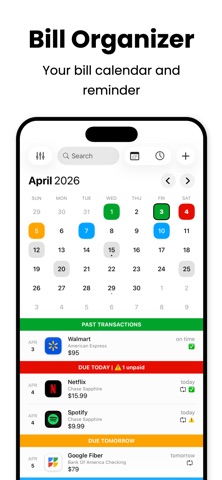
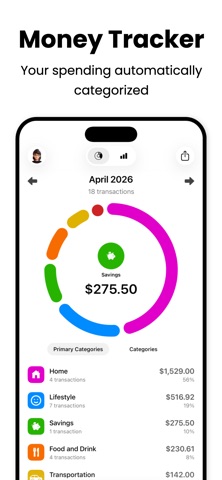
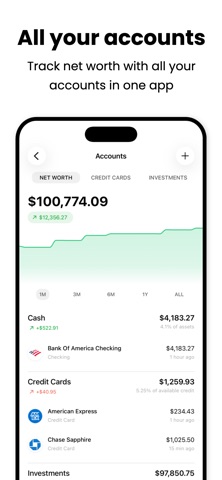


Launched in 2015 and now at version 4.2.3, Bill Tracker Pro has earned a decade of iteration and a 4.59-star rating across roughly 5,000 reviews. Plaid-powered bank sync, a safe-to-spend calculator, bill reminders, home screen widgets, and a shared-finance mode for couples combine into a genuinely broad personal finance toolkit. At 229 MB the install is substantial, but the feature density largely justifies the footprint for committed users.
Subscription detection and safe-to-spend balance work well
Bill Tracker Pro centers on two core promises: keeping upcoming bills visible and surfacing money you may be losing without realizing it. The Plaid-powered bank sync fulfills the second promise well, automatically pulling transactions and flagging recurring charges that users may have forgotten entirely. That subscription-detection feature is a practical, money-saving tool rather than a marketing gimmick. The safe-to-spend figure goes further than a raw bank balance by deducting upcoming bills before showing available cash. Rounding out the toolkit are customizable bill reminders, home screen widgets for at-a-glance due dates, and a partner-sharing mode that is genuinely uncommon at this price tier. The hybrid approach, allowing both manual entry and automated sync, means the app does not force full automation on users who prefer to stay in control.
Heavy install size but stable in daily use
A 229 MB install places Bill Tracker Pro firmly in the heavier end of the Finance category, where most competitors land well under 100 MB. That size suggests embedded frameworks, likely including the Plaid SDK and widget assets, rather than pure bloat, but users on storage-constrained devices will notice the ask. On the positive side, a 4.59-star rating drawn from around 5,000 reviews signals that the majority of daily users encounter a stable, reliable experience. The most recent update is dated July 2026, confirming the app is actively maintained rather than coasting. Widget performance and reminder reliability are areas where finance apps typically live or die in user reviews, and the strong rating suggests both hold up reasonably well in practice.
Free entry point obscured by unclear paywall
The app is listed as free, which lowers the barrier to trying it. The complication is that in-app purchases exist and the App Store description does not clearly spell out which features sit behind a paywall. New users may complete initial setup only to hit a gate before accessing core functionality, which is a frustrating experience by any measure. The partner-sharing feature and subscription detection are the clearest differentiators at this price tier, so if either of those ends up locked behind a premium tier, the value proposition shifts considerably. Prospective users are well advised to read recent reviews specifically mentioning the paywall before committing time to setup.
Plaid integration trades privacy for automation
Connecting via Plaid means routing bank credentials through a third-party data aggregator, which is a real and deliberate privacy tradeoff rather than a hidden risk. Plaid is a widely used, regulated service, but it does mean financial account data travels beyond both the app and Apple's ecosystem. Users who are privacy-conscious should review the app's privacy nutrition label on the App Store, which is the authoritative source for what data is collected, linked to identity, and used for tracking. The app's content rating of 4-plus and a free price point do not themselves indicate data practices. Anyone unwilling to use Plaid can still use the app in manual-entry mode, though that limits the subscription-detection feature significantly.
Widgets and partner sharing show thoughtful design
Home screen widget support reflects a thoughtful approach to surface-level design: keeping due dates visible without requiring users to open the app is a quality-of-life decision that shows awareness of how people actually interact with their phones. The partner-invite flow for shared budgeting suggests the interface handles multi-user scenarios with some care, an area where many finance apps fall short. Accessibility specifics, such as Dynamic Type support and VoiceOver compatibility, are best verified directly on a test device, as the App Store does not publish granular accessibility metadata. The 4-plus content rating confirms no mature content concerns. Given the app's decade-long history and consistent update cadence, basic iOS accessibility conventions are likely respected, though power users with specific needs should verify before relying on it.
Decade of updates signals genuine maintenance
A release date of November 2015 combined with a July 2026 update and a current version of 4.2.3 paints a clear picture of sustained, long-term development. Reaching a major version number above four across a decade indicates the developer has responded to platform changes, new iOS releases, and user feedback rather than letting the app stagnate. The roughly 5,000 ratings accumulated over that period represent organic, long-term user engagement rather than a launch spike. For a finance app where data reliability and security patches matter, an active update history is one of the most reassuring signals a developer can provide. Bill Tracker Pro clears that bar comfortably.
Pros
- Plaid bank sync automatically imports transactions and identifies forgotten recurring subscriptions
- Safe-to-spend figure deducts upcoming bills from available balance for a more honest cash view
- Built-in partner sharing enables joint budgeting without requiring a separate couples-focused app
- Consistent update cadence across a decade of active development signals long-term reliability
Cons
- At 229 MB, the install size is notably heavy for a personal finance utility
- In-app purchase scope is not clearly disclosed upfront, risking a paywall surprise mid-setup
- Plaid integration requires sharing bank credentials with a third-party aggregator, a meaningful privacy tradeoff
Related guides
Similar Finance apps


apptidal is independent and ad-supported. We earn no commission on installs and no company can pay for a better score. How we stay independent.