
Media · iOS
Body Tune - Face Photo Editor
by Face & Body Tune Photo Editor, Societatea cu Raspundere Limitata


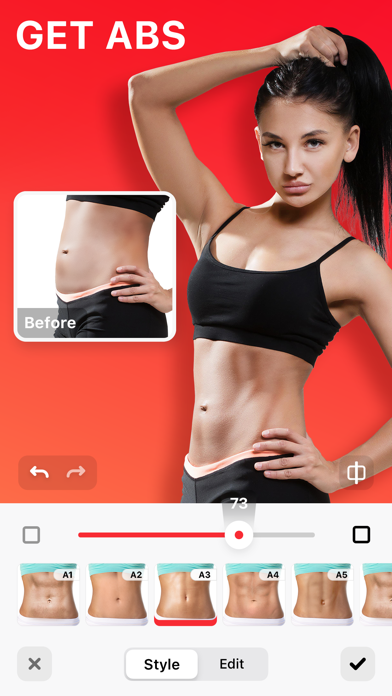
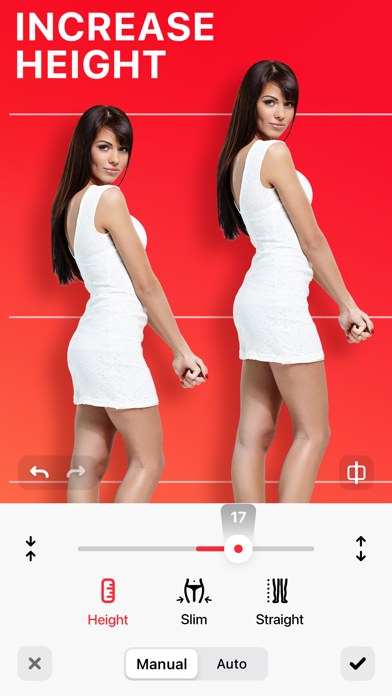

Released in 2017 and carrying a 4.6 store rating from over 156,000 reviewers, Body Tune has earned a sizeable audience for one focused job: reshaping body proportions in photos. At 75 MB the install is painless, the free entry point removes friction, and a March 2026 update confirms the developer is still paying attention. The trade-offs are real, though, including paywalled features and a narrow aesthetic framing.
Body reshaping works smoothly but lacks breadth
Body Tune concentrates almost entirely on body reshaping, letting users slim a waist, adjust proportions, lengthen legs, or layer cosmetic extras like tan overlays and tattoo graphics in a few taps. There is no steep learning curve, which is the whole point. For casual social media editing that workflow is genuinely convenient, and a 4.6 average sustained across more than 156,000 reviews is a meaningful signal that the core toolset feels responsive and approachable on a first session. Where it falls short is breadth: this is not a general photo editor, and users who want color grading, background removal, or face retouching beyond the body will hit the app's ceiling quickly.
Lightweight performance hampered by edge distortion
At 75 MB the app sits comfortably within the lightweight tier for iOS media tools, suggesting a reasonably lean runtime footprint. Update cadence is a positive signal too, with version 2.6.5 landing in March 2026 on an app first released in 2017, indicating the developer is patching and iterating rather than abandoning the codebase. Body warping is computationally modest compared to video or AI upscaling tasks, so sluggishness is unlikely on any current iPhone. The persistent weakness in this category is edge distortion: warping body outlines against busy or geometric backgrounds tends to produce telltale ripple artifacts, and Body Tune is not exempt from that limitation.
Free tier exists but paid features lack transparency
The free download removes the commitment barrier, which explains much of the app's install volume. The complication is that in-app purchases exist and their scope or pricing is not surfaced before you are already inside the experience. That discovery-by-surprise model is a frustrating pattern regardless of how reasonable the actual prices turn out to be. Users who only need the most basic reshaping tools may find the free tier sufficient for occasional use. Anyone wanting the full feature set should budget for a subscription or one-time purchase and check current pricing in the App Store before committing time to the onboarding flow.
Privacy details require direct App Store review
Body Tune processes personal photos, which makes the privacy posture worth examining before use. The App Store privacy nutrition label is the authoritative source for what data this app collects, how it is linked to your identity, and whether any of it is used for tracking. We cannot verify those specifics independently, so we recommend reviewing that label directly on the product page. As a general practice, photo-editing apps that offer cloud saving or social sharing features tend to request broader permissions than purely offline tools, so it is worth checking which permissions the app requests at install and during use.
Simple interface masks narrow aesthetic positioning
The interface is built around simplicity, with tap-and-drag controls that require no prior editing knowledge, which aligns with the app's casual-user positioning. Visual design follows current iOS conventions, keeping the learning curve low. On accessibility, the content rating of 4+ suggests Apple found no objectionable material during review, though that label does not speak to assistive-technology support. Dynamic Type support and VoiceOver compatibility are not confirmed in available data. The marketing framing, which centers on slimming and skinny aesthetics directed primarily at women, is a deliberate design choice that may feel exclusionary to users outside that narrow target demographic.
Nine years of updates signal active support
By the most visible measure, yes. A March 2026 update on an app that launched in June 2017 represents nearly nine years of continued development, which is well above average longevity for a niche media tool. Version 2.6.5 suggests iterative refinement rather than a stagnant codebase. The 156,000-plus rating count also implies a steady enough user base to justify ongoing investment from the developer. The main uncertainty is whether future updates will expand the feature set meaningfully or simply maintain the current narrow scope, but for users whose needs the app already meets, the maintenance record is genuinely reassuring.
Pros
- 4.6 rating across 156K reviews signals reliable core performance for its intended task
- Lightweight 75 MB install with a low barrier to entry as a free download
- Nearly nine years of active development with a confirmed March 2026 update
- Tap-and-drag reshaping controls require no prior photo editing knowledge
Cons
- In-app purchase costs are not disclosed upfront, creating a frustrating paywall discovery experience
- Body warping against complex backgrounds produces visible edge distortion, a known category weakness
- Narrow slimming-focused aesthetic framing excludes users seeking broader or more body-neutral editing tools
Related guides
Similar Media apps


apptidal is independent and ad-supported. We earn no commission on installs and no company can pay for a better score. How we stay independent.