
Finance · iOS
Budget Bestie
by Budget Bestie Corp.

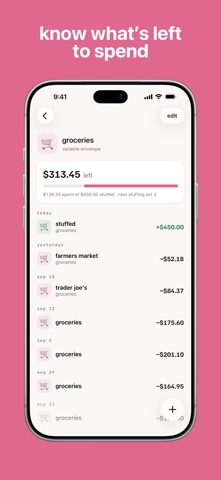

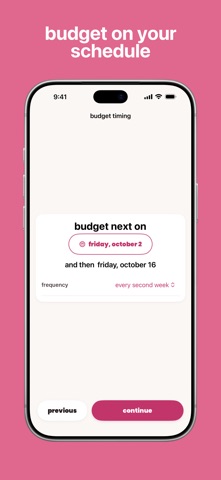


Launched in March 2024, Budget Bestie builds its entire experience around cash stuffing, the practice of allocating money into spending categories before each pay period. It supports weekly, biweekly, twice-monthly, and monthly pay schedules, which keeps the budgeting rhythm honest. At 116 MB and free to download, the barrier to entry is low, though the scope of its free tier deserves scrutiny before you build habits around it.
Envelope budgeting aligned to your pay schedule
Budget Bestie takes a method that once required physical envelopes and paper cash and moves it cleanly onto your phone. You create spending categories, assign dollar amounts before your next paycheck arrives, and draw those amounts down as you spend. When payday hits, the envelopes reset. The key differentiator is pay-schedule alignment: rather than forcing everyone onto a generic monthly calendar, the app lets you match your actual income cadence. That single design choice makes the pacing feel more realistic than many competing budgeting tools. The core loop is genuinely simple, and simplicity here is a feature rather than a limitation. The app earns its 4.68-star rating from roughly 3,000 users by doing this one thing without unnecessary friction.
Lightweight app with consistent developer updates
At 116 MB, Budget Bestie sits comfortably within the lightweight end of the Finance category, suggesting a focused codebase without heavy data-syncing overhead. Because the app relies on manual entry rather than live bank connections, performance is less dependent on network conditions than account-linked alternatives. The update history is encouraging: version 1.6.0 landed in July 2026, more than two years after the March 2024 launch, indicating the developer is actively iterating rather than abandoning the project. A rating volume of 3,000 reviews this early in the app's life also suggests a reasonably engaged user base, which typically correlates with bug reports being surfaced and addressed. Daily use should feel snappy given the app's narrow scope, though real-world smoothness will vary by device generation.
Free tier scope unclear due to paywall vagueness
The app is free to download, but the presence of in-app purchases introduces real uncertainty. The App Store description is vague about which features sit behind a paywall, and that lack of transparency is a genuine friction point. Before reorganizing your finances around Budget Bestie, it is worth spending time in the free tier to confirm whether envelope creation, pay-schedule customization, and spending history are all accessible without a subscription. If the core cash stuffing loop is fully free, the value proposition is strong for its target audience. If key features are locked, the calculus changes. Competing envelope apps range from fully free to subscription-based at roughly ten to fifteen dollars a month, so Budget Bestie's pricing position relative to peers depends entirely on what the free tier actually covers.
Manual entry avoids sharing bank credentials
Because Budget Bestie uses manual entry rather than bank account linking, it likely requests fewer sensitive permissions than account-aggregation apps. The absence of a live sync feature means your financial institution credentials are not handled within the app, which is a meaningful privacy consideration for cautious users. That said, we cannot verify specific data practices here. The App Store privacy nutrition label on Budget Bestie's product page is the authoritative source for what data is collected, how it is used, and whether it is linked to your identity. Before committing, scroll to the Privacy section on the App Store listing and review those disclosures directly. A 4+ content rating confirms no mature content concerns, but data handling specifics require that first-party label review.
Visual design resonates with user base
The envelope metaphor is inherently visual and spatial, and apps built around it tend to favor color coding, iconography, and card-style layouts over dense data tables. Budget Bestie's strong user ratings suggest the interface resonates with its audience, and the simplicity of the core loop implies a relatively low cognitive load for new users. Accessibility specifics, such as VoiceOver compatibility, Dynamic Type support, and color contrast ratios, are not independently verifiable without hands-on testing. Users who rely on assistive technologies should check the App Store reviews for relevant mentions or contact the developer directly. The 4+ content rating and straightforward premise suggest the design aims for broad approachability, which is a reasonable starting assumption for accessibility intent.
Active maintenance across two year span
The maintenance picture here is genuinely positive. Budget Bestie reached version 1.6.0 with an update recorded in July 2026, meaning the developer has sustained active development across more than two years since the March 2024 launch. That update cadence matters in the Finance category, where abandoned apps can leave users with stale interfaces and unresolved bugs. The growing review count and high average rating suggest the user community is engaged and that feedback is reaching the developer. The main caveat is that the app is still relatively young, so long-term reliability, feature depth, and the developer's commitment to maintaining a free tier all remain open questions. Early signals, however, point to a team that is paying attention.
Pros
- Pay-schedule alignment across four common frequencies makes budgeting feel realistic rather than calendar-forced
- Manual entry model avoids bank credential handling, reducing a key privacy and security concern
- Actively maintained with version 1.6.0 shipped in July 2026, more than two years post-launch
- 4.68-star average across roughly 3,000 ratings reflects strong early user satisfaction for a focused niche tool
Cons
- In-app purchase scope is not clearly disclosed upfront, making true free-tier limits hard to assess without downloading
- Fully manual entry with no apparent bank sync means ongoing data entry discipline is required to keep envelopes accurate
- Narrowly focused on cash stuffing with no investment tracking, bill reminders, or broader financial dashboard features
Related guides
Similar Finance apps


apptidal is independent and ad-supported. We earn no commission on installs and no company can pay for a better score. How we stay independent.