
Finance · iOS
Budget Planner App - Fleur
by Akash Jain


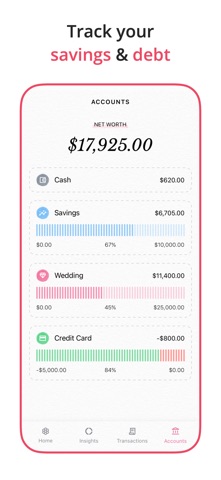
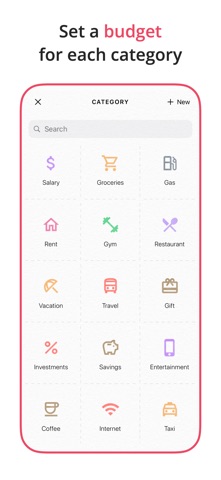


Built by solo developer Akash Jain, Fleur takes an unusual stance in a category crowded with spreadsheet-style apps: it treats aesthetics as the core product. No account creation, no bank logins, just a calm interface for logging income and expenses against a monthly budget. Optional iCloud sync keeps your data on your own devices. That restraint has earned a 4.8 average rating across 12,000 reviews, a remarkable signal of genuine user satisfaction.
Fleur executes simple budgeting with emotional intelligence
Fleur covers the fundamentals of personal budgeting: income logging, expense tracking, custom categories, repeating transactions, and multiple accounts. What separates it from competitors is the deliberate emotional tone. Insight screens present spending habits in a readable, non-punishing way, and logging an expense takes only a few taps. The app never tries to be a financial command center, and that focus pays off. Users who want a simple monthly budget they will actually open every day will find Fleur executes that narrow brief about as well as any iOS app in the category.
Lean codebase and local storage ensure reliability
At 101 MB, Fleur is a compact install by modern iOS standards, suggesting a lean codebase without heavy third-party data frameworks. The 4.8 rating across 12,000 reviews points to a consistently smooth experience at scale, not just a honeymoon bump from early adopters. Because the app relies on local storage and iCloud rather than live bank feeds, there are no server-side slowdowns or failed sync errors tied to external financial APIs. Qualitatively, the architecture favors reliability over feature breadth, which is a reasonable trade for an app built around daily habit formation.
Free tier offers genuine value without upgrades
Fleur is free to download, making the barrier to entry essentially zero. A subscription or in-app purchase tier exists for premium features, which is standard for the category and reasonable given the quality of the design work on offer. For casual budgeters, the free tier delivers genuine value without requiring a financial commitment. Users who want automatic bank syncing or advanced reporting will likely find themselves paying for a separate service anyway, so the cost question really comes down to whether Fleur's manual-entry model suits your habits before upgrading.
Local storage eliminates server-side privacy risks
Skipping account creation is a meaningful privacy choice, not just a convenience feature. With no developer-side account, there is no credential database to breach and no behavioral profile tied to your identity on a remote server. Data lives on your device and travels only through your personal iCloud account. To understand exactly which data types Fleur declares, check the App Store privacy nutrition label on the app's product page, which Apple requires developers to keep current. For users wary of handing bank credentials to third-party aggregators, this local-first posture is a genuine differentiator.
Calm design and simple layout aid accessibility
Design is Fleur's most deliberate strength. The interface uses soft palettes, generous whitespace, and calm typography to reduce the anxiety that money apps often trigger. Navigation is shallow and predictable, which benefits users of all experience levels. For accessibility specifically, iOS apps built with standard UIKit components inherit VoiceOver and Dynamic Type support, and Fleur's minimal layout works in its favor here since complex data-dense screens are harder to make accessible than simple ones. Users with specific accessibility needs should verify VoiceOver behavior firsthand, as only hands-on testing confirms full compliance.
Solo developer maintains consistent quarterly updates
Version 3.0.5, updated in July 2026, confirms that Akash Jain is actively iterating on the product more than four years after its May 2022 launch. Consistent updates from a solo developer are a positive signal, suggesting the app keeps pace with iOS changes and user feedback. The risk inherent in any single-developer project is continuity: if the developer steps away, updates could stall. That said, the local-first data model means your budget history is never held hostage on a third-party server, which limits the downside if development were ever to slow.
Pros
- Genuinely calming, well-crafted interface that encourages daily use
- No account required and data stays on-device via iCloud
- Compact 101 MB install with a stable, reliable local-storage architecture
- Actively maintained by the developer with a recent 2026 update
Cons
- No automatic bank connection means every transaction requires manual entry
- Not designed for shared or family budgets with multiple contributors
- Feature depth will feel limiting to anyone managing investments, debt payoff plans, or complex cash flow
Related guides
Similar Finance apps


apptidal is independent and ad-supported. We earn no commission on installs and no company can pay for a better score. How we stay independent.