
Finance · iOS
Budget Planner - Money Flow
by Hermann Wagenleitner
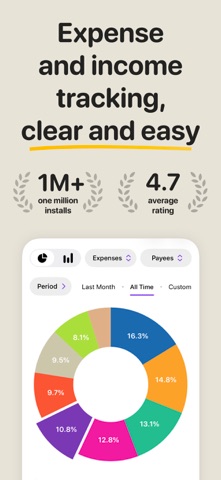

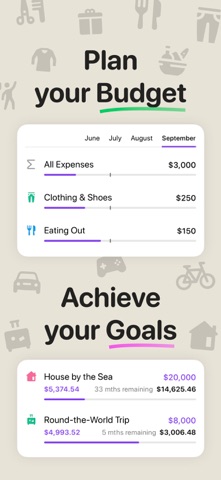


Released in 2014 and still receiving updates as recently as June 2026, Budget Planner - Money Flow covers the full personal-budgeting loop: logging transactions, setting category budgets, scheduling recurring entries, and reviewing progress through interactive reports. A 4.75 rating across 714 reviews signals genuine user satisfaction. The free entry point removes any barrier to trying it, though in-app purchases exist and their scope is not spelled out upfront.
Double-entry bookkeeping and geotagged receipts outpace simple loggers
Double-entry bookkeeping support and account-to-account transfers put Money Flow well ahead of simple expense loggers. Geotagging and photo attachments let users pin a receipt image to the exact location of a purchase, a genuinely useful feature at tax time or during expense reimbursements. Support for over 170 currencies with live exchange rates and a built-in converter rounds out a toolkit that handles multi-account, multi-currency households without forcing anyone into a costly subscription spreadsheet service. Home Screen and Lock Screen widgets add a practical at-a-glance balance check, and Face ID plus Touch ID on launch provides a sensible baseline of security for anyone storing real financial data on a shared or easily lost device.
124 MB footprint reflects features, not bloat
At 124 MB, Money Flow is not enormous, but it is noticeably heavier than bare-bones rivals that handle similar logging tasks. That footprint likely reflects the embedded currency data, widget extensions, and attachment storage rather than bloat, though leaner alternatives do exist. The app carries a 4.75 rating from 714 reviewers, a volume and score combination that suggests consistent day-to-day reliability rather than a spike of launch-week enthusiasm. Scheduled recurring transactions and flexible budget categories add real power, though they also introduce setup complexity that casual users may find more demanding than expected. Qualitatively, the decade-plus update record implies the developer has ironed out most rough edges over time.
Free download masks unclear premium paywall structure
The app is free to download, which removes any upfront financial commitment and makes a trial run straightforward. The concern is that the scope of in-app purchases is not disclosed clearly on the store page, meaning users can hit a feature gate mid-setup without warning. That kind of friction erodes trust in a finance app, where users are already sharing sensitive data. If the premium tier unlocks sync, recurring transactions, or reports, those are core features rather than nice-to-haves, and their pricing deserves transparency. Until the paywall structure is clearly communicated, we recommend exploring the free tier thoroughly before purchasing anything.
Privacy label requires direct review before use
The content rating is 4-plus, indicating no objectionable material, but that tells us nothing meaningful about data handling. For a finance app that stores account balances, transaction histories, and potentially receipt photos, privacy practices matter considerably. The App Store privacy nutrition label for Money Flow is the authoritative source: check it before entering any real financial data. Pay particular attention to whether transaction data is linked to your identity, whether it is shared with third parties, and what permissions the app requests at runtime, particularly location access for geotagging and photo library access for receipts. Face ID and Touch ID support is a positive signal for on-device security.
Widget design and feature breadth need accessibility confirmation
The widget support for both Home Screen and Lock Screen reflects a developer who understands how iOS users actually interact with their devices throughout the day. The feature set, covering budgets, transfers, recurring entries, reports, and geotagging, is broad enough that interface clarity becomes critical; a cluttered layout would undermine the entire proposition. Based on the sustained high rating and long update history, the design appears to meet user expectations consistently. Formal accessibility features such as Dynamic Type support and VoiceOver compatibility are not confirmed in available store data, so users who rely on assistive technologies should test the free version directly before committing to any purchase.
Twelve years of updates signal genuine commitment
Few finance apps in the App Store can point to a continuous development record stretching from August 2014 through a June 2026 update, and that longevity is one of Money Flow's most compelling credentials. Version 1.43.2 reflects sustained iteration rather than a product that shipped and stalled. For a budgeting app, long-term maintenance matters more than in almost any other category: financial data accumulates over years, and abandonment by a developer can strand that history. The combination of a decade-plus track record, a recent update timestamp, and a healthy review count gives reasonable confidence that Hermann Wagenleitner intends to keep the app current with iOS platform changes.
Pros
- Double-entry bookkeeping and account transfers handle genuine multi-account financial setups
- Support for over 170 currencies with live rates makes it practical for travelers and expats
- Geotagging plus photo receipt attachments add useful transaction-level detail for expense tracking
- Continuous updates from 2014 through mid-2026 demonstrate rare long-term developer commitment
Cons
- In-app purchase scope is not clearly disclosed, risking frustrating feature gates mid-setup
- At 124 MB the install footprint is heavier than leaner single-account budgeting alternatives
- Scheduled transactions and multi-account features add setup complexity that casual users may find overwhelming
Related guides
Similar Finance apps


apptidal is independent and ad-supported. We earn no commission on installs and no company can pay for a better score. How we stay independent.