
Media · iOS
Dazz Cam - Vintage Camera
by DAZZ PTE. LTD.


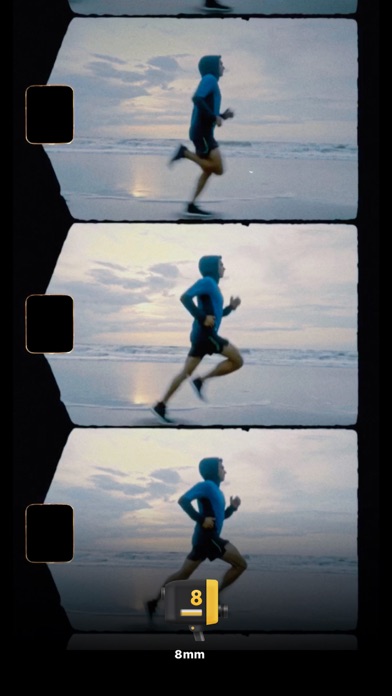

Quietly refining its vintage camera formula since August 2018, Dazz Cam has accumulated over 111,000 ratings averaging 4.75, which is a remarkably strong signal of sustained user satisfaction. The core pitch is simple: point, tap, get a film-style photo with no post-editing required. Formats span 135 and 120 film, half-frame, VHS, 8mm, and CCD profiles, keeping the app genuinely broad in scope while remaining approachable for casual shooters who prioritize speed over control.
Format variety feels structurally distinct
Dazz Cam simulates analog and early-digital camera formats by applying format-specific color grading, grain, and aspect ratios at the moment of capture. What separates it from simple filter apps is the meaningful variety between modes. Shooting on a half-frame layout feels structurally different from a 120-film square crop, and the VHS and 8mm video modes carry distinct color shifts rather than a uniform sepia tint applied uniformly across everything. The developers reportedly sampled real film stock for color and texture reference, and that groundwork shows in results that feel less algorithmically generic than most competitors. For its intended audience, the app does its job convincingly well.
Lightweight install with stable performance
At 139 MB, the install footprint is reasonable for a media app carrying multiple format engines and video modes. The one-tap capture philosophy keeps the interface fast and friction-free, which is a genuine practical advantage for spontaneous shooting. Update recency is a strong positive signal here: the app was last updated in July 2026, and its update history stretches back to its 2018 launch, suggesting the development team actively maintains performance alongside adding new formats. With 111,000 ratings and a 4.75 average, sustained stability complaints are not a visible pattern in the community response. Video modes may introduce more processing overhead than still photography, though qualitative performance should be assessed on your specific device.
Free base app, paid formats likely
The base app is free to download, which lowers the barrier to entry considerably. However, the breadth of formats advertised almost certainly sits behind in-app purchases or a subscription, which is standard practice across the vintage camera category. Users who find value in only a handful of formats may get meaningful use from the free tier, but anyone wanting the full library of 135, 120, half-frame, CCD, VHS, and 8mm profiles should budget accordingly before committing. Given the quality of the output and the consistent update cadence since 2018, the paid unlock represents reasonable value for regular users compared to buying physical film gear or subscribing to a full editing suite.
Camera permissions required, review privacy label
Dazz Cam carries a 4+ content rating, which reflects clean content rather than privacy practices. As a camera app, it will request access to your device camera and photo library at minimum, and video modes may involve microphone access. The App Store privacy nutrition label on the app's product page is the authoritative source for understanding exactly what data is collected, how it is linked to your identity, and whether anything is used for tracking. We recommend reviewing that label directly before installing, particularly if you are cautious about usage analytics or advertising data, which free, ad-supported apps in this category commonly collect.
Minimal interface, limited accessibility detail
The interface is deliberately minimal, which serves the one-tap philosophy well and keeps the visual design clean. Format selection and the shutter button are the primary interactions, reducing cognitive load for casual users. That same minimalism, however, means there are few affordances for users who rely on assistive technologies or need adjustable text and contrast options. Standard iOS accessibility features like VoiceOver and Display Accommodations should function at the system level, but the degree to which in-app elements are fully labeled for screen reader use is not verifiable without direct testing. The CCD and compact digital profiles are a thoughtful addition that broadens the app's aesthetic range beyond traditional film simulation.
Eight years of active development
The maintenance record here is genuinely strong. Dazz Cam launched in August 2018 and received its most recent update in July 2026, representing nearly eight years of continuous development. That longevity in a category where many competitors launch and go dormant within a year is a meaningful differentiator. The format library has grown over that period, and the 111,000-rating volume suggests a large, active user base that provides ongoing feedback. The developer, DAZZ PTE. LTD., appears committed to the product long-term, which reduces the risk of the app becoming abandoned or incompatible with future iOS versions in the near term.
Pros
- Unusually wide format range spanning half-frame, 120 film, VHS, 8mm, and CCD profiles gives the app genuine variety
- Real film stock sampling produces color results that feel more considered than generic filter overlays
- Consistent update cadence across nearly eight years since the 2018 launch signals strong long-term developer commitment
- Single-tap capture removes friction entirely, making spontaneous shooting fast and approachable
Cons
- No manual adjustment controls after capture locks users completely into each format's output with no exposure or grain correction
- Full format library almost certainly requires in-app purchases, limiting the free tier's practical scope
- The locked workflow will frustrate photographers accustomed to RAW editing or post-capture fine-tuning
Related guides
Similar Media apps


apptidal is independent and ad-supported. We earn no commission on installs and no company can pay for a better score. How we stay independent.