
Finance · iOS
Easy Budget Money Tracker Zeny
by Lemon LLC
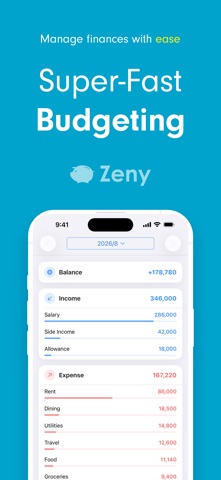
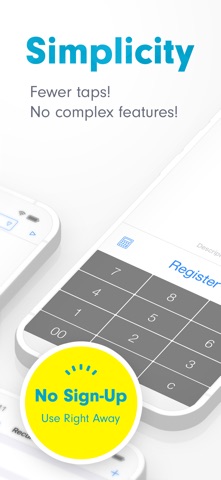


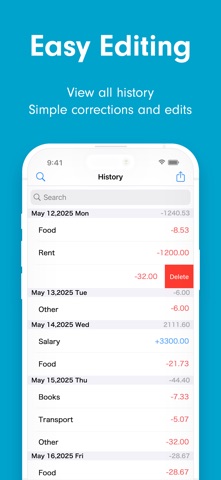

Active since 2014 and updated as recently as July 2026, Zeny from Lemon LLC is a deliberately minimal money tracker. At just 41 MB, it opens straight to a numeric input field with no registration required. The pitch is manual-only logging with category breakdowns and simple charts. That focused approach has earned a 4.84 rating across roughly 2,000 reviews, though several practical features remain locked behind a premium paywall.
Tap, categorize, chart with minimal friction
Zeny's core proposition is blunt simplicity: tap a number, assign a category, done. A built-in calculator lets you split a bill and log the result without ever leaving the input screen, which is a genuinely thoughtful touch. Visual feedback comes via pie charts broken down by category plus bar charts covering both income and expenses. Scope controls for year, month, week, and day let you zoom in on any period without digging through nested menus. For the specific task of building a manual spending diary, the app executes cleanly and with minimal friction, which explains the consistently high user rating.
Lightweight and stable across a decade
A 41 MB install footprint is compact even by current App Store standards, and nothing in the feature set suggests heavy background processing or complex data rendering that would strain older hardware. The app has been continuously maintained across more than a decade, with the most recent update landing in July 2026, signaling that crash fixes and OS compatibility patches are an ongoing priority. User rating volume of around 2,000 reviews with a 4.84 average is a credible signal of stable, reliable day-to-day behavior. Qualitatively, the manual-only architecture means there are no sync failures or API timeouts to contend with, which keeps the experience predictable.
Free version limited, premium unlocks essentials
The free tier is genuinely usable for straightforward single-device logging, supported by ads that are a fair trade-off for zero upfront cost. The friction arrives quickly for anyone who needs search, CSV export, recurring entries, passcode or Touch ID protection, per-category bar charts, or cloud sync across devices, all of which sit behind Zeny Premium. Before committing transaction history to the app long-term, prospective users should check the current subscription price and weigh it against capable free alternatives. For light, single-device use the free version holds up; for anything more demanding, the paywall math matters.
No account required, but review privacy label
Because Zeny operates without an account and performs no bank syncing, the attack surface for financial data exposure is narrower than many competitors. That said, the App Store privacy nutrition label for this app is the authoritative source for exactly what data is collected, how it is used, and whether it is linked to your identity or shared with third parties. We recommend reviewing that label directly before installing. The presence of ads on the free tier does imply some level of ad-network data sharing, which is worth factoring in alongside the absence of a mandatory login.
Clean layout, assistive tech support unclear
The interface prioritizes one-handed reachability, with the numeric input front and center on launch. Visual hierarchy is clean enough that new users can orient themselves without a tutorial. Chart types are standard and readable. On accessibility, the app carries a 4+ content rating and targets a broad audience, but specific support for Dynamic Type scaling, VoiceOver compatibility, or high-contrast modes is not documented in available materials. Users who rely on assistive technologies should test the free version before committing, as manual-entry finance apps vary widely in screen-reader friendliness.
Steady updates through twelve years of releases
A July 2026 update on an app originally released in April 2014 is a meaningful longevity signal. Lemon LLC has kept Zeny current through multiple iOS generations, and the version number of 3.1.19 suggests a steady cadence of incremental releases rather than long periods of neglect followed by emergency patches. For a finance app where data integrity matters, that track record is reassuring. The 2,000-review base also means the developer has a real user community providing feedback, which tends to correlate with continued maintenance investment.
Pros
- No account registration required, the app is functional from the very first launch
- Genuinely fast one-handed entry with a built-in bill-splitting calculator
- Lightweight 41 MB footprint backed by over a decade of continuous maintenance
- Year, month, week, and day scope controls paired with pie and bar chart breakdowns
Cons
- Search, data export, and passcode or Touch ID lock are all gated behind the premium subscription
- Cloud sync and multi-device support require a paid upgrade, leaving free users tied to one device
- Fully manual entry with no bank integration means every transaction must be logged by hand
Related guides
Similar Finance apps


apptidal is independent and ad-supported. We earn no commission on installs and no company can pay for a better score. How we stay independent.