
Media · iOS
EPIK - AI Photo & Video Editor
by SNOW Corporation


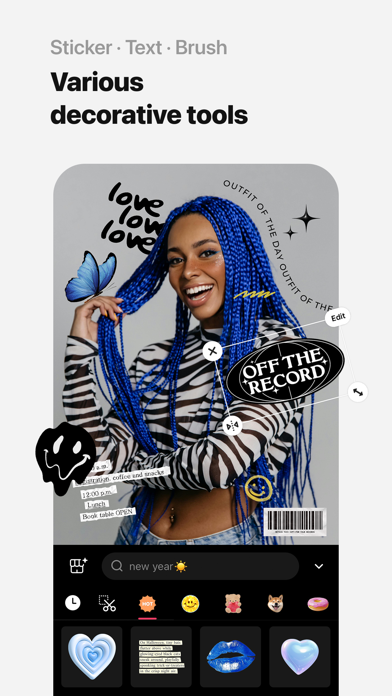


SNOW Corporation's EPIK blends one-tap AI tools like skin correction, object removal, and hairstyle swaps with granular controls including HSL, Curves, and Split Tone. At 355 MB it demands real storage, but the payoff is an editor that functions more like a scaled-down desktop suite than a typical filter app. A 4.72 rating across 54,000 reviews signals broad user satisfaction with the core experience.
What EPIK - AI Photo & Video Editor is built to do
EPIK covers two distinct use cases under one roof. On the AI side, it offers skin correction, blemish removal, object erasing, hairstyle swaps, and expression changes, tools aimed at portrait creators who want fast, polished results without manual effort. On the manual side, HSL sliders, Curves, Split Tone, Patch, and Clone tools provide the kind of granular control that typically requires a paid desktop application. The AI cutout system stands out by detecting animals and objects alongside human subjects, a versatility edge over competitors that restrict subject detection to people only. Batch editing across multiple photos simultaneously is a practical time-saver for anyone managing a content library or social feed. The breadth is genuinely impressive for a free app, though results from the AI tools do vary with source photo quality.
EPIK - AI Photo & Video Editor in daily use
A 355 MB install is a meaningful commitment on a crowded phone, and users should budget storage accordingly before downloading. That size reflects a feature set that goes well beyond lightweight filter apps, and SNOW Corporation has kept the app actively updated, with version 7.2.2 landing in July 2026, a strong signal that performance issues are addressed regularly. The 4.72 store rating from more than 54,000 reviewers suggests the experience holds up reliably across a wide range of devices rather than performing well only on flagship hardware. Qualitatively, the combination of AI processing and a dense manual toolset means older or lower-memory devices may notice slower rendering on complex edits. For most mid-range and current-generation iPhones, daily use should feel fluid.
Is EPIK - AI Photo & Video Editor worth the cost
The base download is free, which makes the professional color toolkit, batch editing, and multi-subject AI cutout genuinely accessible at no cost. In-app purchases exist but are not fully disclosed upfront, so users may encounter paywalled features after investing time learning the app. That ambiguity is a legitimate frustration. Still, the depth available in the free tier, including HSL, Curves, Split Tone, Patch, and Clone, compares favorably to mobile editors that charge monthly fees for equivalent controls. Casual users who never venture beyond the AI shortcuts will likely never hit a paywall at all. Power users should explore the purchase structure early to avoid surprises once they are already invested in the workflow.
EPIK - AI Photo & Video Editor and your privacy
EPIK carries a 4+ content rating and is published by SNOW Corporation, a South Korean developer with a broad portfolio of camera and editing apps. Because EPIK processes photos and videos, it will request access to your photo library, and AI features may involve server-side processing depending on the specific tool. We do not fabricate privacy-label findings. The definitive source for what data EPIK collects, links to your identity, and uses for tracking is the App Store privacy nutrition label on the app's product page. Reviewing that label before granting permissions is the recommended step for any user with data-sensitivity concerns, particularly given that photo libraries contain personally identifiable information.
Design and accessibility in EPIK - AI Photo & Video Editor
EPIK organizes a large feature set across a layered interface, and that density creates a real learning curve for new users. The AI tools are surfaced prominently for tap-and-go convenience, while manual controls like Curves and Split Tone are nested deeper, a sensible hierarchy that rewards exploration without overwhelming beginners. Visual design follows current mobile editing conventions with a dark canvas and icon-driven navigation. Accessibility features such as Dynamic Type support and VoiceOver compatibility depend on SNOW Corporation's implementation choices; users who rely on assistive technologies should test the app firsthand, as the icon-heavy layout may present labeling challenges. The 4+ content rating indicates no mature content concerns.
How EPIK - AI Photo & Video Editor is maintained
Version 7.2.2 was released on July 13, 2026, nearly five years after the app's August 2021 debut, demonstrating sustained investment from SNOW Corporation rather than a launch-and-abandon approach. Regular updates in a competitive category like mobile photo editing matter because AI models improve, operating system changes require compatibility work, and security patches need timely delivery. The combination of a high rating, a large review base of 54,000 users, and recent update activity collectively suggest an app that is treated as an ongoing product rather than a static release. That maintenance cadence is one of the stronger arguments for building a workflow around EPIK rather than a less frequently updated alternative.
Pros
- HSL, Curves, and Split Tone are available in the free tier, a rare offering among mobile editors
- Batch editing across multiple photos saves meaningful time for content creators managing feeds or libraries
- AI cutout detects animals and objects alongside humans, offering broader versatility than many competitors
- Actively maintained with a July 2026 update and a strong 4.72 rating across 54,000 reviews
Cons
- At 355 MB, the install footprint is heavy and may be prohibitive on storage-constrained devices
- In-app purchase scope is not clearly disclosed upfront, leaving users uncertain about where the free tier ends
- Hairstyle swaps and expression changes feel novelty-driven rather than practically useful for regular editing workflows
Related guides
Similar Media apps


apptidal is independent and ad-supported. We earn no commission on installs and no company can pay for a better score. How we stay independent.