
Finance · iOS
Expense Tracker - Money Note
by Komorebi Inc.

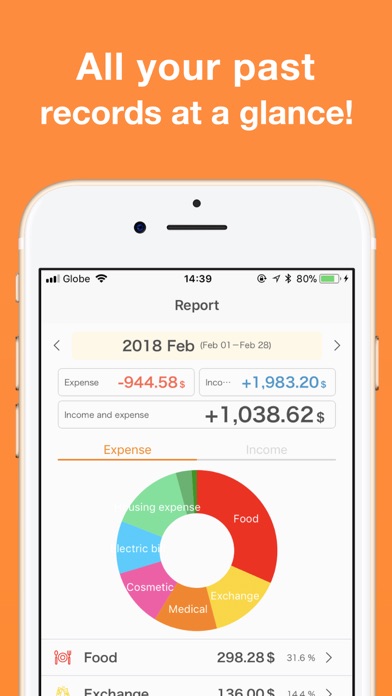


Komorebi Inc. has maintained this deliberate, offline-first budgeting app since March 2018, and it remains one of the cleaner no-nonsense options in a crowded Finance category. There is no account creation, no cloud server handshake, and no bank credential to hand over. You open the app and start logging. At 110 MB and rated suitable for ages 4 and up, it is a modest, approachable install with a genuinely differentiated premise.
Frictionless logging with real data portability
The core promise is frictionless manual expense logging, and the app delivers on it with conviction. Open it for the first time and you are already in the ledger, no email confirmation, no OAuth redirect, no paywall gate. Unlimited custom categories let you shape the structure around your actual spending habits rather than a preset template. Calendar views, monthly summaries, and yearly reports give casual budgeters enough analytical depth without requiring a finance background. CSV and PDF export, plus print support, mean your data remains genuinely portable and not hostage to the app itself. That combination of zero-friction onboarding and real data-exit options is rarer in this category than it should be.
Stable performance across a broad user base
A 110 MB install is reasonable for a finance utility, and the app carries no media-heavy content that would explain significant bloat, which suggests the size comes from widget frameworks and theme assets rather than unnecessary overhead. With over 3,000 ratings averaging 4.89, the volume of positive feedback points to a stable, low-crash experience across a broad user base. The local-only data model means the app never waits on a network response before displaying your records, so loading and entry feel immediate. iCloud backup handles persistence across devices, though that introduces a dependency on Apple's sync reliability rather than a proprietary server. Daily use rewards the habit of quick, consistent logging.
Free core with unclear paywall boundaries
The app is free to download, and the offline, no-subscription core is a genuine value proposition in a category where competitors routinely charge monthly fees for basic features. In-app purchases are listed as available, but the exact scope of what stays free versus what sits behind a paywall is not prominently disclosed upfront, which creates mild uncertainty before you invest time building a transaction history. That said, the foundational feature set, including categories, reports, widgets, and export, appears accessible without payment. For users who want manual budgeting without a recurring charge, the price-to-utility ratio is strong even accounting for that ambiguity.
Local first architecture limits server exposure
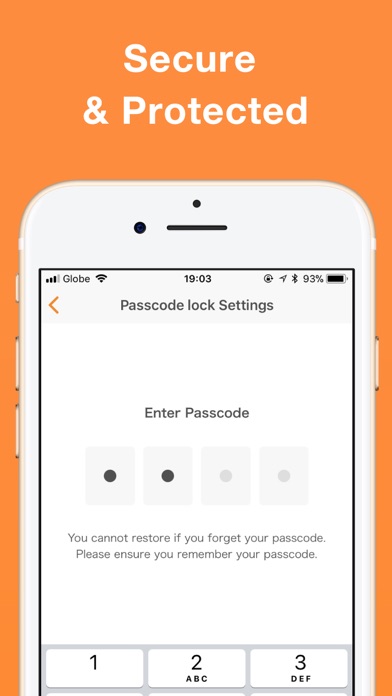
The local-first architecture is the most meaningful privacy feature here. Because no account registration is required and no bank connection is established, your financial records are not transmitted to a third-party server by design. That said, we cannot independently verify exactly which data types are collected, shared, or used for tracking. Apple's App Store privacy nutrition label for this app is the authoritative source, and we recommend reviewing it before installing. Face ID and Touch ID passcode lock are included, which is a sensible baseline for an app holding sensitive spending records. Users who are especially privacy-sensitive should also confirm iCloud backup settings to understand where their data ultimately resides.
Extensive customization across themes and widgets
Komorebi signals a genuine commitment to polish through breadth of customization: more than twenty theme colors, more than twenty alternate app icons, fifteen-plus Home Screen widgets, and Lock Screen widget support. These are not superficial additions; they reflect a developer that expects the app to be part of a user's daily visual environment. iPad sync and iCloud backup round out Apple ecosystem coverage sensibly. The 4+ content rating suggests nothing in the interface is age-restricted, and the straightforward logging flow is approachable for non-technical users. Formal accessibility features such as Dynamic Type compatibility and VoiceOver support are worth testing firsthand, as the App Store listing does not detail them explicitly.
Active development since 2018 with regular updates
A July 2026 update to version 5.2.1 confirms the app is under active development, and the release history stretching back to March 2018 demonstrates multi-year commitment from Komorebi Inc. rather than an abandoned side project. Regular updates in a niche Finance utility category are a meaningful signal of developer investment, particularly for an app whose value depends on long-term data continuity. The rating count of roughly 3,000 is modest compared to category giants, but the 4.89 average across that base suggests consistent satisfaction rather than a spike from a single viral moment. Users can reasonably expect continued support and refinement.
Pros
- No account registration and no bank connection required, keeping onboarding genuinely frictionless
- Local data storage delivers fast, offline access with no server dependency
- CSV and PDF export ensures your transaction history is portable and not locked in
- Broad widget support including Lock Screen widgets rewards consistent daily logging
Cons
- iOS and iPadOS only, making it a non-starter for households with Android devices
- Local-first model creates real data-loss risk if iCloud sync lapses before a device is lost
- In-app purchase scope is not clearly disclosed upfront, adding uncertainty before you commit to the app
Related guides
Similar Finance apps


apptidal is independent and ad-supported. We earn no commission on installs and no company can pay for a better score. How we stay independent.