
Media · iOS
FaceApp: Perfect Face Editor
by FaceApp Technology Limited


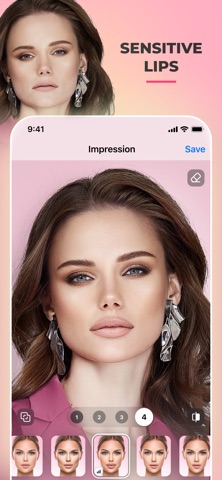


Launched in January 2017 and still actively updated as of June 2026, FaceApp has grown into one of the most feature-rich portrait editors on iOS. Its toolkit spans 60-plus filters, hair and beard styling, makeup effects, and skin retouching. A 4.73 star average across 1.8 million ratings signals genuine user satisfaction, though the 142 MB install and subscription paywall temper enthusiasm for budget-conscious users.
AI portrait transforms work better than cheaper rivals
FaceApp centers on AI-driven portrait transformation, and the core promise holds up with unusual consistency. Hair color swaps, beard additions, age progressions, and skin smoothing all produce results that avoid the obvious smearing common in cheaper rivals. A before-and-after compare tool appears at every editing step, which is a genuinely practical feature that keeps results honest. The pipeline from selecting a photo to tapping share is fast enough for casual social-media prep. Where the experience falters is scope: color and tone controls top out at basic temperature and saturation sliders, so anyone expecting Lightroom-style precision will hit a ceiling quickly.
Heavy file size reflects asset library, not bloat
At 142 MB, FaceApp sits on the heavier end of the portrait-editor category, though that footprint reflects a broad on-device asset library rather than obvious bloat. The app has received consistent updates through mid-2026, including version 26.1.3, which suggests the development team is actively addressing bugs and adding features rather than coasting on an established install base. Load times and filter rendering feel snappy on modern hardware based on category norms, and the 1.8 million ratings with a 4.73 average imply that crashes and stability issues are not widespread complaints. Navigation across 60-plus filter categories can feel cluttered during heavier editing sessions.
Free tier feels like trial before paywall
The app is free to download, but that framing requires a caveat: a meaningful portion of the filter library is locked behind FaceApp Pro, a subscription that only reveals itself once you are mid-edit and tapping greyed-out items. That discovery pattern is a deliberate friction tactic, and it makes the free tier feel more like a timed trial than a genuinely usable product. Users who subscribe get access to the full toolkit, and the breadth of features on offer arguably justifies the cost for frequent portrait editors. Casual users who only need occasional touch-ups may find the free tier just sufficient, but should go in with realistic expectations.
Cloud processing raises justified privacy concerns
Privacy is the most consequential conversation around FaceApp, and it deserves careful attention rather than a quick dismissal. The app processes face photos through cloud-based AI servers, which means images leave the device. The developer is registered in Cyprus under FaceApp Technology Limited, and earlier scrutiny over data handling drew significant press coverage. We recommend reading the App Store privacy label directly before installing, as it is the authoritative source for what data categories are collected and how they are linked to your identity. Camera and photo library access are expected permissions, but users should review the full list and weigh the trade-off between editing convenience and biometric data exposure.
Filter grid layout grows unwieldy at scale
The interface leans on a thumbnail-grid layout for filter browsing, which works well for quick visual comparison but becomes harder to navigate as the library grows. Category labels help organize the 60-plus options, though the sheer volume means some useful tools are buried several taps deep. The before-and-after compare gesture is a design highlight, surfaced consistently rather than hidden in a menu. On accessibility, the app carries a 12-plus content rating. Standard iOS accessibility features such as Display and Text Size adjustments apply at the system level, though the filter-grid layout is more visually oriented than text-driven, which may present challenges for users relying on VoiceOver navigation.
Nearly decade of updates shows active development
Version 26.1.3 landed on June 19, 2026, nearly a decade after the original January 2017 launch, which is a strong signal of sustained commitment. Regular updates across a multi-year span typically indicate that the developer is responding to OS compatibility changes, addressing reported bugs, and expanding the feature set rather than letting the product stagnate. The 1.8 million ratings accumulated over that period also suggest a large enough user base to surface issues quickly and incentivize fixes. For a free-tier app in a competitive category, that maintenance cadence is a genuine point in its favor.
Pros
- Photorealistic portrait filters consistently outperform cheaper single-purpose rivals
- Before-and-after compare tool is surfaced at every editing step, not buried in menus
- Broad toolkit covering hair, beard, makeup, and skin retouching in a single app
- Actively maintained with updates running into mid-2026 across nearly a decade of releases
Cons
- Subscription paywall is revealed mid-edit rather than upfront, making the free tier feel deliberately limited
- Cloud-based face processing raises privacy considerations that warrant careful review before use
- 142 MB install size and a cluttered 60-plus filter grid make the app heavier than focused alternatives
Related guides
Similar Media apps


apptidal is independent and ad-supported. We earn no commission on installs and no company can pay for a better score. How we stay independent.