
Media · iOS
Google Photos: Backup & Edit
by Google
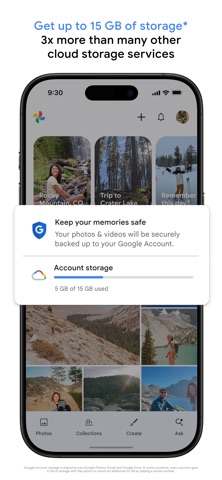


Google Photos has been a fixture on iOS since 2015, and version 7.83.0 keeps it firmly relevant. Fifteen gigabytes of free cloud storage, natural-language search, and AI editing tools like Magic Eraser and Unblur make it a genuinely capable photo manager rather than a simple backup bucket. The persistent catch is that 15 GB is shared across Gmail, Drive, and Photos combined, nudging many users toward a paid Google One plan sooner than they anticipate.
Natural language search outperforms rivals
Google Photos handles automatic cloud backup, cross-device syncing, and photo organization, then layers on AI-powered search and editing tools that few rivals can match. The natural-language search is the headline feature: typing something descriptive like 'kayaking on a lake surrounded by mountains' and surfacing the right photo feels almost unfair compared to competing gallery apps. Automatic grouping of duplicates and similar shots quietly reduces scroll fatigue over time. AI editing tools including Magic Eraser, Unblur, and Portrait Light cover a solid range of quick fixes without forcing users into a separate editor. The core promise, reliable backup plus smart discovery, is fulfilled consistently, which explains a 4.83-star rating across 1.4 million App Store reviews.
Large install size strains storage constrained devices
At 419 MB, Google Photos is one of the heavier installs in the media category, and users on storage-constrained iPhones will feel that footprint. Background backup performance is tied to network conditions and iOS background-app restrictions rather than anything we can measure directly, but the app's volume of positive reviews and frequent update cadence suggest the sync pipeline is broadly reliable. The interface stays responsive during browsing even in large libraries. The AI search index can take time to build on a freshly installed app, so results improve noticeably after the first full backup completes. Regular updates, with the latest arriving in July 2026, indicate Google actively addresses performance issues as iOS evolves.
Free tier generous until Gmail fills quota
The app itself is free, and the 15 GB of cloud storage is three times what several competitors offer at no cost. That sounds generous until you account for the fact that Gmail and Google Drive draw from the same pool, meaning active Google users can exhaust the allowance faster than expected. Once the ceiling is hit, continued high-quality backup requires a Google One subscription, adding a recurring cost. Some AI editing features, notably expanded Magic Eraser capabilities and certain Unblur enhancements, are gated behind that subscription tier as well. For casual shooters the free tier represents solid everyday value; heavy photographers or active Gmail users should factor the subscription cost into their decision from the start.
Google processes photos for facial recognition
Google Photos requests access to your photo library, which is expected for any backup app, but the broader privacy picture deserves scrutiny. Google's business model is built on data, and photos uploaded to the service are processed by Google's servers to power features like face grouping and object recognition. The App Store privacy nutrition label for this app is the authoritative source for what data is collected and how it is linked to your identity, and we encourage every user to review it before granting full library access. Choosing 'Selected Photos' access rather than full library permission is a practical middle ground for privacy-conscious users who still want the core backup features.
Conversational search interface leads design
The interface follows familiar iOS conventions, with a bottom tab bar covering Photos, Search, and Library views that most users will navigate intuitively within minutes. The search experience is a genuine design highlight: the input field accepts conversational queries and returns results quickly, making the app feel more like a smart assistant than a file browser. Standard iOS Dynamic Type and VoiceOver support are present, as expected for a major Google application targeting a broad audience. The 4+ content rating reflects a clean, family-appropriate experience. One minor friction point is that the subscription upsell surfaces regularly once storage fills, which can feel intrusive during everyday browsing.
Decade of updates signals strategic commitment
Google Photos has been updated continuously since its 2015 launch, and the version 7.83.0 release in July 2026 confirms that active development is ongoing more than a decade in. The update frequency is notably high for an app of this maturity, suggesting Google treats it as a strategic product rather than a legacy one. New AI capabilities have been added across successive versions, including the expansion of Magic Eraser and the introduction of Unblur and Portrait Light. A rating of 4.83 across 1.4 million reviews is a strong signal that the app maintains quality across iOS updates. Users can reasonably expect continued feature additions, particularly as Google integrates newer generative AI capabilities into its consumer products.
Pros
- Natural-language photo search is fast and impressively accurate, outpacing most competing gallery apps
- Automatic backup works reliably across iOS devices with minimal user configuration required
- Fifteen gigabytes of free storage is three times what several rivals offer at no cost
- Magic Eraser, Unblur, and Portrait Light handle common quick edits without requiring a separate editing app
Cons
- The 15 GB free tier is shared with Gmail and Drive, so it fills up significantly faster than the headline figure implies
- At 419 MB the install size is heavy for a media utility and will be felt on storage-constrained devices
- Several AI editing enhancements and higher-quality backup options are locked behind a recurring Google One subscription
Related guides
Similar Media apps


apptidal is independent and ad-supported. We earn no commission on installs and no company can pay for a better score. How we stay independent.