
Media · iOS
InstaSize: AI Photo Editor
by Instasize Inc.

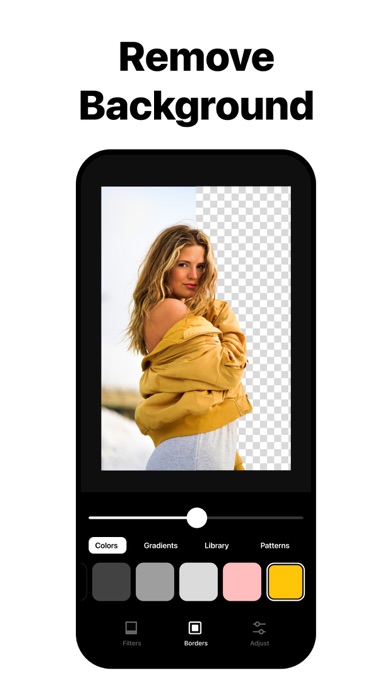


Launched in 2012 and now claiming over 100 million creators, InstaSize carries credibility most photo editors lack. Version 7 pushes the app firmly into AI territory, adding Magic Fill and Object Removal alongside the long-standing crop, filter, and collage toolkit. At 187 MB the install is not lightweight, but the breadth available for free makes that a reasonable trade-off for anyone serious about social content.
Magic Fill synthesizes convincing expansions with caveats
The headline feature in v7 is Magic Fill, an AI tool that expands an image beyond its original borders rather than padding edges with white space. Point it at a portrait framed in 4x5 and ask it to fill a 16x9 canvas, and the generator synthesizes pixels that blend into the existing scene. Results hold up well on skies, simple landscapes, and studio-style shots, though complex or busy backgrounds can reveal seams. Object Removal rounds out the AI suite. Beyond those additions, InstaSize delivers its familiar strengths: color controls, a broad filter library, platform-specific crop presets for Instagram, Snapchat, Pinterest, and more, plus a collage builder. The tools are well-organized and responsive, even if none of them breaks new ground in 2025.
Local AI models enable offline processing speed
A 187 MB footprint is on the heavier side for a mobile photo editor, signaling that AI models and asset libraries are bundled locally rather than streamed on demand. That trade-off generally means faster processing once the app is open, since Magic Fill does not require a strong network connection for every render. The app has been updated as recently as June 2026 and has accumulated over 325,000 ratings, both signals pointing to a stable, well-tested codebase rather than a neglected one. Qualitatively, the long update history and high rating volume suggest the app handles everyday editing sessions without frequent crashes or slowdowns, though individual experience will vary by device generation.
Free tier covers basics, subscriptions gate advanced tools
The app is free to download, and the core crop, filter, and collage tools are accessible without payment. InstaSize has operated a freemium model since its 2012 launch, so expect prompts for premium filters and, almost certainly, gated access to the full AI feature set at some point in a session. The exact scope of what the subscription unlocks is best confirmed in the App Store listing before committing. For creators who use the platform-specific presets and Magic Fill regularly, a subscription could replace several single-purpose apps. Casual users who only need basic resizing will likely find the free tier sufficient, with occasional upsell friction as the main cost.
Ad support means reviewing privacy label first
InstaSize is an ad-supported, free app from a third-party developer, which typically means some level of data collection for advertising or analytics purposes. The App Store privacy nutrition label for this app is the authoritative source for what data is collected, how it is linked to your identity, and whether it is used for tracking. We recommend reviewing that label before granting photo library access, as a photo editor necessarily requests broad access to your camera roll. Check which permissions the app requests at first launch and consider limiting access to selected photos rather than the full library if the privacy label raises concerns.
Familiar interface reflects thirteen years of iteration
InstaSize has iterated on its interface across more than a decade of updates, and the result is a layout that feels familiar to anyone who has used a mainstream mobile photo editor. Platform-specific crop presets are surfaced prominently, which reflects a clear understanding of how its core audience actually works. The 4+ content rating indicates nothing objectionable in the app itself. Formal accessibility testing, such as VoiceOver compatibility or Dynamic Type support, is not something we can verify without hands-on evaluation, but the app's longevity and large user base suggest major usability regressions would surface quickly in the review record. Users with specific accessibility needs should test the free download before committing to a subscription.
Active development since 2012 with recent AI additions
The maintenance record here is genuinely strong. InstaSize has been on the App Store since November 2012, making it one of the longer-running photo editors in its category, and the most recent update is dated June 2026. Version 7.0.697 suggests a high iteration cadence rather than infrequent major releases. The addition of AI-powered features in this version demonstrates that the developer is tracking category trends rather than coasting on legacy installs. Over 325,000 ratings accumulated across roughly 13 years reflect sustained engagement, not a launch spike, and that volume gives the development team a large feedback signal to work from when prioritizing fixes and features.
Pros
- Magic Fill AI expansion handles skies, simple landscapes, and studio shots convincingly
- Platform-specific crop presets cover Instagram, Snapchat, Pinterest, and more in one place
- Actively maintained with updates as recent as June 2026 and a 13-year track record
- 4.67 rating across 325,000 reviews reflects sustained user satisfaction rather than a launch spike
Cons
- 187 MB is a heavy install footprint compared to leaner photo editing alternatives
- Freemium model likely gates premium filters and full AI feature access behind a subscription
- Magic Fill produces visible artifacts on complex or detailed backgrounds
Related guides
Similar Media apps


apptidal is independent and ad-supported. We earn no commission on installs and no company can pay for a better score. How we stay independent.