
Media · iOS
Lensa AI: Photo Editor
by Prisma labs, inc.


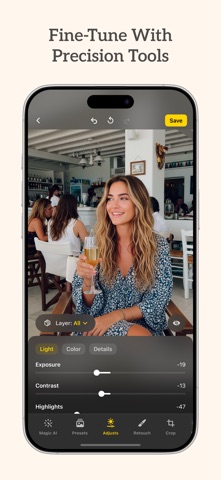

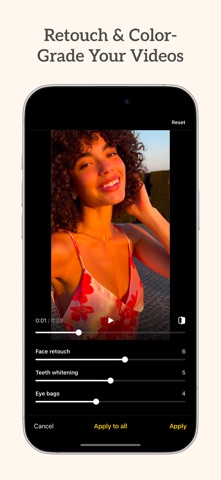
Launched in late 2018 and kept current through mid-2026, Lensa AI from Prisma Labs focuses on portrait refinement, background cleanup, and filter-based stylization. At 199 MB it installs without drama, and a 4.7 rating across more than 417,000 App Store reviews signals broad satisfaction. The free entry point is real, though the most compelling features sit behind in-app purchases that surface faster than many users anticipate.
Cohesive execution across three core tools
Lensa centers its pitch on three pillars: portrait retouching, object removal, and stylized filters aimed at social-ready output. The retouching tools smooth skin and adjust facial features without demanding manual precision, which keeps the experience approachable for non-photographers. Object removal handles cluttered backgrounds competently, though results vary with complex scenes. Stylization filters lean toward trendy aesthetics rather than timeless looks. None of these capabilities are categorically unique in a crowded editing market, but the execution is cohesive and the controls stay shallow enough that most users reach a usable result in under a minute.
Stable performance with consistent updates
A 199 MB install is modest by modern AI-editing standards, and the app's consistent update cadence, with version 8.8.3 landing in July 2026, suggests Prisma Labs is actively addressing bugs and optimizing for current iOS builds. The 417,000-plus ratings at 4.7 stars represent a volume of real-world feedback that typically correlates with stable, crash-resistant behavior. Processing speed for AI-driven edits depends on device generation, but qualitatively the app feels tuned for quick turnaround rather than deep batch work. Heavy or repeated use may expose the paywalled ceiling more than any performance ceiling.
Free tier limited, subscription required for regular use
The free download is a genuine starting point rather than a bait-and-switch demo, but users who engage with the app regularly will encounter paywalled features sooner than expected. Filters and advanced stylization options are among the elements that require spending. For occasional portrait cleanup the free tier can satisfy, yet anyone planning daily use should treat Lensa as a subscription or purchase candidate from the outset and compare its pricing against alternatives like Facetune or Adobe Lightroom before committing. The value proposition is reasonable for its target audience, less so for power users who will quickly feel constrained.
Privacy review recommended before granting access
Lensa processes portrait photos, which places it in a sensitive category by default. The App Store privacy nutrition label is the authoritative source for understanding exactly what data Prisma Labs collects, links to your identity, and uses for tracking. We recommend reviewing that label before granting camera or photo library access, particularly given that AI editing apps often send image data to remote servers for processing. Check whether the app requests access beyond photos and camera, and consider what data retention policies apply to uploaded images. The content rating of 4+ reflects no objectionable content, but privacy due diligence remains the user's responsibility.
Simple interface designed for quick results
Lensa's interface prioritizes simplicity, with a layout that surfaces core tools without requiring navigation through nested menus. The visual design is clean and consistent with current iOS conventions, which helps new users orient quickly. Controls are touch-friendly and sized appropriately for one-handed use. Formal accessibility features such as Dynamic Type support and VoiceOver compatibility are not prominently advertised, which is worth noting for users who rely on assistive technology. The app's shallow learning curve is its strongest design asset, making it genuinely usable for people who find dedicated photo editors intimidating.
Seven years of active development and support
Prisma Labs has sustained Lensa through nearly seven years of App Store availability, a meaningful signal of developer commitment in a category where many competitors have gone dormant. The July 2026 update to version 8.8.3 confirms the app is tracking current iOS releases rather than coasting on legacy code. A rating count above 417,000 at 4.7 stars reflects an engaged user base that generates ongoing feedback, giving the developer clear signals for iteration. For users who depend on an app not becoming abandonware, Lensa's track record here is one of its more reassuring qualities.
Pros
- Over 417,000 App Store ratings at 4.7 stars reflect broad, sustained real-world satisfaction
- Actively maintained with a July 2026 update confirming ongoing iOS compatibility
- Object removal and portrait retouching tools are accessible without a learning curve
- 199 MB install size is lean relative to the AI-driven feature set on offer
Cons
- Paywalled features surface quickly, limiting the free tier for regular users
- No RAW file support or manual controls makes it unsuitable for serious photography workflows
- Stylization options skew toward social media trends rather than versatile or lasting edits
Related guides
Similar Media apps


apptidal is independent and ad-supported. We earn no commission on installs and no company can pay for a better score. How we stay independent.