
Finance · iOS
MoneyPlan - Budget Tracker
by Sori Games
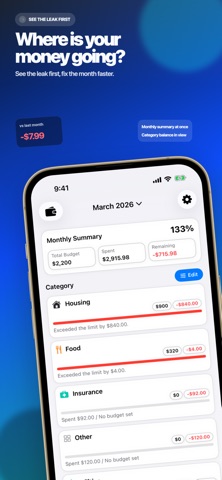


MoneyPlan arrives from Sori Games as a free, 24 MB budget tracker built around plain-language transaction logging, screenshot import from Photos or Wallet, iCloud sync across iPhone, iPad, and Mac, a calendar view for fixed expenses, and monthly category reports. The feature set is ambitious for a first release. With zero public ratings so far, however, real-world reliability remains an open question that only time and a growing user base will answer.
AI-first parsing cuts entry friction
Rather than relegating AI to a side panel, MoneyPlan makes it the primary entry point. Type something like 'spent 14 dollars on lunch' and the app parses that into a draft transaction for your review before saving. Beyond text, you can share a screenshot from Photos or Wallet and let MoneyPlan extract the transaction details automatically, which is a genuinely useful shortcut for anyone who receives payment confirmations digitally. Saving favorite prompt examples and adding custom prompts gives the workflow real adaptability. The concept is strong, but with no user ratings yet, parsing accuracy in edge cases remains unverified by any public community signal.
Lean footprint depends on server reliability
A 24 MB install is lean by modern standards, suggesting the app avoids heavy on-device model weights and likely routes AI parsing through a server call. That keeps the footprint small but ties accuracy to network availability. Version 1.6.1 landed roughly six weeks after the March 2026 launch, which points to active development but also implies the team is still ironing out early issues. iCloud sync across Apple devices is architecturally sound in principle, and the calendar view for fixed expenses adds scheduling depth that many lightweight trackers skip. Until a meaningful number of users report on sync stability and AI reliability, performance must be rated cautiously rather than confidently.
Free tier masks unclear paywall scope
The app is free to download with a 4+ content rating, so the barrier to trying it is essentially zero. What remains unclear is the scope of any in-app purchases. The App Store listing does not spell out exactly what sits behind a potential paywall, meaning features like advanced reports or extended AI usage could require payment after the initial setup experience. For now, the free tier appears functional enough to evaluate the core concept. We recommend exploring the full feature set before committing to any purchase, simply because the app is too new to know whether premium tiers deliver consistent value.
Server-side AI parsing requires privacy review
Because MoneyPlan likely sends text or image data to a server for AI parsing, understanding its data practices matters more than it would for a purely local app. We cannot verify specific privacy-label findings here, so the right move is to open the App Store product page, scroll to the App Privacy section, and review exactly which data types are collected and whether they are linked to your identity. Pay particular attention to financial data and usage data categories. The app's reliance on iCloud for sync means Apple's own privacy framework applies to that layer, which is a reasonable foundation, but the AI parsing pipeline deserves its own scrutiny.
Design prioritizes speed over accessibility clarity
MoneyPlan's interface centers the AI tab prominently rather than burying it in settings, which reflects a clear design philosophy about reducing friction. The calendar view for fixed expenses and the monthly category reports suggest a layout organized around time, which tends to match how people actually think about recurring bills. Accessibility specifics, such as Dynamic Type support, VoiceOver compatibility, and color-contrast ratios, are not independently verifiable without hands-on testing. What is reasonable to expect from a Finance app targeting a broad Apple audience is compliance with standard iOS accessibility guidelines, but users who rely on assistive technologies should test the AI input flow specifically, since conversational interfaces can vary widely in screen-reader friendliness.
Two months of updates suggest active development
The update history is short but encouraging. Released in March 2026 and already on version 1.6.1 by early May 2026, MoneyPlan has seen multiple revisions in its first two months, which signals that Sori Games is actively responding to issues rather than shipping and stepping away. The risk is that rapid early versioning can also indicate an unstable foundation still being stabilized. No user reviews exist yet to confirm whether updates have resolved real problems or introduced new ones. Watching the review count and rating trajectory over the next few months will be the clearest indicator of whether this momentum translates into a reliable, mature product.
Pros
- Natural language transaction entry genuinely reduces the daily friction of budget logging
- Screenshot import from Photos or Wallet offers a fast path for capturing digital receipts
- iCloud sync covers iPhone, iPad, and Mac without requiring a separate third-party account
- Lean 24 MB install size keeps the app from bloating storage on any Apple device
Cons
- Zero public ratings leave AI parsing accuracy and sync reliability entirely unverified
- The scope of in-app purchases is opaque, so paywalls may surface after initial setup
- No bank connections or automatic transaction import beyond manual screenshots limits automation
Related guides
Similar Finance apps


apptidal is independent and ad-supported. We earn no commission on installs and no company can pay for a better score. How we stay independent.