
Finance · iOS
NEKO: Monthly Bill Tracker
by Tuxedo Lab LLC
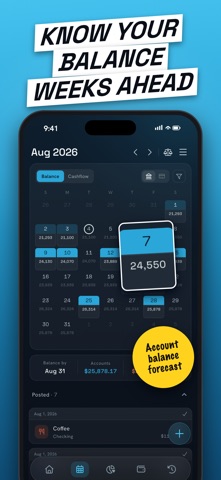


Released in February 2019 and still receiving updates as recently as July 2026, NEKO is a calendar-driven bill tracker built around a projected balance engine. It will not replace a comprehensive finance app, but for users whose core frustration is misjudging spending room between paydays, it addresses that gap with unusual clarity. A 4.64-star average across nearly 500 ratings confirms consistent real-world satisfaction.
Safe to Spend calculation works well
NEKO's central feature is a 'Safe to Spend' number, a date-specific calculation of how much money remains after accounting for upcoming bills, scheduled income, and transfers. Most bill trackers simply list obligations; NEKO reframes the question as a daily cash-flow check rather than a monthly accounting exercise. That projected balance, visible against your current account total on any future date, is genuinely useful for checking account management. The calendar view pairs bills with paydays in a scannable layout, making timing conflicts obvious at a glance. For the narrow problem it targets, the execution is solid and the concept is well-realized.
App runs reliably on most devices
At 129 MB, NEKO carries a footprint that feels slightly heavy for an app without bank-sync infrastructure or investment tracking. That said, install size alone is not a reliable proxy for runtime behavior, and the steady stream of updates through mid-2026 suggests the developer is actively addressing bugs and optimizing the experience. The high rating held across nearly 500 reviews points to an app that behaves reliably for most users over time. Qualitatively, a calendar-first interface with a focused data model tends to stay responsive because it is not processing large transaction histories. Users on older devices should find the experience acceptable, though checking recent App Store reviews for device-specific complaints is always worthwhile.
Free download with unclear paywall details
NEKO is free to download, which makes the initial commitment essentially zero. In-app purchases are listed in the App Store, though the store data provided here does not detail exactly what the free tier includes versus what sits behind a paywall. Before building a daily workflow around NEKO, it is worth opening the app and confirming which features, such as multiple accounts, recurring transfer tracking, or export options, require an upgrade. The free entry point is genuinely low-risk for evaluation purposes, and if the Safe to Spend calculation alone prevents even one overdraft fee, the value proposition is already positive.
Privacy practices require App Store verification
NEKO carries a 17-plus content rating, which is unusual for a finance utility and worth noting, though content ratings in this category sometimes reflect mature financial themes rather than explicit content. Because NEKO does not advertise direct bank-sync as a core feature, it may handle less sensitive credential data than apps that connect to financial institutions, but the actual data collected, shared, or used for tracking is best verified in the App Store privacy nutrition label on the app's product page. That label is the authoritative source for what NEKO collects, how it is linked to your identity, and whether any data is used for third-party advertising.
Calendar design prioritizes simplicity over depth
The calendar-first layout is a deliberate design choice that works well for the app's core use case, making bill timing and payday alignment easy to scan without navigating deep menus. The visual simplicity that makes NEKO approachable for casual users can also feel limiting for power users who want granular category breakdowns or detailed reports. On accessibility, the App Store does not publish structured data on VoiceOver support or Dynamic Type compliance for this app, so users who rely on assistive technologies should test the free version directly. The focused interface, with fewer interactive elements than a full finance suite, is generally a favorable condition for screen-reader compatibility, though that cannot be confirmed without hands-on testing.
Seven years of continuous active updates
The maintenance record here is one of NEKO's clearest strengths. Launched in February 2019 and updated to version 8.6.5 as recently as July 10, 2026, the app has been in continuous development for over seven years. That version number alone signals dozens of iterative releases rather than occasional patches. Tuxedo Lab LLC has demonstrated a consistent commitment to the product, which meaningfully reduces the risk of downloading an app that will be abandoned mid-workflow. For a utility that users may rely on daily for financial planning, that kind of sustained developer attention is a genuine differentiator.
Pros
- Safe to Spend calculator delivers a concrete, date-specific spending ceiling that most bill trackers skip entirely
- Calendar view makes payday and bill timing alignment immediately scannable
- Actively maintained across seven-plus years, with a July 2026 update confirming ongoing developer commitment
- Strong 4.64-star average across nearly 500 ratings reflects consistent satisfaction from real long-term users
Cons
- At 129 MB, the install size feels disproportionate for an app without bank-sync or investment features
- Free-tier limitations are not detailed in store data, so the paywall ceiling requires in-app investigation before committing to a workflow
- No spending category analytics or detailed reporting, which will frustrate users who want more than cash-flow visibility
Related guides
Similar Finance apps


apptidal is independent and ad-supported. We earn no commission on installs and no company can pay for a better score. How we stay independent.