
Media · iOS
Peachy - AI Face & Body Editor
by SHANTANU PTE. LTD.


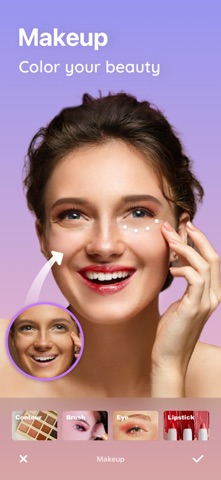

Launched in June 2018 and updated as recently as June 2026, Peachy has accumulated over 172,000 ratings at a 4.85 average, signaling a large and loyal user base. The app bundles skin retouching, facial and body reshaping, and a virtual makeup layer into a 255 MB install. That breadth is genuinely impressive for a free mobile tool, though the free tier almost certainly does not unlock everything on offer.
Three editing lanes cover retouch, reshape, and makeup
Peachy organizes its toolkit into three clear lanes. The retouch lane handles acne removal, wrinkle softening, dark circle reduction, and teeth whitening. The reshape lane lets users adjust facial proportions and body curves. The makeup layer adds foundation simulation and brow darkening, among other cosmetic overlays. For a single free app, that is a notably wide surface area. The continuous update history since 2018 confirms the developer is actively refining these tools rather than coasting on an initial release. Results in the retouch lane tend to be the most convincing, while body reshaping, as with all mobile tools in this category, requires careful restraint to avoid unnatural warping at adjustment boundaries.
Heavy file size but stable performance at scale
At 255 MB, Peachy sits on the heavier end for a single-purpose mobile editor, so users on storage-constrained devices should factor that in before downloading. The 4.85 rating across 172,000 reviews is a strong signal of stable, consistent day-to-day behavior, since apps with persistent crashes or export failures tend to see rating averages erode at that volume. Processing happens on-device, which generally means speed scales with the host hardware. Qualitatively, the update cadence, with a release as recent as June 2026, suggests the developer is patching issues promptly rather than letting bugs accumulate. Users on older iPhones may notice slower render times on complex layered edits.
Free tier leads to paywall for full toolkit
The app is free to download, which removes any barrier to a first look. In practice, free-tier access in this category rarely includes the full reshape or makeup range without a subscription or one-time purchase prompt. First-time users should expect a conversion screen before reaching the more polished tools. If the paywall is reasonable, the breadth of the toolkit could justify the spend for regular selfie editors. For occasional users, the free tier may cover enough ground to stay useful without paying. Anyone already subscribed to a dedicated portrait retouching app will likely find Peachy duplicates rather than extends their existing toolkit.
Privacy practices require review before granting permissions
Peachy carries a 4+ content rating, which reflects Apple's age classification rather than a privacy audit. Because the app works with photos and likely requests camera and photo library access, users should review the App Store privacy label on the app's product page before installing. That label, populated by the developer, discloses what data categories are collected and whether any are linked to identity or used for tracking. We have not independently verified those disclosures, and privacy practices can change between app versions. As a general precaution with any photo editor, it is worth checking whether images are processed locally or uploaded to remote servers.
Lane layout manages complexity on small screens
The interface organizes a genuinely complex feature set into a lane-based layout that keeps the learning curve manageable for casual users. Tool categories are visually separated, which reduces the cognitive load of navigating skin, shape, and makeup functions in a single session. On smaller iPhone screens, fine adjustments to areas like brow volume or under-eye detail can feel constrained by available canvas real estate, a limitation shared across the mobile editing category rather than unique to Peachy. The app does not advertise specific accessibility features prominently, so users who rely on VoiceOver or Dynamic Type should test those functions during the free trial before committing to a paid plan.
Eight year update history shows sustained commitment
The update history here is one of Peachy's clearest strengths. A release date of June 2018 combined with a most-recent update of June 2026 represents a sustained eight-year development commitment, which is uncommon for a free consumer app in a crowded category. Version 2.12.1 suggests iterative refinement rather than a stagnant codebase. For users who build editing habits around a single tool, that longevity matters, since abandonment by the developer is a real risk with free apps. The large rating base also gives the team meaningful feedback signals to prioritize fixes and feature additions, making future updates more likely to address real user pain points.
Pros
- Eight years of continuous updates, with the most recent release in June 2026, signal genuine long-term developer commitment
- A 4.85 average across 172,000 ratings indicates stable, consistently reliable day-to-day performance
- Three distinct tool lanes covering skin retouching, facial reshaping, and virtual makeup offer broader coverage than most single-purpose rivals
- Free entry point lets users evaluate the core toolkit before encountering any paywall
Cons
- At 255 MB the install footprint is heavy for a single-purpose mobile editor, which may deter storage-constrained users
- The free model almost certainly gates the most capable reshape and makeup tools behind in-app purchases, so the advertised feature set is not fully accessible without spending
- Body reshaping on a mobile canvas makes precise, edge-artifact-free edits genuinely difficult, a category-wide limitation Peachy does not fully escape
Related guides
Similar Media apps


apptidal is independent and ad-supported. We earn no commission on installs and no company can pay for a better score. How we stay independent.