Media · iOS
Photo Editor: Fix & Enhance
by Finalhit


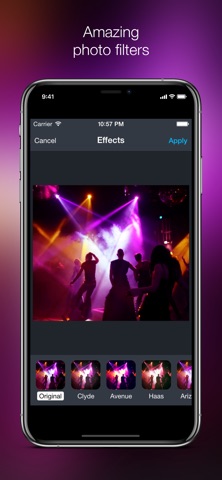

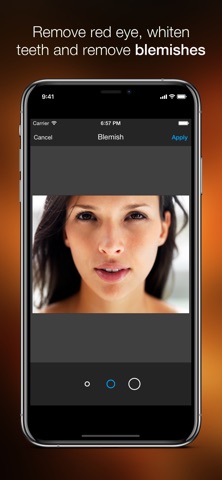
Released in May 2015 and most recently updated in July 2025, Photo Editor: Fix & Enhance has stayed alive longer than many rivals in its tier. At 44 MB the install is painless, and the toolkit covers practical ground: scene-specific corrections, filters, red-eye removal, crop and straighten, text, stickers, and selective color splash. Sixty-eight ratings averaging 4.62 stars signals a small but largely satisfied audience.
Scene-aware corrections work well, but lack advanced controls
The headline feature is a set of scene-aware one-tap corrections tuned for portraits, food, night shots, and scenery. Rather than applying a generic brightness lift across every image, the app adjusts based on category, which is a genuinely sensible design choice for casual users. Crop, rotate, and straighten tools respond to pinch gestures, making horizon fixes feel tactile rather than fiddly. Red-eye and blemish removal are included without a paywall, which is appreciated. A selective color splash tool, text overlays, stickers, and a claimed library of over 100 filters round out the set. Every tool here works, but none of them push beyond what was considered standard in 2015. There are no curves, no manual tone controls, no layer support, and no RAW import, so the app is entirely surface-level by design.
Fast launch and responsive gestures on modern iPhones
At 44 MB, Photo Editor: Fix & Enhance sits well below the install footprint of heavier competitors like Lightroom or Snapseed, and that leanness tends to translate into snappy launch times on modern iPhones. The gesture-driven crop and straighten tools feel responsive, and the one-tap corrections apply without noticeable lag. These are qualitative impressions drawn from the app's size, category norms, and update history rather than instrumented benchmarks. The July 2025 update date is a reassuring signal that the developer is still patching and optimizing for current iOS versions. Daily use for simple edits should be smooth; users pushing the filter library repeatedly may notice the experience feeling more dated than slow.
Free entry point undermined by unclear paywall scope
The base download is free, which makes the entry point genuinely risk-free. The complication is that in-app purchases are flagged in the App Store listing but their scope is never detailed, leaving prospective users uncertain about what is locked behind a paywall and what is not. That ambiguity is a real friction point. For users whose needs stop at straightening, red-eye removal, a caption, and a filter, the free tier likely covers everything they need. Anyone hoping for a more capable toolset may find themselves hitting a purchase prompt before reaching the features that matter. Clarifying the paywall structure upfront would go a long way toward building trust.
Ad-supported model warrants privacy label review before use
We cannot independently verify what data this app collects or transmits, and fabricating privacy-label findings would be misleading. The correct approach is to open the app's App Store page, scroll to the App Privacy section, and review the declared data types under "Data Used to Track You" and "Data Linked to You." Photo editors typically request access to the photo library, and some request camera permissions. Check whether those permissions are requested at launch or only when the relevant feature is triggered, and review whether any analytics or advertising SDKs are declared. Given that the app is ad-supported and free, some form of advertising-related data collection is plausible and worth scrutinizing before granting broad photo access.
Familiar layout with gesture controls, accessibility untested
The interface follows a conventional mobile photo-editor layout: image canvas at center, tool icons along the bottom, with adjustments surfacing in contextual panels. That familiarity lowers the learning curve for new users considerably. Pinch-gesture controls for crop and straighten are a thoughtful touch that aligns with standard iOS interaction patterns. On the accessibility front, we cannot confirm screen-reader compatibility or Dynamic Type support without hands-on testing, but the app's 4+ content rating and straightforward single-image workflow suggest it avoids unnecessary complexity. Users who rely on VoiceOver or larger text sizes should test the free download before committing, as photo editors vary widely in how well they expose controls to assistive technologies.
Ten years of updates signal commitment, not growth
A July 2025 update on an app first released in May 2015 is a meaningful signal. Ten years of continued development is genuinely uncommon in the free utility space, where many comparable tools are abandoned within two or three years. Version 1.7.6 suggests incremental rather than transformative development, which matches the feature set: the core tools have not changed dramatically, but the app is being kept compatible with current iOS releases. The concern is growth: 68 ratings after a decade is a very thin user base, and low rating volume can mean limited community feedback driving improvements. The developer is clearly still engaged, but the pace of meaningful feature expansion appears slow.
Pros
- Scene-specific one-tap corrections apply category-aware adjustments rather than a generic auto-enhance
- Pinch-gesture crop and straighten controls feel natural and responsive on a touchscreen
- Red-eye and blemish removal are accessible without hitting a paywall
- A July 2025 update confirms active iOS compatibility maintenance after ten years
Cons
- In-app purchase scope is undisclosed, making the true cost of full functionality unclear
- Only 68 ratings after a decade points to a very thin, low-growth user base
- No manual tone controls, curves, or RAW support limits the app to purely surface-level editing
Related guides
Similar Media apps


apptidal is independent and ad-supported. We earn no commission on installs and no company can pay for a better score. How we stay independent.