
Media · iOS
Photoroom: AI Photo Editor
by Photoroom

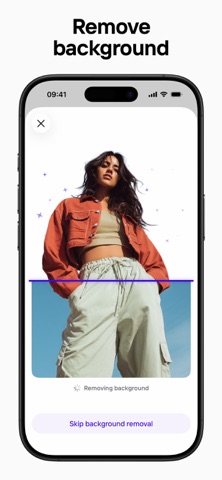

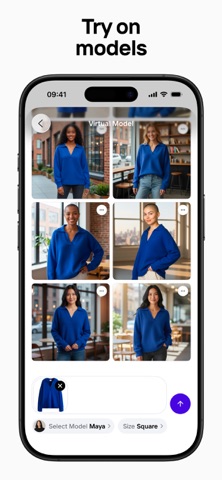


Released in 2019 and consistently updated through mid-2026, Photoroom has grown into one of the App Store's most practical product-photography tools. The core workflow is straightforward: photograph a product, strip the background, apply a clean or AI-generated backdrop, and export a marketplace-ready image. Over 226,000 ratings averaging 4.82 stars suggest that workflow resonates broadly with its intended audience.
Background removal handles tricky edges reliably
Photoroom is built around one specific problem: turning casual phone photos into polished product listings without a desktop or professional studio. Background removal is the engine, and it handles genuinely tricky edges like fabric texture, fine hair, and transparent objects with less manual cleanup than most competing apps require. Batch editing lets sellers apply a consistent treatment across an entire product catalog in a single pass, which is a meaningful time-saver. Preset export dimensions for Amazon, Etsy, Shopify, and other major platforms remove a tedious manual step that regularly trips up first-time sellers. The app does what it promises, and does it with enough reliability to justify its dominant rating.
Large install size trades off for speed
At 357 MB, the install footprint is substantial for a mobile app, reflecting the on-device AI models powering its background removal and generative backdrop features. That size investment generally pays off in processing speed: background removal completes quickly without requiring a server round-trip for every image. The app carries a 4.82 average across more than 226,000 ratings, a sample large enough to filter out honeymoon-period inflation and suggest genuine day-to-day reliability. Update cadence is strong, with version 2026.29.01 landing in July 2026, indicating the development team is actively addressing bugs and expanding features rather than letting the product stagnate.
Subscription justified for active sellers
The free tier covers basic background removal and a limited set of backdrops, which is enough to evaluate the core concept but not enough to run a real product catalog efficiently. The most compelling features, including AI-generated backgrounds, virtual model placement, Brand Kit consistency tools, and team collaboration, sit behind a subscription paywall. For a seller actively managing listings on one or more marketplaces, the subscription cost is relatively easy to justify against the time saved on photography and editing. Casual users or hobbyists who only occasionally need a clean product shot will likely find the free tier too restrictive and the subscription cost harder to rationalize.
Standard permissions with privacy label review recommended
Photoroom requests access to the photo library and camera, both of which are central to its core function and expected for any editing app. Beyond those standard permissions, the specifics of data collection, tracking, and third-party sharing are detailed in the App Store privacy nutrition label on the app's product page. We recommend reviewing that label directly before subscribing, paying particular attention to any data linked to your identity and whether usage data is shared with advertising partners. The app's content rating of 4+ indicates no age-restricted material, but privacy practices for a subscription-based tool with account creation deserve a careful read regardless.
Task-oriented interface prioritizes editing canvas
The interface is organized around a clear, task-oriented flow: import, remove background, apply backdrop, export. New users can complete their first edit without consulting documentation, which reflects deliberate UX prioritization. The layout favors large tap targets and a minimal chrome approach that keeps the editing canvas central. Accessibility accommodations such as Dynamic Type support and VoiceOver compatibility are worth verifying directly on device, as AI-heavy editing apps vary in how thoroughly they label interactive elements for assistive technology. The visual design is clean and modern, consistent with current iOS conventions, and the app avoids the cluttered toolbar approach that makes some desktop-ported editors feel unwieldy on a phone screen.
Weekly release pace reflects active development
The maintenance record here is genuinely strong. Photoroom launched in March 2019 and has reached version 2026.29.01 as of July 2026, suggesting a release cadence measured in weeks rather than months. That pace matters in the AI editing space, where model improvements and new generative features can shift competitive positioning quickly. The growing rating count, now past 226,000, indicates an expanding user base rather than a product coasting on an established audience. For a free-to-download app with a subscription model, sustained development investment is a reasonable expectation, and Photoroom appears to be meeting it.
Pros
- Background removal handles complex edges like fabric and hair with minimal manual cleanup
- Batch editing dramatically reduces time spent on large product catalogs
- Preset export sizes for Amazon, Etsy, and Shopify eliminate a common manual step
- 4.82 average rating across 226,000 reviews signals consistent real-world reliability
Cons
- Most compelling AI features, including virtual models and generative backdrops, require a paid subscription
- 357 MB install size is large relative to typical mobile editing apps
- Toolset is too narrowly focused on product photography to serve general or creative editing needs
Related guides
Similar Media apps


apptidal is independent and ad-supported. We earn no commission on installs and no company can pay for a better score. How we stay independent.