
Media · iOS
Picsart AI Photo Editor, Video
by PicsArt, Inc.

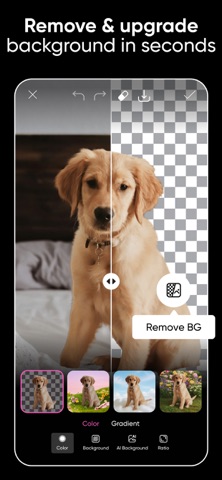
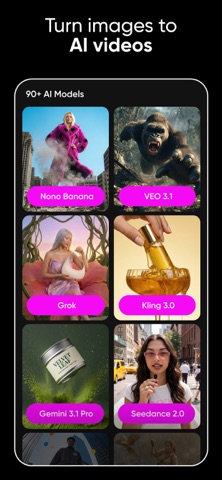

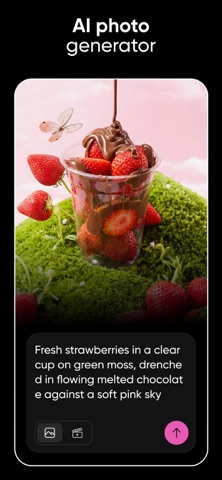

Launched in 2013 and now carrying over 1.2 million ratings at a 4.67 average, Picsart folds background removal, object erasing, collage building, templated design, AI image generation, video tools, and a conversational assistant called Aura into one 252 MB download. That breadth is genuinely impressive. The high rating reflects real utility, yet it also softens a persistent subscription funnel and a feature menu deep enough to feel like a maze on a small screen.
Powerful toolkit with genuine production capability
The toolset is the headline, and it largely delivers on its ambitions. Background Remover and Object Eraser handle cluttered photos in a couple of taps, while the template library jump-starts everything from Instagram stories to product banners. Newer additions, including image-to-video generation and AI avatar creation, are genuinely fun even when results are imperfect. Aura, the conversational assistant, lowers the learning curve by translating plain-language requests into actual edits. Very few mobile editors match this combination of casual accessibility and legitimately useful production capability inside a single download, which explains the enormous rating volume accumulated since 2013.
Performance uneven across device tiers
At 252 MB, Picsart sits on the heavier end of the creative-app category, and older or budget devices may stutter when switching between the AI tools and the main editor. On current mid-range and flagship hardware the experience is generally fluid. The interface is the bigger daily friction point: layers of menus and modal upsells interrupt the editing flow more than competing tools do. Generative AI features, video generation especially, can be slow and produce inconsistent output. For simple tasks like cropping or color correction, the app can feel overbuilt, though frequent users learn to navigate its depth efficiently over time.
Strong value for daily creators only
The base app is free, but that framing is misleading in practice. Premium templates, the strongest AI models, watermark-free exports, and higher-resolution outputs all sit behind Picsart Gold, and the prompts to upgrade appear constantly during normal use. Free sessions can feel interrupted rather than merely limited. For creators who publish content daily and would otherwise pay for multiple specialized tools, a Gold subscription likely justifies itself. Casual or occasional editors will find the free tier frustrating and may resent paying for features that feel essential rather than optional. The value equation is genuinely strong, but only for committed, high-volume users.
Standard permissions with cloud processing implications
Picsart requests access to the photo library, camera, and microphone, which are standard permissions for a creative app of this scope. The app carries a content rating of 12 plus on the App Store. For a detailed breakdown of exactly which data types are collected, linked to your identity, or used for tracking, the App Store privacy nutrition label on the app's product page is the authoritative source and worth reviewing before downloading. Given the app's social-sharing features and AI cloud processing, users with heightened privacy concerns should check those disclosures carefully before granting broad permissions.
Polished design undermined by menu clutter
Picsart has a visually polished surface with a consistent dark-themed canvas and clear iconography that suits its creative audience. The challenge is depth: the sheer number of tools, sub-menus, and promotional banners creates a cluttered experience, particularly on smaller phone screens. New users often report a steep orientation period before the layout feels intuitive. Standard iOS accessibility features such as Dynamic Type and VoiceOver should function as the operating system provides them, though a tool this visually complex benefits most from hands-on exploration. The Aura assistant does meaningfully reduce the interface burden for users who prefer directing edits conversationally rather than hunting through menus.
Actively developed with accelerating AI features
Version 30.3.2 landed on July 12, 2026, confirming that PicsArt, Inc. maintains a rapid and consistent update cadence. The version number itself signals years of iterative development since the 2013 launch, and the recent update date suggests the team responds to iOS changes and user feedback without long gaps. AI feature additions have accelerated noticeably in recent releases, keeping the app competitive with newer entrants in the generative editing space. For users who depend on the app professionally, that maintenance rhythm is reassuring. The combination of a large active user base and frequent releases makes abandonment an unlikely near-term risk.
Pros
- Enormous all-in-one toolkit spanning photo editing, video, and graphic design
- Background removal and object erasing are fast and produce clean results
- Aura conversational assistant meaningfully flattens the learning curve
- Consistently rapid update cadence with a July 2026 release confirming active development
Cons
- Constant, aggressive prompts toward the paid Gold subscription interrupt free-tier editing
- AI generation quality, particularly video, is inconsistent and credit-hungry
- Deep nested menus and promotional banners make the interface overwhelming on small screens
Related guides
Similar Media apps


apptidal is independent and ad-supported. We earn no commission on installs and no company can pay for a better score. How we stay independent.