
Media · iOS
Prequel: Photo & Video Editor
by Prequel Inc.

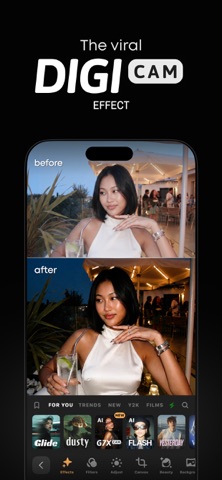


Prequel has carved out a recognizable niche in mobile editing by leaning hard into aesthetic-first effects rather than technical precision. With over 800 filters, named effects like VHS, PRISM, and D3D, plus one-tap video templates, it targets creators chasing a consistent visual mood fast. The free tier is genuinely functional, though the subscription wall becomes apparent quickly once you start hunting for the distinctive looks that actually define the app.
D3D parallax conversion excels, precision adjustments fall short
Prequel positions itself as a mood-first editing tool, prioritizing aesthetic output over granular technical control. The D3D feature is a genuine standout, converting still photos into looping parallax clips without any manual masking required. Combined with intro effects and music layering, a polished short clip is achievable in under two minutes. The template system meaningfully speeds up repetitive social-media posting workflows, and the 30-plus font options for text overlays offer more variety than most competitors in this category. Where the app falls short is in adjustment depth: curves, selective color correction, and multi-track editing are absent, so anyone needing precision retouching will find the toolkit underpowered for those tasks.
Heavy install size, smooth operation for most users
At 359 MB, Prequel carries a heavier install footprint than many filter-focused apps, which is worth noting on storage-constrained devices. That size reflects a large bundled asset library rather than a lean processing engine. Qualitatively, the app holds a 4.74 star rating across roughly 338,000 reviews on iOS, a volume and score that together suggest consistently smooth day-to-day operation for the majority of users. Export times for short social-media clips are generally in line with category norms. One practical friction point is browsing: the effect gallery mixes free and locked content without clear separation, so casual exploration regularly dead-ends at a paywall prompt rather than flowing naturally into editing.
Free tier limited, Gold subscription targets daily creators
Prequel is free to download, but the most visually distinctive named effects sit behind the Gold subscription tier. The app does not surface subscription pricing within its App Store metadata, so prospective subscribers need to check the in-app purchase screen directly before committing. The free catalog is real rather than purely cosmetic, offering usable filters and basic adjustments. For creators who post to Reels or TikTok daily and want a broad, regularly refreshed library of on-trend looks, the Gold tier can justify itself through time saved. Casual or occasional users, however, will likely find the free offering thin relative to the frequency of paywall interruptions during browsing.
Standard permissions, check App Store privacy label
Prequel carries a content rating of 12-plus on the App Store. For a definitive picture of what data the app collects and how it is used, the App Store privacy nutrition label on Prequel's product page is the authoritative source. That label details categories such as identifiers, usage data, and any data linked to your identity. As a general practice with any creative app that supports account creation and cloud-synced content, it is worth reviewing those disclosures before signing up for a subscription. Camera and photo library access are expected permissions for an editor in this category, and users can manage those via iOS Settings at any time.
Dark interface and templates ease social media workflows
The interface follows a clean, dark-themed aesthetic that complements the visual content it handles, with a horizontally scrollable effect strip that is intuitive for swipe-based browsing. Tap targets are reasonably sized for one-handed use, which suits the social-media creator workflow the app is built around. Accessibility features such as Dynamic Type support and VoiceOver compatibility depend on how thoroughly the developer has implemented Apple's UIKit accessibility APIs; users who rely on assistive technologies should test the trial period before subscribing. The overall design language is polished and consistent with current iOS conventions, and the one-tap template approach lowers the skill floor considerably for new users.
Eight years of updates maintain iOS compatibility
Prequel shows strong maintenance signals. The app was most recently updated on July 3, 2026, placing it among the more actively developed tools in the media editing category. It has been in continuous development since its March 2018 launch, now at version 2.96, which reflects steady, incremental improvement over eight years rather than sporadic bursts of activity. The combination of a high rating volume (338,000 reviews) and a current average of 4.74 stars suggests the developer has managed to keep pace with iOS updates and user expectations over time. Creators who depend on an app staying compatible with new iPhone hardware and OS releases can take reasonable confidence from that track record.
Pros
- D3D parallax effect converts stills to looping clips automatically, with no manual masking
- One-tap video templates meaningfully reduce production time for repetitive social-media posting
- Free tier includes genuinely usable filters and adjustment tools rather than preview-only placeholders
- Consistently maintained with a July 2026 update and eight years of continuous development
Cons
- Most signature named effects require a Gold subscription, and the browsing experience functions as a recurring paywall loop
- At 359 MB, the install footprint is heavy relative to what a filter-focused app typically needs
- Adjustment tools lack depth, with no curves, selective color, or multi-track editing available
Related guides
Similar Media apps


apptidal is independent and ad-supported. We earn no commission on installs and no company can pay for a better score. How we stay independent.