
Media · iOS
SnapEdit: Photo Editor AI
by SilverAI Joint Stock Company



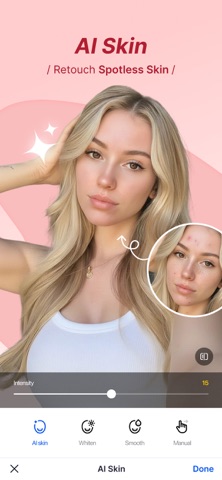
SnapEdit from SilverAI Joint Stock Company is a free AI photo editor centered on object removal and image enhancement. Released in March 2022 and still receiving updates as recently as July 2026, it holds an impressive 4.82 store rating across 14,000 reviews. At 184 MB it is a moderate install. The core promise is simplicity: let the AI handle the heavy lifting so users can skip manual masking entirely. That promise largely holds, with some caveats around the paywall.
One-touch removal works well for small objects
SnapEdit is built around one central idea: point at something unwanted in a photo, and the AI removes it cleanly. For smaller distractions like a stray pedestrian, a power line, or a trash bin, the one-touch removal tool performs convincingly and with minimal fuss. Larger, more complex removals are routed to Super Erase, which requires a Pro subscription. That split feels calculated, pushing the genuinely difficult jobs behind a paywall at exactly the moment a user is most invested in a result. Beyond removal, the app also offers enhancement and background tools. For everyday cleanup tasks, however, the free tier is genuinely functional and not merely a teaser.
Processing time noticeable on older devices
At 184 MB, SnapEdit sits in a reasonable range for an AI-powered editor, though it is not a lightweight install. The 4.82 rating across a substantial 14,000 reviews is a meaningful signal that most users find the experience smooth and reliable rather than buggy or sluggish. AI processing tools in this category can be slow on older hardware, and SnapEdit does require some computation time per edit. The workflow is intentionally minimal, which keeps friction low for quick sessions. Users who edit frequently may notice processing pauses on older devices, but the overall experience reflects a well-optimized app for its category.
Free tier is functional, Pro unlocks complex edits
The app is free to download and the base tier offers real, usable functionality rather than a hollow demo. That is a meaningful distinction in a category crowded with apps that gate everything useful immediately. The Pro subscription unlocks Super Erase for complex removals along with additional AI tools, and prospective subscribers should check the current pricing in the App Store before committing, as subscription costs can change. Users who only need occasional small-object removal may find the free tier entirely sufficient. Those who regularly tackle difficult edits will hit the Pro ceiling quickly and should weigh the recurring cost against alternatives.
Photo library access required, server processing unspecified
SnapEdit carries a 4+ content rating, which reflects no objectionable content concerns. Because the app processes photos, it will request access to the photo library, which is standard for this category. What data is transmitted to SilverAI servers for AI processing, how long it is retained, and whether it is used for model training are questions worth examining before uploading sensitive images. The App Store privacy nutrition label for SnapEdit is the authoritative source for these details, and we encourage users to review it directly before granting permissions. As with any cloud-assisted AI editor, a degree of data sharing with the developer's servers should be assumed.
Minimal interface reduces friction for most users
The interface is clean and task-focused, which suits the app's AI-first philosophy well. Navigation is straightforward, with editing tools surfaced prominently rather than buried in menus. The simplified workflow is itself an accessibility advantage, reducing the cognitive load that more complex editors impose. Standard iOS accessibility features such as Dynamic Type and VoiceOver compatibility depend on how thoroughly the developer has implemented Apple's accessibility APIs. The app's 4+ rating and broad appeal suggest it is not designed for a narrow audience, and the minimal UI should be navigable for most users without prior photo editing experience.
Four years of updates show sustained commitment
The update history here is genuinely reassuring. Version 6.20 was pushed in July 2026, more than four years after the March 2022 launch, which demonstrates sustained developer commitment rather than a post-launch plateau. Reaching version 6.20 also implies a meaningful number of iterative improvements to both the AI models and the app experience over time. The strong and stable 4.82 rating across 14,000 reviews further suggests that recent updates have not introduced regressions that frustrated users. For an AI-dependent app where model quality directly affects usefulness, an active update cadence is especially important, and SilverAI appears to be delivering on that front.
Pros
- One-touch object removal works reliably on small to mid-size distractions
- Exceptionally strong 4.82 rating across a meaningful 14,000 reviews
- Actively maintained with version 6.20 released July 2026, over four years post-launch
- Free tier delivers genuine, usable functionality rather than a gated preview
Cons
- Super Erase for larger, complex removals is locked behind a Pro subscription
- 184 MB is a sizeable install for an app with a narrow editing focus
- AI automation limits manual precision for users who need detailed, technical control
Related guides
Similar Media apps


apptidal is independent and ad-supported. We earn no commission on installs and no company can pay for a better score. How we stay independent.