
Media · iOS
Snapseed: Photo Editor
by Google




Google has stewarded Snapseed since 2011, and version 4.0.4 reflects over a decade of deliberate refinement. More than 30 tools are available at no cost, with no ads, no watermarks, and no subscription wall anywhere in sight. A 4.86 star rating drawn from 18,000 reviews signals consistent, broad satisfaction. RAW support, non-destructive editing, and smart masking together make this one of the most feature-dense free creative apps on the App Store.
Comprehensive editing pipeline with non-destructive adjustments
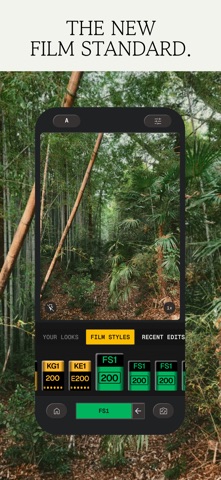
Snapseed covers the full arc of a mobile editing session, from basic exposure and white balance corrections through selective local adjustments, healing, perspective correction, and stylized film looks. The non-destructive pipeline is the quiet centerpiece: every adjustment is stored as a stackable step, meaning you can return to any individual change, revise it, or delete it without touching the rest of the edit. RAW file support extends that flexibility to shooters who transfer files directly from a dedicated camera. The Snapseed Camera adds real-time film looks at the point of capture, and crucially those looks remain editable afterward rather than being baked permanently into the file.
Responsive interface with efficient gesture controls
At 191 MB the install footprint is reasonable for the breadth of tools on offer, sitting comfortably within category norms for full-featured editors. The update timestamp of June 2026 confirms Google is actively shipping builds, which matters for iOS compatibility as Apple revises its frameworks each year. The 18,000-review sample behind the 4.86 rating is large enough to be statistically meaningful, suggesting that sluggishness or crash-prone behavior is not a widespread complaint. Qualitatively, the gesture-driven interface, vertical swipe to select a tool, horizontal swipe to adjust it, keeps interactions fast and reduces the tap count compared to toolbar-heavy alternatives. Batch processing a set of images with a saved look adds further efficiency for higher-volume workflows.
Free with no ads, subscriptions, or watermarks
Free with no asterisks is a compelling value proposition in any category. There are no ads interrupting the editing session, no watermarks stamped on exports, and no subscription tier gating advanced tools. The App Store listing does reference in-app purchases as a possibility, which creates mild uncertainty, but no purchase prompts surface during normal use. Competing apps at this feature level typically charge a monthly or annual subscription. For casual users and serious hobbyists alike, Snapseed delivers a return that is straightforwardly exceptional relative to its price.
On-device processing with standard privacy framework
Google develops and maintains Snapseed, so the app operates within Google's broader privacy framework, a detail worth noting for users who are attentive to data practices. The App Store privacy nutrition label is the authoritative source for exactly which data types are collected or linked to your identity, and we recommend reviewing it before installing. At minimum, photo library access is required for the app to function. No network connection is needed for editing itself, which is a meaningful practical privacy point: your images are processed on-device rather than uploaded to a remote server for manipulation.
Uncluttered design limited for screen reader users
The interface follows a gesture-first philosophy that keeps the canvas uncluttered. Tool categories are logically grouped, and the non-destructive stack is surfaced through a clearly labeled history panel rather than buried in menus. The content rating of 4+ reflects an interface free of mature material, making it suitable across a wide age range. Standard iOS accessibility features, including Dynamic Type and display accommodations, apply at the system level. The app does not appear to expose a dedicated VoiceOver-optimized editing mode, which is a limitation for users who rely on screen readers for fine adjustment work.
Fifteen years of active development under Google
An update dated June 2026 on an app first released in June 2011 represents fifteen years of continuous development, a lifespan that is genuinely unusual in the mobile software market. Google's stewardship has kept the feature set growing through multiple iOS generations without fragmenting the experience into a paid tier. Version 4.0.4 suggests a mature, stable codebase rather than a product in rapid experimental flux. For users concerned about app abandonment, the combination of a large active user base, a major corporate developer, and recent update activity makes Snapseed one of the lower-risk installs in the creative category.
Pros
- Completely free with no ads, subscription tiers, or export watermarks
- Non-destructive editing stack lets you revise or remove any individual adjustment at any time
- RAW file support brings full-fidelity editing to mobile without a paywall
- Smart subject and background masking isolates targets in a single tap, accelerating local adjustments
Cons
- No layered compositing for blending multiple source images limits advanced creative work
- The 191 MB install size may strain storage on entry-level devices
- No cross-device sync or desktop companion app means edits are confined to a single iPhone
Related guides
Similar Media apps


apptidal is independent and ad-supported. We earn no commission on installs and no company can pay for a better score. How we stay independent.