
Media · iOS
Sound Editor: Audio Changer
by Proapptive Solutions, LLC
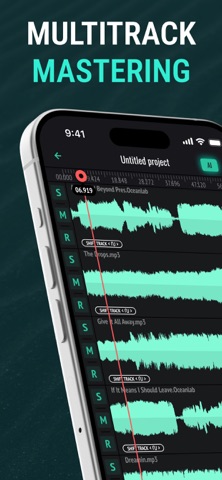

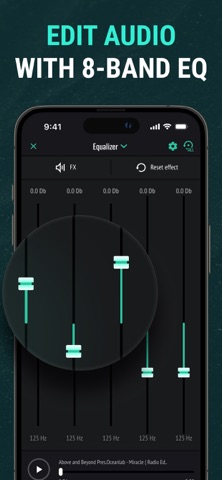


Released in December 2017 and still receiving updates as recently as July 2026, Sound Editor: Audio Changer pitches itself as a portable multitrack studio for iOS. The feature list sounds reasonable on paper: five simultaneous tracks, cut and paste tools, fade controls, and an 8-band equalizer packed into a 170 MB install. The 3.12 store rating across 769 reviews, however, is a persistent signal that the real-world experience falls short of those ambitions.
Toolkit covers basics but execution falls short
The core toolkit covers the fundamentals most casual editors reach for first: cut, copy, paste, trim, fade in and out, silence insertion, and an 8-band equalizer for basic frequency correction. Five simultaneous tracks allow a user to layer a vocal, a music bed, and a handful of sound effects without bouncing down to a single file first. For a free app, that scope sounds genuinely useful. The trouble is that the 3.12 average rating from nearly 800 reviewers suggests the execution does not match the feature list. Common friction points in this rating tier typically include unintuitive workflows, unexpected crashes, and core tools that behave inconsistently, meaning the toolkit exists on paper more reliably than it performs in practice.
Modest footprint and recent updates mask persistent friction
At 170 MB the install footprint is modest for a multitrack editor, which is a reasonable sign that the app is not bloated with assets it cannot use. Update recency is genuinely encouraging: a July 2026 update on an app first released in 2017 shows the developer has not abandoned the project. Even so, a rating that has settled at 3.12 across hundreds of reviews over multiple years points to issues that updates have not fully resolved. Qualitatively, that pattern often reflects either persistent stability problems on certain device configurations or a user experience that feels rough enough to prompt low ratings even when the app technically functions. Expect occasional friction rather than a smooth, predictable session.
Free to try but hidden paywalls likely
The app is free to download, which removes any financial barrier to trying it. That said, free audio editors in this category frequently rely on in-app purchases to unlock export quality, remove watermarks, or enable features prominently shown in screenshots. The app store listing does not detail exactly what those purchases cover or how much they cost, so a user could invest time in a project only to hit a paywall at the export stage. For truly casual, low-stakes edits the free tier may be sufficient. Anyone planning to use the output professionally should verify the full cost of the feature set before committing real work to the app.
Review privacy label before granting audio permissions
A content rating of 4+ means Apple found no objectionable content, but that label says nothing about data collection practices. Audio editing apps commonly request microphone access and storage permissions, both of which are reasonable for the task. What matters more is whether the app collects usage data, links it to your identity, or shares it with third-party advertisers, which is especially relevant here because the app is ad-supported. The definitive source for those answers is the App Store privacy nutrition label on the app's product page. We strongly recommend reviewing that label before granting permissions, particularly if you record sensitive audio.
Visual interface may challenge accessibility without custom labels
The app targets iOS exclusively, so it benefits from Apple's system-level accessibility features including Dynamic Type and VoiceOver support at the OS level. Whether the developer has implemented custom accessibility labels on editing controls, waveform views, and track headers is not verifiable without hands-on testing. Multitrack audio editors are inherently visual, and waveform-based interfaces can be challenging for users relying on screen readers unless developers invest specifically in accessibility. The 3.12 rating does not isolate design as the sole culprit, but a below-average score in a competitive category often correlates with a UI that feels unpolished or non-intuitive to a broad range of users.
Nine years of updates without resolving core complaints
On the maintenance question, the evidence is genuinely positive. Version 1.11.6 arrived in July 2026, nearly nine years after the December 2017 launch, which demonstrates a level of developer commitment that many free utility apps in this category do not sustain. Regular updates matter for iOS compatibility as Apple releases new OS versions each autumn. The concern is not abandonment but rather whether the updates are meaningfully improving the user experience. A rating that has remained below 3.2 across hundreds of reviews over multiple years suggests the updates have kept the app functional without fully addressing the underlying issues that drive negative feedback.
Pros
- Free to download with no upfront cost, making it a risk-free first try
- Five simultaneous tracks support basic vocal, music, and effects layering
- 8-band equalizer handles frequency correction without a separate app
- Actively maintained with a July 2026 update confirming ongoing developer support
Cons
- A 3.12 average across 769 reviews reflects consistent, long-standing user frustration
- In-app purchases likely gate export quality or key features not disclosed upfront
- Five-track ceiling and the absence of clear export format details limit serious production use
Related guides
Similar Media apps


apptidal is independent and ad-supported. We earn no commission on installs and no company can pay for a better score. How we stay independent.