
Media · iOS
SoundLab - Audio Editor
by 孛 刘
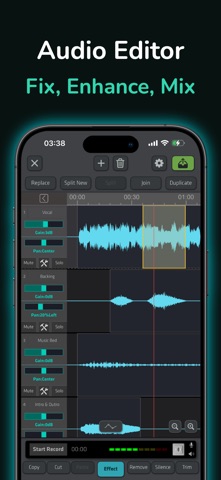


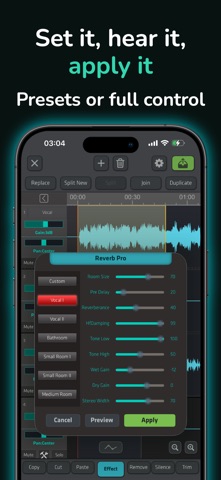
Released in August 2020 and still receiving updates as recently as April 2026, SoundLab has grown into a surprisingly capable free audio workstation. Its 16-track editor, on-device AI vocal separation, and a recording studio mode with external microphone support target users who have clearly outgrown voice memo apps but are not yet ready to commit to a desktop DAW. Over 14,000 ratings averaging 4.6 stars suggest the core promise lands for most people.
Full DAW capabilities with purposeful tools
SoundLab positions itself as a full mobile DAW rather than a simple trim-and-export utility, and the feature list largely backs that claim. Sixteen simultaneous tracks is a serious number for a phone screen, and the waveform view handles the layout with pinch-to-zoom navigation that keeps things manageable. A library of more than 20 audio effects provides genuine tonal shaping rather than cosmetic presets, and lossless output options protect quality throughout the chain. The recording studio mode adds in-ear monitoring, input gain control, and anti-pop support, making it production-oriented rather than decorative. The workflow does require an adjustment period, but the tools feel purposeful rather than padded, which is the more important quality to get right.
Performance scales with device hardware
At 171 MB the install footprint is on the heavier side for a mobile audio app, reflecting the on-device AI model and the breadth of its editing engine rather than bloat. Because the AI vocal separator processes audio locally, performance depends on the device's own chip rather than a server connection, meaning newer iPhones will handle stem splits noticeably faster than older ones. The app's consistent update cadence, with version 2.10.9 landing in April 2026, suggests the developer actively addresses bugs and compatibility issues rather than letting the codebase stagnate. Qualitatively, the 14,000-plus ratings at 4.6 stars indicate that most users do not encounter persistent crashes or major workflow-breaking bugs in everyday sessions.
Free tier covers core editing workflow
The free entry point removes virtually all financial risk from trying SoundLab, which is genuinely generous given the feature depth on offer. In-app purchases are present, and while the exact paywall boundaries shift with updates, premium exports, certain effect packs, and advanced AI features are the categories most likely to be gated over time. For casual to intermediate users, the free tier appears to cover enough of the core editing workflow to deliver real value. Anyone planning to use SoundLab as a primary production tool should audit which outputs and features require a purchase before building a serious project around them, since the long-term free tier scope is not always clearly communicated upfront.
Audio processing stays on device
The most privacy-relevant feature SoundLab offers is its on-device AI vocal separation, which processes audio without uploading files to a remote server. That architectural choice is a meaningful advantage over cloud-dependent rivals, particularly for anyone working with unreleased material or sensitive recordings. Beyond that, the app will request microphone access for recording and likely storage permissions for file import and export. For a complete and current picture of what data is collected and how it is used, the App Store privacy nutrition label for SoundLab is the authoritative source and should be reviewed before granting permissions, especially given the ad-supported free model.
Small screen layout requires gesture learning
The interface makes reasonable compromises for a 16-track editor on a small screen, using a waveform-centric layout with gesture-based navigation that feels native to iOS rather than ported from a desktop paradigm. Visual contrast and touch target sizing appear adequate for standard use, though a dense multi-track view will always present challenges for users with low vision or limited fine motor control. SoundLab carries a 4+ content rating, indicating no objectionable material concerns. Formal screen-reader compatibility and Dynamic Type support are not independently verified here, so users who depend on VoiceOver or other accessibility services should test the app directly before committing to it as a primary workflow tool.
Six years of consistent development
The development record here is genuinely encouraging. SoundLab launched in August 2020 and has reached version 2.10.9 with an update posted in April 2026, reflecting nearly six years of continuous iteration. That cadence is well above average for an independent mobile audio app, particularly one offered free. The growing review count, now past 14,000, combined with a stable 4.6-star average, suggests that updates have improved rather than destabilized the experience over time. Users can reasonably expect continued support, though as with any app from an independent developer, long-term roadmap commitments are always subject to change.
Pros
- On-device AI vocal separation avoids cloud upload delays and keeps unfinished recordings off external servers
- 16-track editing with pinch-to-zoom waveform navigation is genuinely uncommon at this price point
- Lossless output options preserve audio quality from recording through final export
- Consistent update history spanning nearly six years signals reliable ongoing maintenance
Cons
- At 171 MB the install size is heavy and may deter users with limited device storage
- In-app purchases gate an unclear subset of features, making long-term free-tier scope hard to predict
- A 16-track interface on a small screen carries a steep initial learning curve for new users
Related guides
Similar Media apps


apptidal is independent and ad-supported. We earn no commission on installs and no company can pay for a better score. How we stay independent.