
Media · iOS
Tezza: Aesthetic Photo Editor
by Tezza App LLC

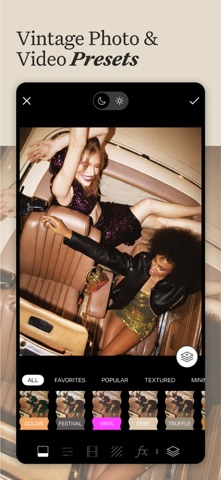
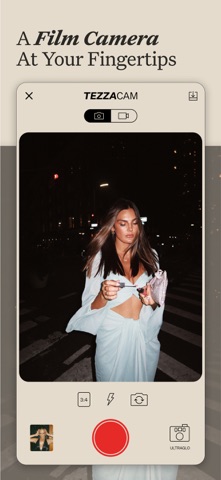

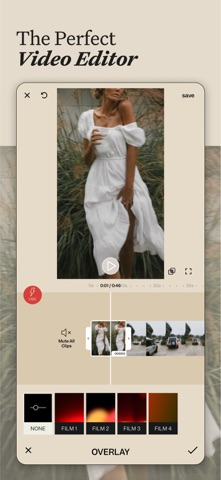

Launched in July 2018 and still receiving updates as recently as June 2026, Tezza has built a coherent identity around vintage aesthetics that few mobile editors match. Its 40-plus curated presets, VHS and Super 8 frame effects, stop-motion tools, and story templates all sit inside one 802 MB package. The result is a creator-focused toolkit optimized for speed and visual consistency rather than technical precision.
Founder curation over generic sliders
Tezza centers its entire experience on a founder-curated preset library spanning vintage, dark-moody, minimal, and bright-colorful palettes. That curatorial voice is the app's clearest differentiator from generic slider-based editors. Beyond static filters, a dedicated retro effects pack covers Super 8, VHS, 8mm, Kodak, and VCR frames alongside a stop-motion tool and cinematic subtitle overlays, enabling a full content session with a singular, recognizable look. For the specific audience it targets, the app does what it promises remarkably well. Users who need curves, selective color masking, or luminosity-range adjustments will find the toolset shallow, but that tradeoff is intentional and clearly communicated by the app's branding.
Heavy install size, sustained stability
At 802 MB, Tezza is one of the heavier installs in the photo-editing category, which can be a real concern on older iPhones with limited storage. That size likely reflects a large on-device asset library of high-resolution film textures and frame overlays rather than bloated code. The app's 4.74 rating sustained across 46,000 reviews is a meaningful signal that crashes and export failures are not widespread complaints. Version 8.19.2 suggests years of iterative refinement since the 2018 launch, and the June 2026 update confirms the team is still actively addressing issues. Qualitatively, the experience reads as smooth and responsive for a creative tool of this scope.
Subscription model for full access
Tezza is free to download, but in-app purchases are listed and the full preset and effects catalog almost certainly sits behind a subscription. The app does not appear to offer a permanent one-time purchase option, which means ongoing cost for ongoing access. Whether that is reasonable depends entirely on how central Tezza's aesthetic is to a creator's workflow. For someone posting daily to Instagram or TikTok with a film-inspired brand, a subscription to a well-maintained, actively updated tool can justify itself quickly. Casual or occasional editors, however, may find the free tier limiting and the subscription hard to rationalize alongside competing apps that offer deeper manual tools at similar price points.
Standard permissions, check privacy label
Tezza requires access to the photo library to function, which is standard for any editing app. A creator-focused tool of this kind may also request camera access for in-app capture. To understand exactly what data is collected, linked to your identity, or used for tracking, the App Store privacy nutrition label on Tezza's product page is the authoritative source and worth reviewing before subscribing. We do not fabricate privacy findings, so we encourage users to check that label directly. As a general practice, granting only the permissions the app explicitly needs and reviewing data-sharing disclosures before entering a subscription is sound advice for any app in this category.
Cohesive aesthetic design, test accessibility
Visually, Tezza practices what it preaches: the interface carries the same warm, editorial sensibility as the presets themselves, making the app feel like a coherent product rather than a utility. Navigation is gesture-driven and streamlined for speed, which suits creators working through a content queue. Standard iOS accessibility features such as Dynamic Type and display accommodations apply at the system level. The app's content rating of 4-plus signals no mature content concerns. One area worth noting is that a heavily visual, aesthetic-first interface can sometimes deprioritize text labels and contrast ratios; users who rely on VoiceOver should test the free tier before committing to a subscription.
Eight years of consistent updates
The update record here is genuinely strong. Tezza launched in July 2018 and reached version 8.19.2 by June 2026, representing roughly eight years of continuous development and a version number that implies frequent, substantive releases rather than occasional patches. That cadence matters in a category where competitors appear and disappear quickly. A 46,000-review base also gives the development team a large feedback signal to work from. For subscribers, active maintenance means new presets, bug fixes, and compatibility updates with new iOS versions, all of which reduce the risk of paying for a tool that stagnates.
Pros
- Cohesive, founder-curated retro-film aesthetic that stands apart from generic filter apps
- Broad vintage effects library covering VHS, Super 8, 8mm, and Kodak frames in one place
- Story templates meaningfully accelerate content creation for regular social media posters
- Eight years of active development with a June 2026 update confirming ongoing maintenance
Cons
- 802 MB install size is among the heaviest in the mobile photo-editing category
- Full preset and effects library is locked behind a subscription with no apparent one-time purchase option
- Manual editing depth is limited, making the app a poor fit for photographers who need precise technical controls
Related guides
Similar Media apps


apptidal is independent and ad-supported. We earn no commission on installs and no company can pay for a better score. How we stay independent.