
Media · iOS
VSCO: Photo & Video Editor
by Visual Supply Company

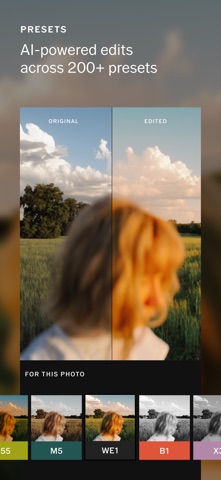

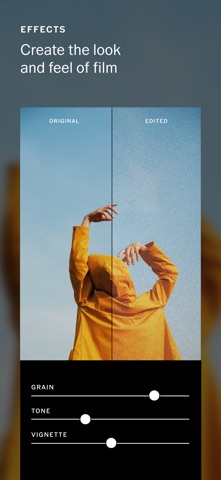

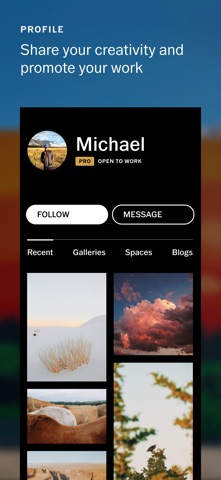
Released in 2013 and still actively developed, VSCO has grown from a simple filter app into a broad mobile photography platform. At 317 MB it carries real weight on your device, but that footprint funds photo presets, video editing, AI-assisted adjustments, portfolio hosting, and client gallery delivery. The free tier offers a genuine starting point, while deeper tools sit behind a subscription. With 276K ratings averaging 4.69 stars, user satisfaction is hard to argue with.
Preset library and batch editing drive workflow
VSCO's core strength remains its preset library, which now numbers over 200 options. The Film X collection draws from Kodak, Fuji, and Agfa references, producing grain and color shifts that feel deliberate rather than gimmicky. Beyond presets, the Recipes feature lets you save an entire edit chain and reapply it across a batch in seconds, a genuine workflow accelerator for anyone shooting consistently. Standard tools like Crop, Fade, and HSL adjustments stay approachable without feeling stripped down. AI-assisted editing tools add a more automated layer for users who want quick results. The breadth is impressive for a mobile app, though video editing functions as a supporting feature rather than a headline capability.
Fluid performance on current devices at scale
A 317 MB install is on the heavier side for a photo editor, and users on older or storage-constrained devices should factor that in before downloading. That said, a 4.69-star average across 276K ratings is a strong signal that the experience holds up at scale, not just in controlled conditions. The app has received consistent updates, with the most recent version pushed in July 2026, suggesting performance issues are addressed regularly rather than left to accumulate. Qualitatively, the editing interface feels fluid and well-organized, with the preset browsing and Recipes workflows designed to minimize taps. Users on current mid-range or flagship iPhones should encounter no meaningful friction in day-to-day editing sessions.
Subscription bundles gallery hosting with editing tools
VSCO is free to download and the core preset library gives you a real taste of what the app can do before any money changes hands. The subscription unlocks AI editing tools, the full Film X preset catalog, client gallery delivery, and portfolio hosting. For semi-professional photographers who would otherwise pay separately for a gallery host and a mobile editing app, the bundled value is genuinely compelling. Hobbyists who only want a handful of film-style filters may find the free tier sufficient. The honest caveat is that the full scope of what sits behind the paywall is not always obvious until you are already inside the app, so prospective subscribers should review the current membership tiers on the App Store listing before committing.
Community features expand data collection beyond local editing
VSCO requires photo library access to function, which is standard for any editing app. It also connects to a social-facing community layer and portfolio hosting infrastructure, meaning some user data travels to Visual Supply Company's servers. The App Store privacy nutrition label is the authoritative source for exactly which data types are collected and whether they are linked to your identity, and we recommend reviewing it directly before signing up for a membership. As with most apps that combine editing, cloud hosting, and social features, the data footprint is broader than a purely local editor would carry. Users with heightened privacy concerns should pay particular attention to the data-linked-to-you section of that label.
Clean design with limited accessibility documentation
VSCO's visual design is clean and editorially restrained, which suits a photography-focused audience. The editing controls are laid out in a logical horizontal strip, and the Recipes workflow surfaces complex functionality without burying it in nested menus. The app carries a 12-plus content rating, reflecting its community-sharing component rather than any particularly complex interface. Standard iOS accessibility features such as Dynamic Type and display accommodations should apply, as is typical for a well-maintained App Store app. VSCO does not prominently advertise dedicated accessibility features, so users who rely heavily on VoiceOver or Switch Control should test the free tier before committing to a paid plan.
Active development since 2013 continues through 2026
VSCO has been on the App Store since June 2013, making it one of the longer-running photo editors in its category. The current version, 461.5.2, was updated in July 2026, confirming that development is ongoing and not coasting. The version number itself reflects a high cadence of iterative releases over the years. The addition of AI editing tools and client workflow features in recent updates shows the team is expanding the product rather than simply patching it. For users considering a subscription, active maintenance is a meaningful assurance that the feature set will continue to evolve and that compatibility with new iOS versions will be maintained.
Pros
- Over 200 presets including the Film X series with considered Kodak, Fuji, and Agfa-inspired color and grain
- Recipes feature saves and reapplies full edit chains, making batch consistency fast and repeatable
- Portfolio hosting and client gallery delivery are built in, reducing the need for separate paid services
- Consistently updated through mid-2026 across a 13-year App Store lifespan, signaling reliable long-term support
Cons
- 317 MB is a substantial install for an app that begins as free, which matters on storage-limited devices
- AI editing tools, the full Film X catalog, and client workflows all sit behind a subscription paywall that is not fully transparent at first launch
- Video editing is present but functions as a secondary feature rather than a genuine strength, making it a poor fit for video-first creators
Related guides
Similar Media apps


apptidal is independent and ad-supported. We earn no commission on installs and no company can pay for a better score. How we stay independent.