
Media · iOS
YouCam Makeup: Face Editor
by PERFECT MOBILE CORP.
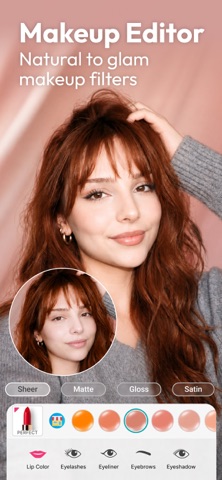


Launched in 2014 and now at version 6.44.1, YouCam Makeup has grown into a sprawling beauty toolkit that goes well beyond lipstick filters. The 236 MB install reflects genuine depth, covering AR cosmetics, AI age progression, virtual hair color, body editing, a conversational beauty assistant, and web-sourced outfit styling. A 4.74 rating across more than 154,000 reviews confirms broad user satisfaction, though the free tier has meaningful limits worth understanding upfront.
Impressive breadth with uneven depth across tools
YouCam Makeup centers on augmented reality cosmetic try-on, letting users preview lip colors, eyeshadow, blush, and contouring on live camera or still photos with reasonable realism. Beyond that core, six AI age-progression and regression filters range from teen to elderly and stand out for their believability compared to earlier novelty tools in this category. An AI Personal Stylist pulls real clothing suggestions from the web and previews outfits on the user's own photo, pushing the app meaningfully beyond makeup territory. A chat-based beauty assistant adds a conversational layer for product and look recommendations. The breadth is genuinely impressive, though the depth of each individual tool varies, and the most polished features sit behind the paywall.
Substantial app handles performance reasonably well
At 236 MB, YouCam Makeup is a substantial download by mobile standards, signaling a feature set that takes real storage to house. Qualitatively, a decade of iterative development and a very recent July 2026 update suggest a codebase that has been tuned over time rather than left to accumulate technical debt. The 154,000-plus ratings at 4.74 indicate that crashes and major performance issues are not widespread complaints. AR filters on live camera can be demanding on older hardware, which is typical for this category, so users on aging devices may notice some lag. The sheer number of tools loaded into one interface can also slow navigation for users who want a quick single edit.
Free tier offers value, paid features unclear
The base app is free, and casual users who want quick makeup previews, the age filter party trick, or basic hair color experiments can extract real value without spending anything. That said, in-app purchases are present and almost certainly gate the most polished AI features, which is a common pattern for apps of this ambition. Before committing to a subscription or one-time purchase, it is worth spending time on the free tier to confirm which specific tools matter most. For beauty content creators who rely on the app regularly, a paid tier could represent fair value given the update frequency and feature breadth. Occasional users may find the free tier sufficient.
Face data processing requires privacy label review
YouCam Makeup processes facial imagery and, through the AI Personal Stylist, pulls data from the web, which means the app touches sensitive categories of information. The App Store privacy label for this app is the definitive source for understanding exactly what data is collected, how it is linked to your identity, and what is used for tracking. We recommend reviewing that label before installing, paying particular attention to face data handling and any third-party sharing disclosures. The content rating of 9-plus suggests Apple found no mature content concerns, but privacy due diligence around camera and photo library permissions remains worthwhile for any app in this category.
Polished design masks navigational complexity
YouCam Makeup uses a visually polished, category-standard interface with prominent previews and swipeable filter carousels that feel familiar to anyone who has used a beauty app before. The sheer volume of features, covering makeup, hair, body, age filters, outfit styling, and a chat assistant, creates genuine navigational complexity, and new users may need time to orient themselves. For accessibility, the app carries a 9-plus content rating and targets a broad consumer audience, but users who rely on VoiceOver or other assistive technologies should test the live camera and AR features directly, as real-time visual tools can vary in screen-reader compatibility across apps in this category.
Over a decade of active development
Maintenance is one of YouCam Makeup's clearest strengths. The app was originally released in August 2014 and reached version 6.44.1 with an update recorded in July 2026, representing over a decade of continuous development. That kind of longevity in a competitive category is meaningful evidence that the developer, Perfect Mobile Corp., treats the app as an ongoing product rather than a static release. Regular updates also suggest compatibility with current iOS versions is actively managed. For users who have been burned by abandoned apps, the long update history here provides reasonable confidence in continued support.
Pros
- Unusually wide feature set covering AR makeup, virtual hair color, body editing, AI age filters, and outfit styling in one app
- AI age filter produces noticeably realistic transformations across six distinct age stages, making it a standout feature in the category
- Over a decade of continuous development with a confirmed July 2026 update, signaling strong long-term maintenance commitment
- Strong user validation with a 4.74 rating across more than 154,000 reviews, indicating broad satisfaction and stability
Cons
- 236 MB is a heavy install commitment before users can determine which features are accessible on the free tier
- In-app purchases are present and likely gate the most polished AI tools, creating friction for users expecting a fully free experience
- The volume of features makes the interface feel cluttered for users who want a fast, focused editing workflow
Related guides
Similar Media apps


apptidal is independent and ad-supported. We earn no commission on installs and no company can pay for a better score. How we stay independent.