
Tools · iOS
Bully - Tasks & Productivity
by MVP App Studio, LLC
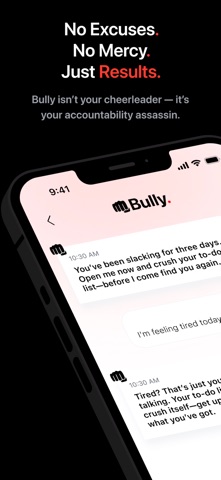
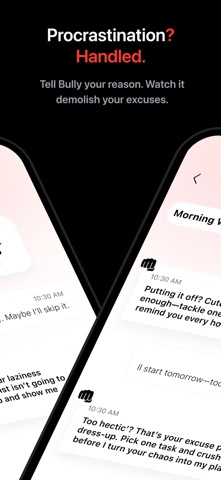


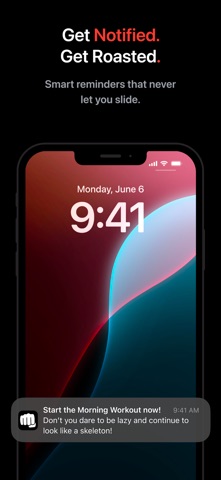
Released in June 2025 and already updated to version 1.1.1, Bully is a task manager that treats aggressive, intelligently scheduled push notifications as its core value rather than an afterthought. The 2 MB install is impressively lean, and a 4.67 store rating sounds encouraging until you notice it rests on just 12 reviews. Free to download, with an unspecified in-app purchase structure lurking beneath the surface.
Aggressive scheduling concept lacks behavioral proof
Bully's central claim is that it auto-schedules reminders around your likely procrastination windows rather than firing at whatever arbitrary time you typed in and then learned to ignore. That is a legitimate differentiator from the sea of standard to-do apps. The 2 MB footprint signals deliberate minimalism, meaning the feature set is narrow by design rather than by neglect. What remains genuinely unclear at this stage is whether the scheduling engine uses any real behavioral learning or simply applies a preset aggressive cadence. With only 12 ratings in the pool, there is not enough collective user experience to settle that question confidently. The concept is sound; the execution is still being proven.
Fast performance undermined by iOS notification limits
A 2 MB install places Bully among the lightest task apps on the App Store, which typically translates to fast launch times and minimal battery overhead. The app was updated as recently as December 2025, suggesting active development rather than an abandoned side project. That said, an app whose entire identity depends on notification delivery is uniquely exposed to iOS system constraints. Focus modes, scheduled summary delivery, and Do Not Disturb can silently neuter the aggressive-reminder model that Bully is built around. Users should verify that notification permissions are set to immediate delivery and that the app is excluded from any active Focus filters, otherwise the core product simply does not function as advertised.
Free trial obscures paywall location
The download is free, which removes the barrier to trying the concept. The concern is that the in-app purchase structure is not disclosed upfront in available metadata, leaving open the question of whether the adaptive scheduling features that define the app's value proposition sit behind a paywall. Early adopters may be experiencing a generous free tier that tightens with future updates. Until the monetization model is transparent, committing to Bully as a daily productivity tool carries some financial ambiguity. For a zero-cost experiment to test whether the aggressive notification approach suits your working style, the price is obviously right.
Privacy claims require App Store label review
Notification-centric apps by definition request persistent background access to surface alerts, and a task manager that claims to learn your procrastination patterns may also collect behavioral timing data. We cannot independently verify what Bully collects or shares, and we will not speculate. The authoritative source is the App Store privacy nutrition label on Bully's product page, which Apple requires developers to self-report. Before installing, review that label for data linked to your identity, data used to track you across apps, and any third-party analytics integrations. The 17-plus content rating is worth noting, though it likely reflects notification tone rather than any sensitive content category.
Minimal design may aid accessibility
A 2 MB app in the productivity category almost certainly favors a stripped-back interface over visual complexity, which can be a genuine accessibility advantage. Simpler layouts tend to work more reliably with iOS VoiceOver and Dynamic Type than feature-dense alternatives. That said, we have not conducted formal accessibility testing and will not claim results we cannot verify. What is observable is that the app's narrow focus means fewer UI surfaces to navigate, which generally benefits users who rely on assistive technologies. Whether tap targets, contrast ratios, and label annotations meet accessibility best practices is something prospective users with specific needs should evaluate during the free trial period.
Six months of updates suggest active development
The update history here is short but encouraging. Bully launched in June 2025 and reached version 1.1.1 by December 2025, meaning the developer shipped at least one meaningful update within the first six months. That cadence suggests MVP App Studio is actively iterating rather than releasing and abandoning. The company name itself implies a lean, early-stage operation, which cuts both ways: faster iteration is possible, but long-term support is less certain than it would be from an established developer. Twelve ratings is too small a sample to read churn or retention signals from, so the update history is currently the strongest available indicator of developer commitment.
Pros
- Extremely lightweight 2 MB install with no feature bloat
- Auto-scheduling concept targets real procrastination behavior rather than relying on user-set reminder times
- Active development cadence with a meaningful update shipped within the first six months
- Clear, narrow identity means no confusing feature sprawl to navigate
Cons
- Only 12 ratings makes the 4.67 store score statistically unreliable as a quality signal
- In-app purchase scope is undisclosed, leaving the true cost of core features unclear
- Aggressive notification model is easily neutralized by iOS Focus modes and Do Not Disturb settings
Related guides
Similar Tools apps


apptidal is independent and ad-supported. We earn no commission on installs and no company can pay for a better score. How we stay independent.