
Finance · iOS
Cost Track: your Money Tracker
by Artezio LLC
Released in 2014 and still receiving updates as recently as June 2026, Cost Track from Artezio LLC organizes spending through a container system called cost sheets rather than a single flat ledger. At 58 MB it installs lightly, and a 4.65 rating from 353 users points to a loyal niche following. The app targets personal and family budgeting without attempting to be a fully automated financial platform.
Manual sheets replace a single ledger
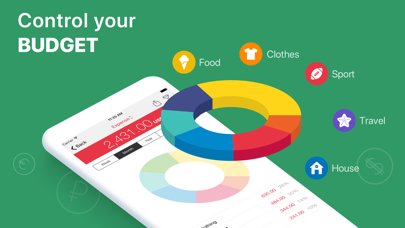
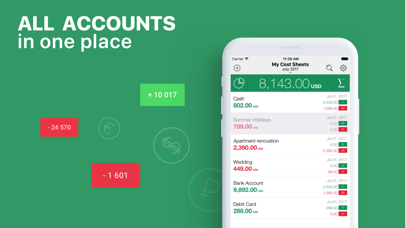
The defining feature here is the cost sheet, a flexible container that lets you group transactions by account type, life event, or project rather than dumping everything into one running list. A wedding fund, a home renovation, and everyday cash spending can each live in their own sheet with their own currency assigned. That per-sheet currency support is a genuine differentiator for travelers or anyone juggling accounts across borders. The system is approachable enough that new users can get started without a tutorial, yet structured enough to handle moderately complex household finances. What the app does not do is automate anything: there is no bank syncing, no recurring transaction engine, and no budget-goal alerting. Within its chosen scope, though, the core execution is clean and coherent.
Local data entry avoids network delays
A 58 MB install size is modest by modern iOS standards, which suggests the app does not carry heavy framework bloat. Because all data entry is manual and local rather than dependent on external API calls, the experience should feel snappy regardless of network conditions. The 2026 update confirms the codebase is being maintained against current iOS releases, reducing the risk of compatibility issues on newer devices. With 353 ratings accumulated over more than a decade, the volume of feedback is limited, but the 4.65 average score suggests the users who do rely on it encounter few serious bugs. Qualitatively, a manual ledger app of this size and age should handle everyday logging tasks without notable friction.
Free core features with unclear upgrades
The app is free to download, which removes any barrier to trying it. In-app purchases are listed but their scope and pricing are not transparently disclosed upfront, which is worth investigating before committing to the app as a long-term tool. For users who only need the core manual-tracking features, the free tier appears functional. Compared to paid alternatives that offer bank syncing and automated categorization, Cost Track competes on simplicity and control rather than feature breadth. Anyone comfortable with hand-entry budgeting will likely find enough value in the free experience, but the opaque in-app purchase structure is a reason to read the App Store listing carefully before upgrading.
Privacy practices require App Store verification
Because Cost Track is a manual-entry app with no advertised bank-sync or external account connections, its data-collection surface is potentially smaller than that of connected finance apps. That said, we cannot verify specific privacy practices from the app metadata alone. The App Store privacy nutrition label on the Cost Track listing is the authoritative source for understanding exactly what data is collected, how it is linked to your identity, and whether any data is shared with third parties. We recommend reviewing that label before entering detailed spending records. Given that the app is ad-supported as part of the free tier, some level of advertising-related data handling is plausible and worth confirming.
Sheet structure clarifies expense organization
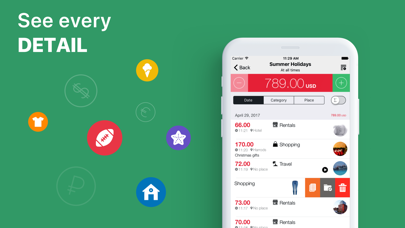
The cost-sheet metaphor translates into a relatively clean information hierarchy: you navigate from a sheet overview down into individual entries rather than confronting a single overwhelming list. That structural clarity benefits users who are new to expense tracking. The 4+ content rating confirms the app contains no mature content, making it appropriate for all ages. Specific accessibility features such as Dynamic Type support or VoiceOver optimization are not confirmed by the available metadata, so users with visual impairments should test the app under their preferred accessibility settings before relying on it. The lightweight install and straightforward interaction model suggest the design prioritizes utility over visual complexity, which generally ages better than trend-driven interfaces.
June 2026 update signals active support
A June 2026 update on an app first released in February 2014 is a meaningful signal of ongoing commitment from Artezio LLC. More than twelve years of continuous availability on the App Store, combined with a recent version bump to 5.2.5, indicates the developer is keeping pace with iOS platform changes rather than letting the app stagnate. The relatively small rating count of 353 does raise questions about the size of the active user community and the volume of real-world feedback driving future development priorities. Still, the update cadence is more reassuring than many niche finance apps that go months or years between releases.
Pros
- Cost-sheet system organizes entries by life event or account rather than a single flat ledger
- Per-sheet currency support adds genuine value for travelers and multi-currency households
- Active maintenance confirmed by a version 5.2.5 update in June 2026, twelve years after launch
- Lightweight 58 MB install with a free entry point lowers the barrier to trying it
Cons
- No automatic bank or card syncing makes this a fully manual, hand-entry-only experience
- In-app purchase terms are not clearly disclosed upfront, requiring extra scrutiny before upgrading
- A rating count of just 353 after more than a decade suggests a very small active community, which may limit future feature development
Related guides
Similar Finance apps


apptidal is independent and ad-supported. We earn no commission on installs and no company can pay for a better score. How we stay independent.